
Playerautoma
Record and replay player actions to automate tasks. Also, re-stacks blocks when used up like Inventory tweaks. The mod works on servers but can be regarded as cheating by some.
Screenshots
About this Mod
Playerautoma
Record and replay player actions. Also, re-stack blocks when used up like Inventory tweaks. The mod works on servers but can be regarded as cheating by some.
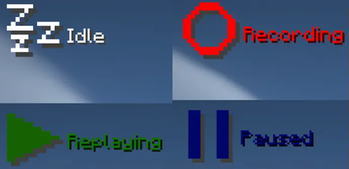
The following actions are recorded:
- movement
- block placement and breaking
- item interactions
- moving items around in the inventory, chests and crafting tables as well as crafting itself
The mod will not add support to record chat actions like commands or writing messages as it would allow for the creation of spam bots.
Any troubles?
This mod is still early in development.
If you encounter any bugs or problems or you have a new feature request please let me know here and if you want to contribute feel free to create a pull request.
Alternatively create an issue on discord.
Installation
This mod requires Minecraft Fabric. Simply put the playerautoma-vx.x.jar and Fabric API JAR in .minecraft/mods.
Usage
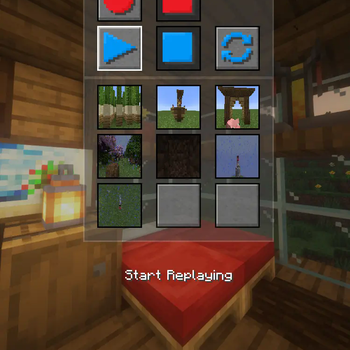
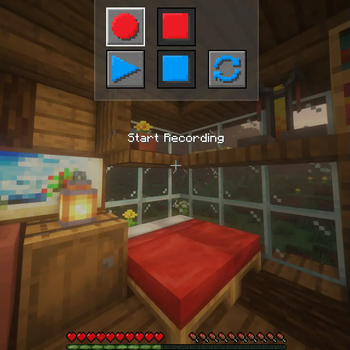
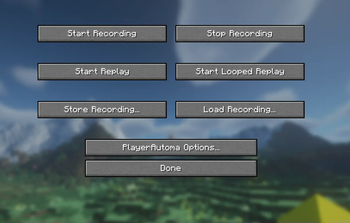
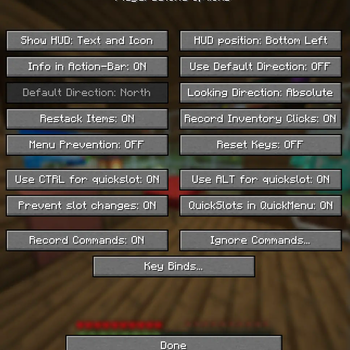
The mod has a menu which should be self-explanatory and can be opened using the O Key.
Other than that the default keybindings are as follows.
GStart RecordingHStop RecordingJStart ReplayBPause ReplayKCancel ReplayLStart looped ReplayUStore RecordingILoad Recording0Menu PreventionCTRL + [1..9]Store to QuickSlotALT + [1..9]Store to QuickSlot
Commands
From v0.4.3 and onwards commands are available and allow you to control the mod using them.
The commands should be self-explanatory and are as follows. See this for detailed documentation.
/record <start|stop|clear>
/record <store> <name> <json|rec>
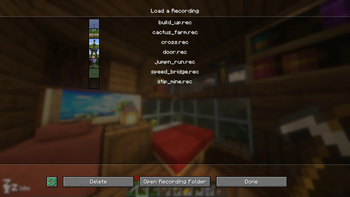
/record <load> <name>
/record quickslot <store|load> <slot>
/replay <start|stop|loop|togglepause>
Recording Commands
You can also record commands entered. This option is turned off by default. This specifies to track commands not to replay them. Meaning if you have a replay that contains commands they will be replayed regardless of the option specified. You can also black-list specific commands. Again this only black list them for the recording.
Available Versions
How to Install Playerautoma on Your Server
Order Server
Order a Minecraft Java server with at least 3 GB RAM (4 GB recommended).
Set fabric Loader
In the panel under "Egg", select the fabric loader and matching Minecraft version (1.21.11).
Install Mod
Open the mod browser in the dashboard and search for "Playerautoma". Click "Install" – done! Alternatively, upload the .jar via SFTP to the /mods folder.
Compatibility
Mod Loaders
Minecraft Versions
1.21.11, 1.21.10, 1.21.8 (+15 more)
Server-side
✗ UnsupportedRecommended RAM
4 GB(min. 3 GB)Frequently Asked Questions
Playerautoma server crashes on startup – what to do?
Most common cause: wrong fabric version or insufficient RAM. Check the server log (latest.log) for "OutOfMemoryError" or "Mixin" errors. With Mado Hosting: ensure at least 3 GB RAM is allocated and the loader matches the mod version (1.21.11). You can switch loaders with one click in the panel.
Is Playerautoma compatible with fabric?
Playerautoma officially supports fabric for Minecraft 1.21.11, 1.21.10, 1.21.8. The Mado dashboard automatically detects incompatible loader combinations.
Server lagging with Playerautoma – how to optimize performance?
Recommended RAM: 4 GB (per 8 players). Use /spark profiler to check if Playerautoma consumes the most tick time. Common fixes: reduce server view-distance to 8-10, install "performant" or "starlight" as supplementary mods on Forge. With Mado Hosting, your server runs on NVMe SSDs with dedicated CPU cores for minimal latency.
Similar Mods




Rent Modded Server
Install Playerautoma with just one click on your server.