
Player Stand
Customizable, player-shaped armor stands that support skins, armor and interactions.
Screenshots
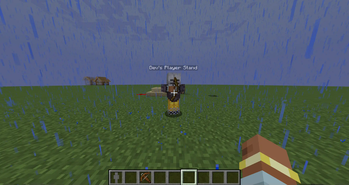
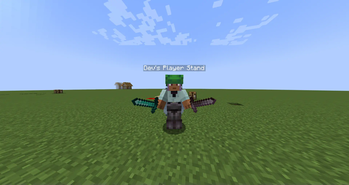
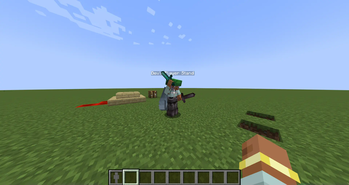
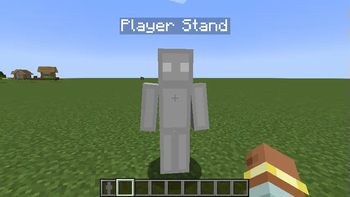
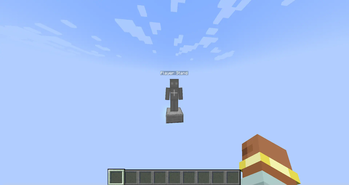
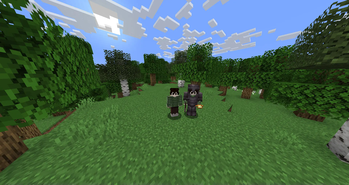
About this Mod
Player Stand is a Minecraft mod that adds a new item called Player Stand — an upgraded version of the armor stand that acts as a fully functional, player-shaped mannequin. Designed to blend seamlessly into both creative and survival gameplay, it offers a more immersive and customizable way to display armor, outfits, poses, and player skins.
📌 Requires AnCore — a shared library used by Anchor Studios mods. Make sure it is installed for Player Stand to work correctly.
Overview
Unlike traditional armor stands, Player Stands use the full player model and support advanced features like armor rendering, custom skins, and animated poses. It's ideal for map makers, server owners, and builders looking for more lifelike, interactive displays.
Key Features
- 🎭 Player Model Display: Uses the full animated player model instead of a static armor stand.
- 🛡️ Armor Compatibility: Can equip and visually display full sets of armor and items in both hands.
- 🧍 Unique Poses: Shift + Right-Click to cycle through a variety of pre-defined poses like Heroic, Defensive, Floating, and more.
- 🎨 Custom Skins: Bind your skin by right-clicking with an empty hand (or a non-equipable item) when the stand has no item to take. Skin binding is fully configurable.
- ⚙️ Configurable Interaction: Toggle whether players can retexture an already-bound stand, choose interaction priorities, and more.
- 🧱 Survival & Creative Support: Balanced and intuitive interactions work seamlessly in both gameplay modes.
- ❤️ Regenerates Over Time: Player Stands slowly heal if left undamaged, mimicking a player-like behavior.
Requirements
❗ This mod will not function without AnCore.
Learn More
Community & Development
Player Stand is developed and maintained by Anchor Studios, focused on quality-of-life features and creative tools that feel native to Minecraft.
Available Versions
How to Install Player Stand on Your Server
Order Server
Order a Minecraft Java server with at least 3 GB RAM (4 GB recommended).
Set forge Loader
In the panel under "Egg", select the forge loader and matching Minecraft version (1.20.6).
Install Mod
Open the mod browser in the dashboard and search for "Player Stand". Click "Install" – done! Alternatively, upload the .jar via SFTP to the /mods folder.
Compatibility
Mod Loaders
Minecraft Versions
1.20.6, 1.20.5, 1.20.4 (+3 more)
Server-side
✓ RequiredRecommended RAM
4 GB(min. 3 GB)Frequently Asked Questions
Player Stand server crashes on startup – what to do?
Most common cause: wrong forge version or insufficient RAM. Check the server log (latest.log) for "OutOfMemoryError" or "Mixin" errors. With Mado Hosting: ensure at least 3 GB RAM is allocated and the loader matches the mod version (1.20.6). You can switch loaders with one click in the panel.
Is Player Stand compatible with forge?
Player Stand officially supports forge for Minecraft 1.20.6, 1.20.5, 1.20.4. The Mado dashboard automatically detects incompatible loader combinations.
Server lagging with Player Stand – how to optimize performance?
Recommended RAM: 4 GB (per 8 players). Use /spark profiler to check if Player Stand consumes the most tick time. Common fixes: reduce server view-distance to 8-10, install "performant" or "starlight" as supplementary mods on Forge. With Mado Hosting, your server runs on NVMe SSDs with dedicated CPU cores for minimal latency.
Similar Mods

![[ETF] Entity Texture Features](https://cdn.modrinth.com/data/BVzZfTc1/af683d206d50b05258d865b0d6e4aa2f2cee12f2_96.webp)
![[EMF] Entity Model Features](https://cdn.modrinth.com/data/4I1XuqiY/6e5bbd0d06b1741bfdab6c0cfab6de8fdaf0064c_96.webp)



Rent Modded Server
Install Player Stand with just one click on your server.