
PlayerSync
A server side mod that allows synchronising player data (inventory, health, xp, ...) across different Forge or NeoForge servers.
Screenshots
About this Mod
PlayerSync
PlayerSync is a Minecraft mod that keeps your player data synchronized across multiple servers. Seamlessly move between servers in your network without losing your inventory, experience, advancements, or modded items.
Features
- Inventory Sync: Your main inventory, armor, ender chest, and offhand items are always up to date on every server.
- Experience & Stats: XP, health, food, and score are preserved as you travel between servers.
- Advancement Sync: Your achievements and advancements follow you everywhere.
- Potion Effects: Active potion effects are restored when you join a new server.
- Mod Support:
- Curios API: Curios slots and items are synchronized.
- Sophisticated Backpacks: Backpack contents are kept in sync.
- Cobblemon:
Party, PC and Podex are supported(Only 1.21.1).
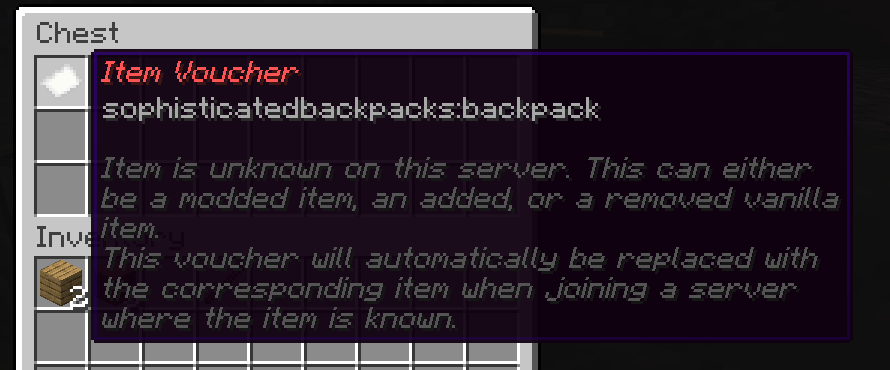
- Placeholder Items: If a modded item is missing on a server, a placeholder is created so nothing is lost.
- Chat Sync (Optional): Synchronize chat messages between servers (can be enabled in config).
How It Works
PlayerSync uses a central MySQL or MariaDB database to store your player data. When you join a server, your data is loaded from the database. When you leave or your data is saved, it is updated in the database. This ensures your progress is always up to date, no matter which server you play on.
Getting Started
Install the Mod:
Download the PlayerSync mod and place it in themodsfolder of each server you want to synchronize.Configure the Database:
Generate config file by starting server at first.Edit theplayersync.tomlconfig file in theconfigfolder to set your database connection details.
Each server should have a uniqueServer_id.Start Your Servers:
PlayerSync will automatically create the necessary tables and keep your data in sync.(Optional) Enable Chat Sync:
Enable chat synchronization in the config if you want messages to be shared between servers.
Configuration Options
All options are found in the playersync.toml file in your server’s config folder.
Database Settings
host
The address of your MySQL/MariaDB database server.
Default:"localhost"db_port
The port for your database server.
Default:3306use_ssl
Whether to use SSL for the database connection.
Default:falseuser_name
The username for your database.
Default:"playersync"password
The password for your database.db_name
The name of the database to use.
Default:"playersync"Server_id
This value distinguishes each server in your network. Each server must have a unique integer here!
Default: Randomly generated.
Synchronization Options
- sync_advancements
Whether to synchronize advancements (achievements) between servers.
Default:true
Serialization Options
- use_legacy_serialization
Use the old (pre-Base64) serialization format for writing data to the database.
Set totrueONLY if you have mod versions older than 1.35 reading the same database.
Default:false
Placeholder Item Options
item_placeholder_title_override
Override the title of placeholder items (for missing modded items).
Default:""(uses default translation)item_placeholder_description_override
Override the description of placeholder items.
Default:""(uses default translation)
FAQ
Q: What happens if I have modded items and join a server without that mod?
A: PlayerSync will create a placeholder item so your original item is not lost. When you return to a server with the mod, your item will be restored.
Q: Is my data safe?
A: Yes! All data is stored in a central database and is not lost when switching servers.
Q: Does this work for singleplayer?
A: PlayerSync is designed for multi-server networks. It is not needed for singleplayer.
Q: What mods are supported?
A: Curios API and Sophisticated Backpacks are supported out of the box. More mod support may be added in the future.
Support
If you have questions or need help, please contact us via Github or Discord.
Enjoy seamless play across all your servers with PlayerSync!
Available Versions
How to Install PlayerSync on Your Server
Order Server
Order a Minecraft Java server with at least 3 GB RAM (4 GB recommended).
Set bukkit Loader
In the panel under "Egg", select the bukkit loader and matching Minecraft version (1.21.8).
Install Mod
Open the mod browser in the dashboard and search for "PlayerSync". Click "Install" – done! Alternatively, upload the .jar via SFTP to the /mods folder.
Compatibility
Mod Loaders
Minecraft Versions
1.21.8, 1.21.7, 1.21.6 (+12 more)
Server-side
✓ RequiredRecommended RAM
4 GB(min. 3 GB)Frequently Asked Questions
PlayerSync server crashes on startup – what to do?
Most common cause: wrong bukkit version or insufficient RAM. Check the server log (latest.log) for "OutOfMemoryError" or "Mixin" errors. With Mado Hosting: ensure at least 3 GB RAM is allocated and the loader matches the mod version (1.21.8). You can switch loaders with one click in the panel.
Is PlayerSync compatible with bukkit and forge and neoforge?
PlayerSync officially supports bukkit, forge, neoforge for Minecraft 1.21.8, 1.21.7, 1.21.6. The Mado dashboard automatically detects incompatible loader combinations.
Server lagging with PlayerSync – how to optimize performance?
Recommended RAM: 4 GB (per 8 players). Use /spark profiler to check if PlayerSync consumes the most tick time. Common fixes: reduce server view-distance to 8-10, install "performant" or "starlight" as supplementary mods on Forge. With Mado Hosting, your server runs on NVMe SSDs with dedicated CPU cores for minimal latency.
Similar Mods




Rent Modded Server
Install PlayerSync with just one click on your server.