
Playtime Ranks
Track your playtime, unlock ranks, and climb the leaderboard just by being active!
Screenshots
About this Mod
⚙️ How It Works
Every second a player is online is tracked.
On first login, the mod imports existing vanilla statistics so players don’t start from zero.
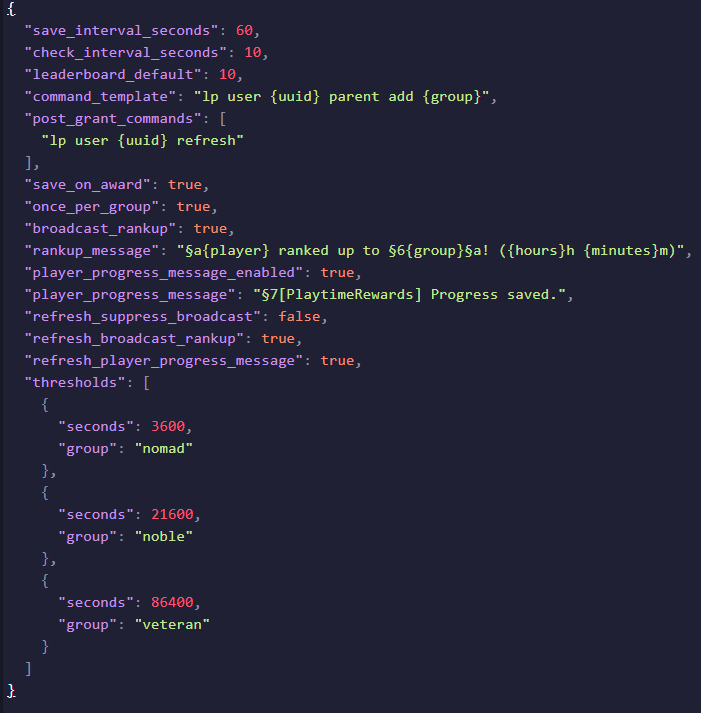
Reaching configured milestones automatically grants ranks.
Rank-ups are broadcast server-wide while progress is silently saved in the background.
No maintenance required once configured.
🎮 Commands
Command Description
/playtime View your total playtime
/playtime me Alias for /playtime
/playtime ranks View configured rank milestones
/playtime top Displays the server leaderboard
/playtime refresh Manually refresh your rank
🏆 Example Milestones
(Default values — fully configurable)
1 Hour → Nomad
6 Hours → Noble
24 Hours → Veteran
Create as many ranks as you want — from early-game recognition to ultra-prestige tiers.
💬 Messaging
Server Broadcast
PlayerX ranked up to Noble! (6h 0m)
Private Save Notification
[PlaytimeRewards] Progress saved.
All messages can be edited in the config.
🔥 Why Use Playtime Rewards?
✅ Encourages long-term player retention
✅ Creates organic progression without economy inflation
✅ Adds prestige without gameplay advantages
✅ Fully automated once installed
✅ Lightweight and server-friendly
Ideal for community-focused servers that want players recognized for commitment.
⭐ Optional Rank Types
Playtime Rewards works great alongside community roles:
Supporter Ranks
Donator — Recognition for players who financially support the server.
Booster — Awarded to members who boost your Discord.
(These ranks are cosmetic and provide no gameplay advantages.)
Staff Ranks
Moderator — Trusted players who assist the community and enforce rules.
Admin — Server leaders responsible for operations, events, and staff management.
🧭 Progression Philosophy
New players begin their journey as Nomads,
earn prestige as Nobles,
and ultimately become legendary Veterans.
Your server decides what comes next.
Available Versions
How to Install Playtime Ranks on Your Server
Order Server
Order a Minecraft Java server with at least 3 GB RAM (4 GB recommended).
Set fabric Loader
In the panel under "Egg", select the fabric loader and matching Minecraft version (1.21.11).
Install Mod
Open the mod browser in the dashboard and search for "Playtime Ranks". Click "Install" – done! Alternatively, upload the .jar via SFTP to the /mods folder.
Compatibility
Mod Loaders
Minecraft Versions
1.21.11, 1.21.10, 1.21.9 (+9 more)
Server-side
✓ RequiredRecommended RAM
4 GB(min. 3 GB)Frequently Asked Questions
Playtime Ranks server crashes on startup – what to do?
Most common cause: wrong fabric version or insufficient RAM. Check the server log (latest.log) for "OutOfMemoryError" or "Mixin" errors. With Mado Hosting: ensure at least 3 GB RAM is allocated and the loader matches the mod version (1.21.11). You can switch loaders with one click in the panel.
Is Playtime Ranks compatible with fabric?
Playtime Ranks officially supports fabric for Minecraft 1.21.11, 1.21.10, 1.21.9. The Mado dashboard automatically detects incompatible loader combinations.
Server lagging with Playtime Ranks – how to optimize performance?
Recommended RAM: 4 GB (per 8 players). Use /spark profiler to check if Playtime Ranks consumes the most tick time. Common fixes: reduce server view-distance to 8-10, install "performant" or "starlight" as supplementary mods on Forge. With Mado Hosting, your server runs on NVMe SSDs with dedicated CPU cores for minimal latency.
Similar Mods




Rent Modded Server
Install Playtime Ranks with just one click on your server.