
Plenty Plates
Many new pressure plates for all your redstone needs. Greatly customizable!
Screenshots

About this Mod









Plenty Plates is a mod all about pressure! Well, pressure plates to be exact. There are multiple new types of pressure plates for detecting all sorts of entities. But that's not all! You can greatly configure each plate after placing it, like making it silent or shrouded.

▶️ All new pressure plates can be placed on all 6 sides of a block, just like buttons!
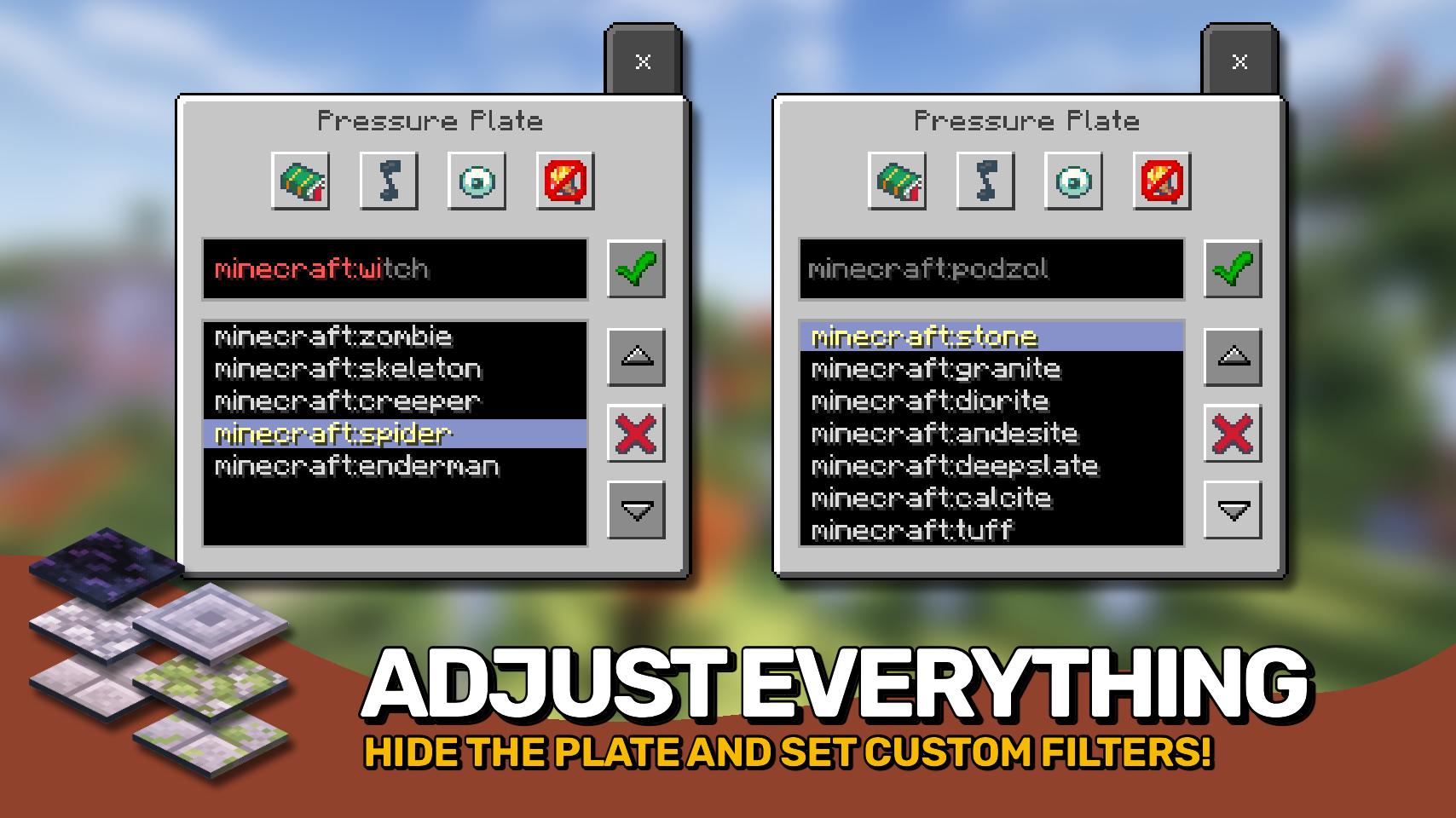
▶️ Pressure plates have a menu accessible by shift + right-clicking, allowing to set whitelist or blacklist filters, and make the plate silent, shrouded, or even make it emit light.
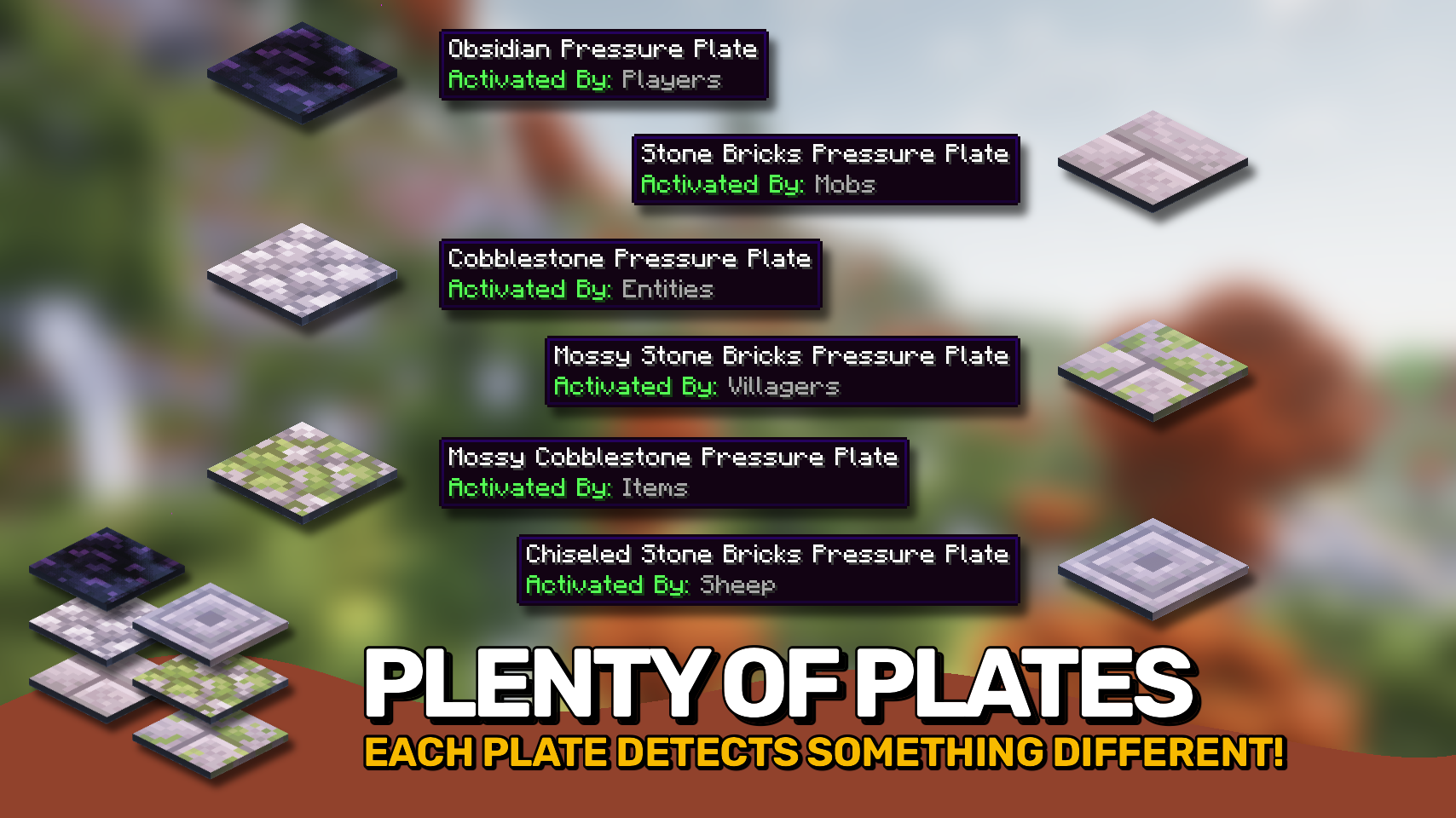
▶️ Obsidian plates for detecting players, allow filtering for specific player names.
▶️ Cobblestone plates for detecting all mobs, can filter for specific mobs.
▶️ Mossy cobblestone plates for detecting items, useful for filtering out specific items.
▶️ Stone bricks plates detect mobs and can even differenciate between adults and babies.
▶️ Mossy stone bricks plates useful for detecting villagers, allows for filtering by profession.
▶️ Chiseled stone bricks plates only trigger for sheep, but can be configured to only respond to specific wool colors.


⏩ INSTALLATION REQUIRED ON CLIENT & REQUIRED ON SERVER
⏩ REQUIRES PUZZLES LIB TO BE INSTALLED (FORGE & FABRIC)
⏩ REQUIRES FABRIC API TO BE INSTALLED (FABRIC)
⏩ REQUIRES FORGE CONFIG API PORT TO BE INSTALLED (FABRIC)

Configuration is easily possible directly from in-game using the mod menu (requires Mod Menu by Prospector to be installed on Fabric) by installing either Configured or Configured (Fabric) by MrCrayfish.
When it comes to manual configuration all files are found at .minecraft/config, named as MOD_ID-client.toml, MOD_ID-common.toml, or MOD_ID-server.toml depending on the type of config. Not all types might exist for this mod if any.
Note that on older mod versions server configuration files are found at .minecraft/saves/WORLD_NAME/serverconfigs, effecticely meaning they must be configured separately for each individual world.

🌟 Thanks a lot to Myrathi and their old ObsidiPlates mod which I loved and which served as main inspiration for this mod.
🌟 Thanks also to Covert_Jaguar and their Railcraft mod, most pressure plate types are based on the detectors from Railcraft.





Available Versions
How to Install Plenty Plates on Your Server
Order Server
Order a Minecraft Java server with at least 3 GB RAM (4 GB recommended).
Set fabric Loader
In the panel under "Egg", select the fabric loader and matching Minecraft version (1.21.5).
Install Mod
Open the mod browser in the dashboard and search for "Plenty Plates". Click "Install" – done! Alternatively, upload the .jar via SFTP to the /mods folder.
Compatibility
Mod Loaders
Minecraft Versions
1.21.5, 1.21.4, 1.21.3 (+7 more)
Server-side
✓ RequiredRecommended RAM
4 GB(min. 3 GB)Frequently Asked Questions
Plenty Plates server crashes on startup – what to do?
Most common cause: wrong fabric version or insufficient RAM. Check the server log (latest.log) for "OutOfMemoryError" or "Mixin" errors. With Mado Hosting: ensure at least 3 GB RAM is allocated and the loader matches the mod version (1.21.5). You can switch loaders with one click in the panel.
Is Plenty Plates compatible with fabric and forge and neoforge?
Plenty Plates officially supports fabric, forge, neoforge for Minecraft 1.21.5, 1.21.4, 1.21.3. Note: Forge and Fabric mods are NOT cross-compatible – pick one loader and stick with it. The Mado dashboard automatically detects incompatible loader combinations.
Server lagging with Plenty Plates – how to optimize performance?
Recommended RAM: 4 GB (per 8 players). Use /spark profiler to check if Plenty Plates consumes the most tick time. Common fixes: reduce server view-distance to 8-10, install "performant" or "starlight" as supplementary mods on Forge. With Mado Hosting, your server runs on NVMe SSDs with dedicated CPU cores for minimal latency.
Similar Mods




Rent Modded Server
Install Plenty Plates with just one click on your server.