
Plunder
A server-sided Fabric Minecraft mod that implements a unique loot-dropping system.
About this Mod

Plunder Mod
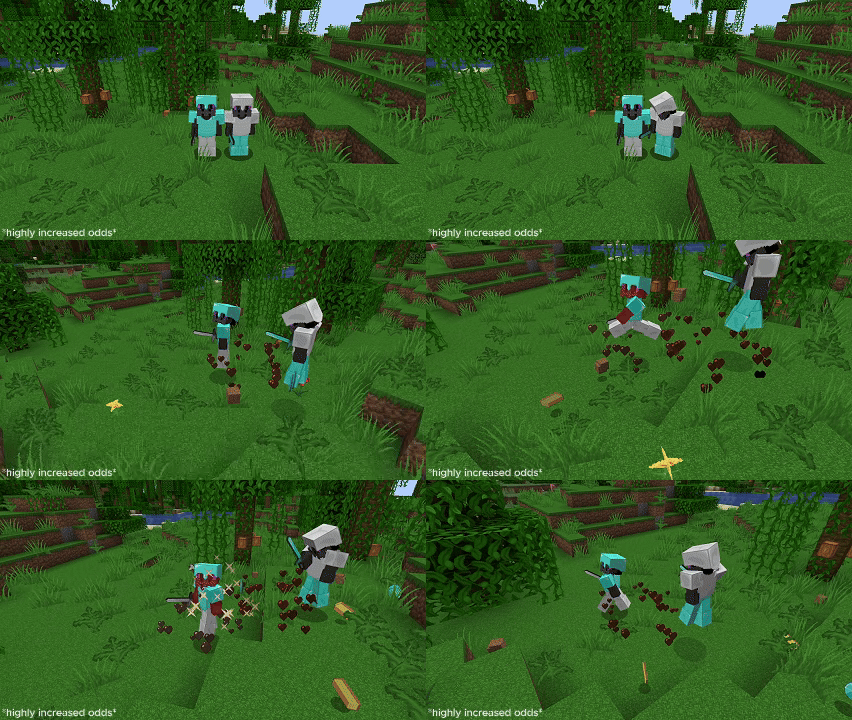
Whenever a player takes damage, whether from PVP or from natural causes (configurable), they have a chance to drop some of the items from their inventory onto the ground. Steal others items in already chaotic PVP!
Features
- Fully customizable with over 15 configuration options!
- Customizable drop rates for every item, only needing to edit a simple JSON file.
- Particles to highlight when a player has dropped some of their items.
- Reloadable configuration without having to restart the server. (Command: /plunderreload)
Usage/Download
Download the mod on the Modrinth website and put it in your servers mod folder.
To create custom odds for any item, navigate to the /mods/plunder/odds.json file. To create a custom drop chance, replace the "item" with the Minecraft item ID of your desired item, and replace the chance with your desired drop chance (0.1 being 10%).
{
  "dropOdds": [
    {
      "item": "diamond",
      "chance": 0.05
    },
    {
      "item": "netherite_ingot",
      "chance": 0
    },
    {
      "item": "stone",
      "chance": 0.1
    },
    {
      "item": "gold_ingot",
      "chance": 0
    }
  ]
}
Additionally, you can configure the /mods/plunder/configuration.properties file to configure when items are dropped, the default drop chances, and the particles.
# Default drop chance for armor pieces (if not configured in odds.json)
armorDropChance = 0.01

# Default drop chance for tools (if not configured in odds.json)
toolDropChance = 0.01

# Default drop chance for all other items/blocks/etc. (if not configured in odds.json)
itemDropChance = 0.01

# Maximum amount of items that can dropped from a single stack (max 64)
maxDropAmount=12

# How long should the delay be for picking up items after they have been dropped? (in ticks)
pickUpTime=20
...
Demo
Available Versions
How to Install Plunder on Your Server
Order Server
Order a Minecraft Java server with at least 3 GB RAM (4 GB recommended).
Set fabric Loader
In the panel under "Egg", select the fabric loader and matching Minecraft version (1.21.4).
Install Mod
Open the mod browser in the dashboard and search for "Plunder". Click "Install" – done! Alternatively, upload the .jar via SFTP to the /mods folder.
Compatibility
Mod Loaders
Minecraft Versions
1.21.4
Server-side
✓ RequiredRecommended RAM
4 GB(min. 3 GB)Frequently Asked Questions
Plunder server crashes on startup – what to do?
Most common cause: wrong fabric version or insufficient RAM. Check the server log (latest.log) for "OutOfMemoryError" or "Mixin" errors. With Mado Hosting: ensure at least 3 GB RAM is allocated and the loader matches the mod version (1.21.4). You can switch loaders with one click in the panel.
Is Plunder compatible with fabric?
Plunder officially supports fabric for Minecraft 1.21.4. The Mado dashboard automatically detects incompatible loader combinations.
Server lagging with Plunder – how to optimize performance?
Recommended RAM: 4 GB (per 8 players). Use /spark profiler to check if Plunder consumes the most tick time. Common fixes: reduce server view-distance to 8-10, install "performant" or "starlight" as supplementary mods on Forge. With Mado Hosting, your server runs on NVMe SSDs with dedicated CPU cores for minimal latency.
Similar Mods




Rent Modded Server
Install Plunder with just one click on your server.