
Progressive Mob Wave Activations - PMWA
Progressive Mob Wave Activations PMWA - Mob spawns enable after a select number of days or after killing a specified mob
Screenshots
About this Mod
PROGRESSIVE MOB WAVE ACTIVATIONS
New Discord server https://discord.gg/sQQPZQSEpS
A powerful yet simple and lightweight mod for modpack authors and players who want to add a progressive, intense, and urgent feel to their gameplay.
With this mod, you can limit any mobs from any mod based on the amount of days that have passed in your world, what other mobs have been killed in the world, or based on minimum distance from the world X0 Z0 coordinates. When a new mob activates, a custom message can show in chat to let players know it has been enabled and can now spawn naturally.
The mod prevents restricted mobs from spawning until the day count, specific mob death requirement, or distance limit from world centre is met. Mobs can still spawn from spawn eggs or summon commands at a player location, but any other spawn will be cancelled, even from mob spawners and other spawn mechanisms unless a player is very close. Since mob spawns are weighted and affect each other, activated mobs will spawn more, leading to more potential variety in game experiences.
Everything works via a simple config text file, with a simple list format based on groups of three elements per restriction. Activation messages are optional, and the mod includes bonus optional features like resetting back a select number of days if all overworld players die, or broadcasting messages each morning to let you know the day count. The mod also includes a command /resetpmwa (day_count) (showmessage?), providing additional control to be able to reset mob death requirements and change the registered day count to any amount.
You can add as many restriction entries as you want, all in the format: "entity:id,color:Activation message,Requirement". Entity IDs for any mob can easily be found by looking through the vanilla /summon command options.
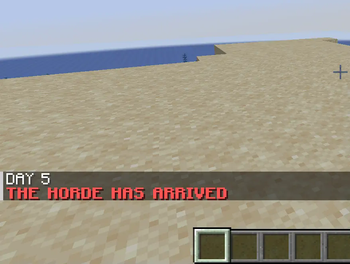
For example, if you wanted to disable zombies from spawning until day 2 in the world, giving a red message of "THE HORDE HAS ARRIVED" when the counter reaches day 2, here's an entry that would do so:
"minecraft:zombie,red:THE HORDE HAS ARRIVED,2"
Or if you wanted to disable withers from spawning until an enderdragon has been killed, with a black message of "You have slain the dragon. Now the wither can spawn", here's an entry for that:
"minecraft:wither,#000000:You have slain the dragon. Now the wither can spawn,minecraft:ender_dragon"
(You can use words or hex codes for colors. Note how simply adding the ID of a mob to be killed will register it as a requirement)
Or if you wanted to prevent creepers from spawning within 500 blocks of the world X0 Z0 coordinates (near spawn), with a green message of "You have entered the outer creeper zone" whenever you leave the central area (only shows to individual player), here's an option for that:
"minecraft:creeper,green:You have entered the outer creeper zone,500-"
(note the dash after the number - this switches it to world distance mode instead of world day counter for that entry)
Or you could restrict a mob without needing to add any activation message at all. Here's an example where cows will start spawning on day 10, with no activation message:
"minecraft:cow,,10"
Or perhaps you want to work with modded mobs. You could add any kind of restrictions between these. Here's an example for if you wanted to restrict void worms from Alex's mobs to require having killed an Ignis boss from L Ender's Cataclysm. Gold message says "Killing the fire lord has spawned a deadly worm from the void".
"alexsmobs:void_worm,gold:Killing the fire lord has spawned a deadly worm from the void,cataclysm:ignis"
Or you could use it with my other mod, ArPhEx. (Example restricts the spider moth to start spawning on day 10, unsummonable until then too - dark red message "The Spider Moth has arrived. Beware the thunderstorms...").
"arphex:spider_moth,dark_red:Day 10: The Spider Moth has arrived. Beware the thunderstorms...,10"
Recommended mostly for mobs that spawn naturally, rather than summonable bosses, but it works for both.
You can add as many mobs as you want, spread across as many days or mob kill requirements as you want. There are no specific restrictions, enabling highly fine-grained control. It's an extra sprinkle on top of any modpack, adding feelings of dynamism and anticipation. You could even add multiple entries for the same mob/entity if you wanted, limiting it based on multiple conditions.
Since activation messages are not required for every mob, if you enable multiple mobs at a time, you could just add an activation message on one of them that says what you want to say. Or you could add placeholder mobs if you want to add custom messages on particular days without the other functionality.
Available Versions
How to Install Progressive Mob Wave Activations - PMWA on Your Server
Order Server
Order a Minecraft Java server with at least 3 GB RAM (4 GB recommended).
Set forge Loader
In the panel under "Egg", select the forge loader and matching Minecraft version (1.21.1).
Install Mod
Open the mod browser in the dashboard and search for "Progressive Mob Wave Activations - PMWA". Click "Install" – done! Alternatively, upload the .jar via SFTP to the /mods folder.
Compatibility
Mod Loaders
Minecraft Versions
1.21.1, 1.20.4, 1.20.1 (+2 more)
Server-side
✓ RequiredRecommended RAM
4 GB(min. 3 GB)Frequently Asked Questions
Progressive Mob Wave Activations - PMWA server crashes on startup – what to do?
Most common cause: wrong forge version or insufficient RAM. Check the server log (latest.log) for "OutOfMemoryError" or "Mixin" errors. With Mado Hosting: ensure at least 3 GB RAM is allocated and the loader matches the mod version (1.21.1). You can switch loaders with one click in the panel.
Is Progressive Mob Wave Activations - PMWA compatible with forge and neoforge?
Progressive Mob Wave Activations - PMWA officially supports forge, neoforge for Minecraft 1.21.1, 1.20.4, 1.20.1. The Mado dashboard automatically detects incompatible loader combinations.
Server lagging with Progressive Mob Wave Activations - PMWA – how to optimize performance?
Recommended RAM: 4 GB (per 8 players). Use /spark profiler to check if Progressive Mob Wave Activations - PMWA consumes the most tick time. Common fixes: reduce server view-distance to 8-10, install "performant" or "starlight" as supplementary mods on Forge. With Mado Hosting, your server runs on NVMe SSDs with dedicated CPU cores for minimal latency.
Similar Mods




Rent Modded Server
Install Progressive Mob Wave Activations - PMWA with just one click on your server.