
Pocket Gnomes
Three magical wands. Three specialized gnomes. Build, farm, and hunt with charming little helpers.
Screenshots

About this Mod
Tiny magical helpers for building, farming, and hunting in Minecraft.
Pocket Gnomes adds three magical wands that summon specialized gnome helpers:
a Builder, a Farmer, and a Hunter.
Simple to learn, fun to use, and perfect for players who want a little magical automation in their world.
What Is Pocket Gnomes?
Pocket Gnomes is a Fabric mod for Minecraft 1.21.11 that lets you command tiny magical workers with unique roles.
With the right wand, you can:
- summon a Builder Gnome to construct structures
- summon a Farmer Gnome to create and maintain farms
- summon a Hunter Gnome to fight mobs, hunt animals, and collect loot
Each wand has its own identity, custom model, and purpose.
Features
Builder Gnomes
Use the Builder Wand to select an area and choose a structure preset.
Your gnome will appear and start building for you.
Included default structure presets:
- Small House
- Large House
- Stone Fortress
- Cottage
- Workshop
- Manor
You can also add your own custom presets with .nbt files.
Farmer Gnomes
Use the Farmer Wand to mark a farm area and choose a crop mode.
Your farmer gnome will:
- prepare the land
- place fences and a chest
- plant crops
- replant after harvesting
- keep the farm running automatically
Available farm modes:
- Mixed Farm
- Wheat
- Carrot
- Potato
- Oak Saplings
Compatible with the Farmer's Delight Refabricated mod.
Additional resources:
- Beetroot
- Cabbage
- Onion
- Tomato
- Rice
Hunter Gnomes
Use the Hunter Wand to summon a combat helper.
Your hunter gnome will:
- patrol near your position
- attack hostile mobs
- hunt selected animals
- pick up drops
- store loot in your Ender Chest
Undo Support
Made a mistake?
Use:
/gnome undo
to revert the latest builder or farmer action.
Custom Presets
Add your own building presets by placing .nbt files in:
config/gnomebuilders/presets
They will appear automatically in the Builder Wand menu.
Optional Farmers Delight Support
Pocket Gnomes supports additional crop modes when compatible crops are available.
Crafting Recipes
All three wands use simple shapeless crafting recipes.
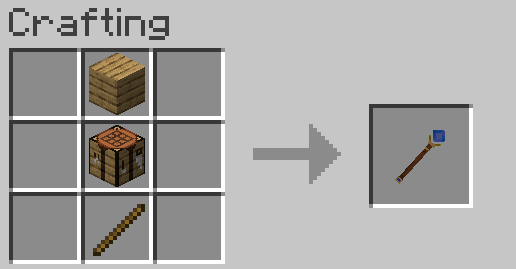
Builder Wand
- Stick
- Oak Planks
- Crafting Table
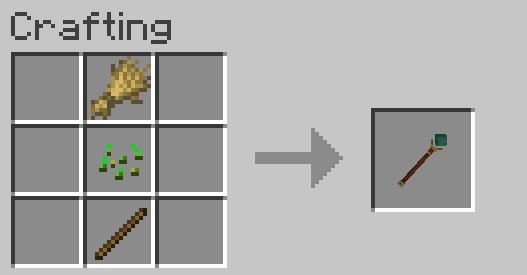
Farmer Wand
- Stick
- Wheat Seeds
- Wheat
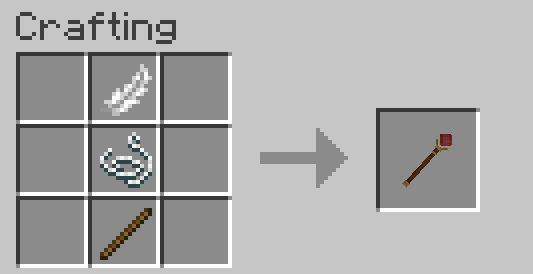
Hunter Wand
- Stick
- String
- Feather
How To Use
Builder Wand
- Right-click one block to set the first point.
- Right-click another block to set the second point.
- Right-click in the air.
- Choose a structure preset.
- Your Builder Gnome starts construction.
Farmer Wand
- Right-click one block to set the first point.
- Right-click another block to set the second point.
- Right-click in the air.
- Choose a farm mode.
- Your Farmer Gnome starts working.
Hunter Wand
- Right-click in the air.
- A Hunter Gnome spawns near you.
- It patrols, fights, gathers loot, and delivers it to your Ender Chest.
Commands
/gnome kit- gives all three wands/gnome wand builder- gives the Builder Wand/gnome wand farmer- gives the Farmer Wand/gnome wand hunter- gives the Hunter Wand/gnome undo- reverts the latest builder or farmer action/gnome remove hunter- removes your active hunter gnomes
Important Notes
- Builder and farmer gnomes currently do not consume player resources
- Builder gnomes clear the selected build area before construction
- Hunter gnomes deposit loot into the owner's Ender Chest
- Requires Fabric API
- Designed for Minecraft 1.21.11
Compatibility
- Minecraft: 1.21.11
- Loader: Fabric
- Dependency: Fabric API
- Optional compatibility: Farmers Delight
Why Pocket Gnomes?
Pocket Gnomes is built around a simple idea:
small magical companions that make survival more fun without turning the game into a full tech mod.
It is meant to feel readable, flavorful, and charming:
three wands, three roles, three little helpers.
Available Versions
How to Install Pocket Gnomes on Your Server
Order Server
Order a Minecraft Java server with at least 3 GB RAM (4 GB recommended).
Set fabric Loader
In the panel under "Egg", select the fabric loader and matching Minecraft version (1.21.11).
Install Mod
Open the mod browser in the dashboard and search for "Pocket Gnomes". Click "Install" – done! Alternatively, upload the .jar via SFTP to the /mods folder.
Compatibility
Mod Loaders
Minecraft Versions
1.21.11
Server-side
✓ RequiredRecommended RAM
4 GB(min. 3 GB)Frequently Asked Questions
Pocket Gnomes server crashes on startup – what to do?
Most common cause: wrong fabric version or insufficient RAM. Check the server log (latest.log) for "OutOfMemoryError" or "Mixin" errors. With Mado Hosting: ensure at least 3 GB RAM is allocated and the loader matches the mod version (1.21.11). You can switch loaders with one click in the panel.
Is Pocket Gnomes compatible with fabric?
Pocket Gnomes officially supports fabric for Minecraft 1.21.11. The Mado dashboard automatically detects incompatible loader combinations.
Server lagging with Pocket Gnomes – how to optimize performance?
Recommended RAM: 4 GB (per 8 players). Use /spark profiler to check if Pocket Gnomes consumes the most tick time. Common fixes: reduce server view-distance to 8-10, install "performant" or "starlight" as supplementary mods on Forge. With Mado Hosting, your server runs on NVMe SSDs with dedicated CPU cores for minimal latency.
Similar Mods





Rent Modded Server
Install Pocket Gnomes with just one click on your server.