
Cobblemon: PokemonToItem
A side mod for cobblemon mod, which allows to convert pokemon to item.
Screenshots
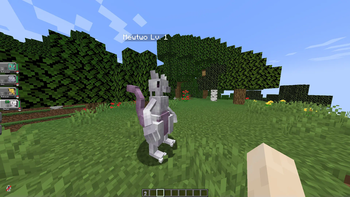
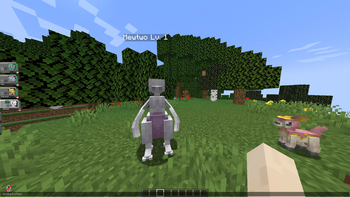
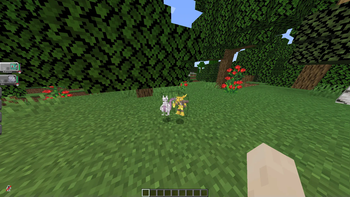
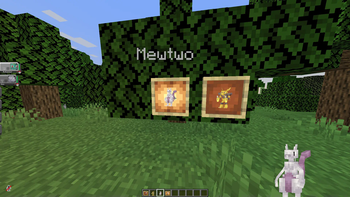
About this Mod
PokemonToItem Mod
Cobblemon Addon - Pokémon Conversion and Itemization
This mod addon enhances the Cobblemon experience for Minecraft version 1.19.2, offering players the exciting ability to convert Pokémon into items and items back into Pokémon using intuitive in-game commands. Seamlessly compatible with both Forge and Fabric platforms, this addon opens up new gameplay possibilities.
Features
- Convert Pokémon to Items: Utilize the
/poketoitemcommand to transform Pokémon into items. - Reverse the Process: Employ the
/itemtopokecommand to reverse the transformation, converting items with embedded Pokémon back into their original forms. - Graphical Interface for Conversion: The
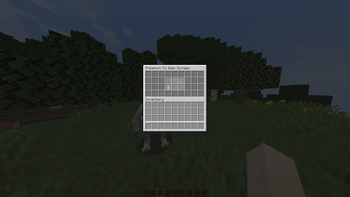
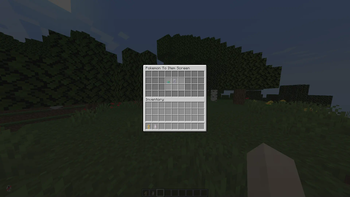
/poketoitemcommand opens a user-friendly interface, allowing you to select Pokémon from your party to be converted into items. - Items vs. Computer: Pokémon conversion is limited to your party. For those stored in your computer, move them into your party prior to conversion.
- Pokémon Extraction from Items: The
/itemtopokecommand allows you to extract Pokémon from items held in your character's main hand.
Installation
Forge:
- Install Minecraft Forge for version 1.19.2.
- Download both the Cobblemon Mod and this addon.
- Place the downloaded mods into the 'mods' folder within your Minecraft directory.
- Launch Minecraft to explore the newly added features.
Fabric:
- Install Fabric Loader for Minecraft 1.19.2.
- Download both the Cobblemon Mod and this addon.
- Move the downloaded mods into the 'mods' directory in your Minecraft folder.
- Launch the game using the Fabric game launcher to experience the enhanced gameplay.
Commands
Convert Pokémon to Item
- To initiate Pokémon conversion, use the following command:
/poketoitem
- A user interface will be displayed, showcasing the Pokémon in your party.
- Select the Pokémon you wish to convert into an item by clicking on it.
- The chosen Pokémon will be transformed into an item.
Convert Item to Pokémon
- To convert an item with an embedded Pokémon back into a living creature, use the command:
/itemtopoke
- Hold the item in your character's main hand.
- Execute the command to convert the item back into a Pokémon.
Permissions
/poketoitempermission:cobblemon.pokemontoitem.command.poketoitem/itemtopokepermission:cobblemon.pokemontoitem.command.itemtopoke
Important Notes
- Ensure you have downloaded the Cobblemon Mod along with this addon.
- Downloads are available via GitHub releases:
- If you have applied a datapack for alternate Pokémon textures, note that the item containing the Pokémon will inherit its appearance from the datapack.
- As this is a beta release, anticipate and report bugs. If you find any issues, please create an issue on our GitHub repository.
Credits
Developed by Sreeraj S , this mod addon builds upon the groundwork laid by the Cobblemon mod creators.Special thanks to the creators of the Cobblemon mod for their amazing work.
For support, feedback, and contributions, visit the official forums or GitHub repository.
Available Versions
How to Install Cobblemon: PokemonToItem on Your Server
Order Server
Order a Minecraft Java server with at least 3 GB RAM (4 GB recommended).
Set fabric Loader
In the panel under "Egg", select the fabric loader and matching Minecraft version (1.21.1).
Install Mod
Open the mod browser in the dashboard and search for "Cobblemon: PokemonToItem". Click "Install" – done! Alternatively, upload the .jar via SFTP to the /mods folder.
Compatibility
Mod Loaders
Minecraft Versions
1.21.1, 1.20.1, 1.19.2
Server-side
✓ RequiredRecommended RAM
4 GB(min. 3 GB)Frequently Asked Questions
Cobblemon: PokemonToItem server crashes on startup – what to do?
Most common cause: wrong fabric version or insufficient RAM. Check the server log (latest.log) for "OutOfMemoryError" or "Mixin" errors. With Mado Hosting: ensure at least 3 GB RAM is allocated and the loader matches the mod version (1.21.1). You can switch loaders with one click in the panel.
Is Cobblemon: PokemonToItem compatible with fabric and forge and neoforge?
Cobblemon: PokemonToItem officially supports fabric, forge, neoforge for Minecraft 1.21.1, 1.20.1, 1.19.2. Note: Forge and Fabric mods are NOT cross-compatible – pick one loader and stick with it. The Mado dashboard automatically detects incompatible loader combinations.
Server lagging with Cobblemon: PokemonToItem – how to optimize performance?
Recommended RAM: 4 GB (per 8 players). Use /spark profiler to check if Cobblemon: PokemonToItem consumes the most tick time. Common fixes: reduce server view-distance to 8-10, install "performant" or "starlight" as supplementary mods on Forge. With Mado Hosting, your server runs on NVMe SSDs with dedicated CPU cores for minimal latency.
Similar Mods




![[ETF] Entity Texture Features](https://cdn.modrinth.com/data/BVzZfTc1/af683d206d50b05258d865b0d6e4aa2f2cee12f2_96.webp)
![[EMF] Entity Model Features](https://cdn.modrinth.com/data/4I1XuqiY/6e5bbd0d06b1741bfdab6c0cfab6de8fdaf0064c_96.webp)
Rent Modded Server
Install Cobblemon: PokemonToItem with just one click on your server.