
Pollution of the Realms
Adds environmental pollution mechanics with real consequences for the world around you
Screenshots




About this Mod
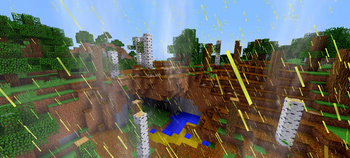
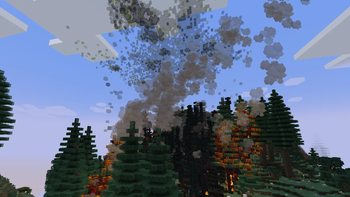
"Pollution of the Realms" is a comprehensive environmental mod that simulates realistic pollution mechanics within Minecraft. It introduces visible emission blocks of carbon, sulfur, and dust particles generated from the combustion of various fuels. These pollutants rise into the atmosphere, accumulate in cloud formations, and travel with air currents, creating a dynamic and immersive environmental system.
Core Mechanics
The mod simulates three primary pollution pathways: atmospheric emissions from fuel combustion, soil contamination from oil spills, and acid precipitation. If left unmanaged, accumulated pollution causes cascading ecological damage, affecting plant growth, animal behavior, crop yields, and player health. This creates meaningful environmental consequences that encourage proactive pollution management.
Purpose and Design Philosophy
"Pollution of the Realms" introduces authentic environmental challenges to modpacks while remaining flexible and mod-agnostic. While the mod includes built-in mitigation tools, its design intentionally encourages creative solutions through integration with other mods. This approach rewards both individual problem-solving and collaborative modpack design.
Key Features
- Visible pollution layers - carbon, sulfur, and dust blocks with varying density levels that accumulate and obscure visibility
- Dynamic atmospheric systems - pollution clouds that travel realistically with simulated air currents
- Multi-source contamination - soil pollution from oil spills; dust clouds around grinding and crushing machinery; explosive underground gas pockets (requires: Large Ore Deposits)
- Environmental degradation - acid rain and water pollution; reduced visibility; damage to trees, crops, grass, farmland, and living entities
- Pollution management - venting devices (requires: Advanced Chimneys) and filtration systems to mitigate emissions and dust
- Customization and extensibility - full config-file support for custom pollutants, fuel types, and emission sources; seamless compatibility with popular tech mods
- Balanced gameplay - encourages sustainable practices without forcing a single solution
- Minimize long-term harm - players manage pollution rather than ignoring it, so their world doesn't become increasingly damaged over time
- Balance resource use with consequences - burning fuel for energy is useful, but players must account for the pollution it creates
- Encourage planning and systems thinking - instead of just building a furnace and moving on, players design filtration, ventilation, or pollution-removal systems
- Reward thoughtful building - players who set up proper chimneys, treatment devices, and emission controls avoid explosions, plant death, and visibility loss
- Preserve world health - sustainable play means crops stay fertile, animals survive, visibility remains good, and water stays clean
REQUIRES ForgeEndertech library
Available Versions
How to Install Pollution of the Realms on Your Server
Order Server
Order a Minecraft Java server with at least 3 GB RAM (4 GB recommended).
Set fabric Loader
In the panel under "Egg", select the fabric loader and matching Minecraft version (26.2).
Install Mod
Open the mod browser in the dashboard and search for "Pollution of the Realms". Click "Install" – done! Alternatively, upload the .jar via SFTP to the /mods folder.
Compatibility
Mod Loaders
Minecraft Versions
26.2
Server-side
✓ RequiredRecommended RAM
4 GB(min. 3 GB)Frequently Asked Questions
Pollution of the Realms server crashes on startup – what to do?
Most common cause: wrong fabric version or insufficient RAM. Check the server log (latest.log) for "OutOfMemoryError" or "Mixin" errors. With Mado Hosting: ensure at least 3 GB RAM is allocated and the loader matches the mod version (26.2). You can switch loaders with one click in the panel.
Is Pollution of the Realms compatible with fabric and forge and neoforge?
Pollution of the Realms officially supports fabric, forge, neoforge for Minecraft 26.2. Note: Forge and Fabric mods are NOT cross-compatible – pick one loader and stick with it. The Mado dashboard automatically detects incompatible loader combinations.
Server lagging with Pollution of the Realms – how to optimize performance?
Recommended RAM: 4 GB (per 8 players). Use /spark profiler to check if Pollution of the Realms consumes the most tick time. Common fixes: reduce server view-distance to 8-10, install "performant" or "starlight" as supplementary mods on Forge. With Mado Hosting, your server runs on NVMe SSDs with dedicated CPU cores for minimal latency.
Similar Mods




Rent Modded Server
Install Pollution of the Realms with just one click on your server.
Details
- License
- Creative Commons Attribution No Derivatives 4.0 International
- Server-side
- Required