
Polygraves
A grave mod that tries to be vanilla and widely compatible
Screenshots

About this Mod
Polygraves!
A simple grave mod that intends to be compatible with inventory manager mods, such as mods that keep certain items on death.
By design, it is pretty basic and doesn't have ALL the quality of life features you would normally expect.
Features
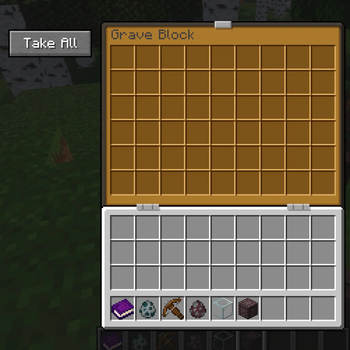
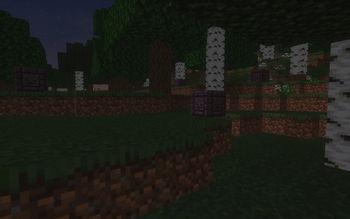
Creates a grave block at your death location which stores all your dropped items.
- Can work in lava
- Supports modded items
- Can be mined with a silk touch pickaxe to get the block itself
- Take only, cannot be used as op storage (without any hoppers, that is)
Compatibility
Tested to work with Lenient Death and I think Keep Inventory Control works as well. Tested to work with Sodium (alongside Indium, however not sure if required). No guarantees that anything else works but based on how this mod is made it should hopefully work! Modded inventory slots are untested and will most likely not work
Flaws
This mod, if the position you died at is not empty, will place the grave one block higher. This will forceably remove the block, which could be detrimental. hint hint new bedrock breaking strategy
Notes
This is my first finished fabric mod, so it will probably have plenty of bugs.
USE AT OWN RISK
Also this mod does not have anything to do with Polymer.
Available Versions
How to Install Polygraves on Your Server
Order Server
Order a Minecraft Java server with at least 3 GB RAM (4 GB recommended).
Set fabric Loader
In the panel under "Egg", select the fabric loader and matching Minecraft version (1.20.1).
Install Mod
Open the mod browser in the dashboard and search for "Polygraves". Click "Install" – done! Alternatively, upload the .jar via SFTP to the /mods folder.
Compatibility
Mod Loaders
Minecraft Versions
1.20.1
Server-side
✓ RequiredRecommended RAM
4 GB(min. 3 GB)Frequently Asked Questions
Polygraves server crashes on startup – what to do?
Most common cause: wrong fabric version or insufficient RAM. Check the server log (latest.log) for "OutOfMemoryError" or "Mixin" errors. With Mado Hosting: ensure at least 3 GB RAM is allocated and the loader matches the mod version (1.20.1). You can switch loaders with one click in the panel.
Is Polygraves compatible with fabric?
Polygraves officially supports fabric for Minecraft 1.20.1. The Mado dashboard automatically detects incompatible loader combinations.
Server lagging with Polygraves – how to optimize performance?
Recommended RAM: 4 GB (per 8 players). Use /spark profiler to check if Polygraves consumes the most tick time. Common fixes: reduce server view-distance to 8-10, install "performant" or "starlight" as supplementary mods on Forge. With Mado Hosting, your server runs on NVMe SSDs with dedicated CPU cores for minimal latency.
Similar Mods




Rent Modded Server
Install Polygraves with just one click on your server.
Details
- License
- Creative Commons Attribution Non Commercial 4.0 International
- Server-side
- Required