
PonderingPlus StationAPI
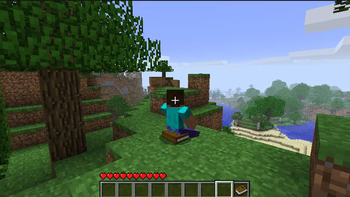
A b1.7.3 mod using StationAPI and babric (beta fabric) that was inspired by a desire to sit and read books and a love for libraries.
Screenshots
About this Mod
PonderingPlus StationAPI for Minecraft Beta 1.7.3
A b1.7.3 mod using StationAPI and babric (beta fabric) that was inspired by a desire to sit and read books and a love for libraries.
- Mod works on Multiplayer with GlassConfigAPI version 3.0+ used to sync configs!
List of changes
- Added the ability to sit by right-clicking any normal block with a book
- Optionally you can disable sitting on the book using the config provided by GlassConfigAPI
- Use the sneak key to stand back up
- If you log out and log back in while sitting you will fall into the block you sat on
- To fix this, install either AnnoyanceFix-StationAPI or UniTweaksTelsAddons and enable vehicle logout/login fixes
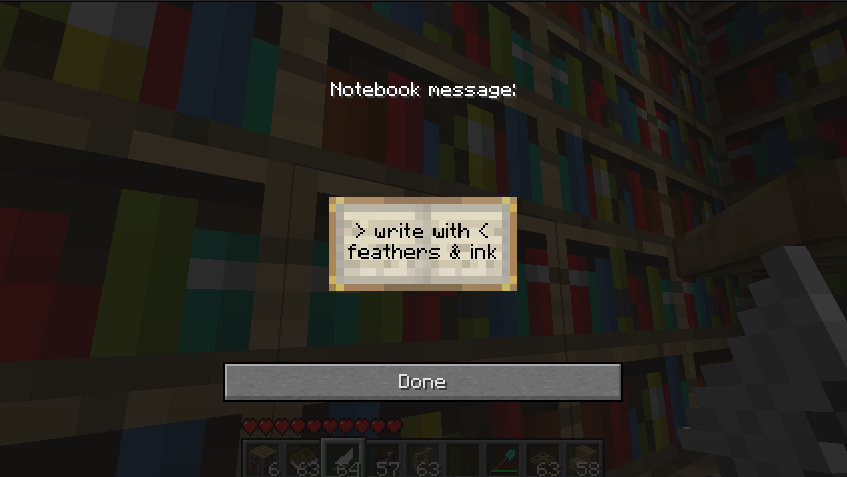
- Added the ability to write a message into a bookshelf (this will convert it into a modded block type)
- Right-click a bookshelf with a feather in hand and black dye (ink sacs) in your inventory
- One black dye (ink sac) will be consumed and the block will convert into an editable bookshelf
- Editable bookshelves do not catch on fire, take slightly longer to break, and show a message when right-clicked
- Editable bookshelves drop regular bookshelves when broken and the written data is lost
- Their texture is also reversed to distinguish them from normal bookshelves (they will still use the bookshelf texture from terrain.png)
- The particles are also ever so slightly different as they pull from the side texture rather than top texture
- Once a bookshelf has become editable, you can edit it any number of times without consuming further items
- Right-click the bookshelf (item in hand does not matter) to read/edit the bookshelf message
- Right-click a bookshelf with a feather in hand and black dye (ink sacs) in your inventory
Installation using Prism Launcher
- Download an instance of Babric for Prism Launcher: https://github.com/babric/prism-instance
- Install Java 17 and set the instance to use it: https://adoptium.net/temurin/releases/
- Add GlassConfigAPI 3.0.2+ to the mod folder for the instance: https://modrinth.com/mod/glass-config-api
- Add Glass Networking to the mod folder for the instance: https://modrinth.com/mod/glass-networking
- Add StationAPI to the mod folder for the instance: https://modrinth.com/mod/stationapi
- (Optional) Add Mod Menu to the mod folder for the instance: https://modrinth.com/mod/modmenu-beta
- Add this mod to the mod folder for the instance: https://github.com/telvarost/PonderingPlus-StationAPI/releases
- Run and enjoy! 👍
Feedback
Got any suggestions on what should be added next? Feel free to share it by creating an issue. Know how to code and want to do it yourself? Then look below on how to get started.
Contributing
Thanks for considering contributing! To get started fork this repository, make your changes, and create a PR.
If you are new to StationAPI consider watching the following videos on Babric/StationAPI Minecraft modding: https://www.youtube.com/watch?v=9-sVGjnGJ5s&list=PLa2JWzyvH63wGcj5-i0P12VkJG7PDyo9T
Available Versions
How to Install PonderingPlus StationAPI on Your Server
Order Server
Order a Minecraft Java server with at least 3 GB RAM (4 GB recommended).
Set babric Loader
In the panel under "Egg", select the babric loader and matching Minecraft version (b1.7.3).
Install Mod
Open the mod browser in the dashboard and search for "PonderingPlus StationAPI". Click "Install" – done! Alternatively, upload the .jar via SFTP to the /mods folder.
Compatibility
Mod Loaders
Minecraft Versions
b1.7.3
Server-side
✓ RequiredRecommended RAM
4 GB(min. 3 GB)Frequently Asked Questions
PonderingPlus StationAPI server crashes on startup – what to do?
Most common cause: wrong babric version or insufficient RAM. Check the server log (latest.log) for "OutOfMemoryError" or "Mixin" errors. With Mado Hosting: ensure at least 3 GB RAM is allocated and the loader matches the mod version (b1.7.3). You can switch loaders with one click in the panel.
Is PonderingPlus StationAPI compatible with babric and fabric?
PonderingPlus StationAPI officially supports babric, fabric for Minecraft b1.7.3. The Mado dashboard automatically detects incompatible loader combinations.
Server lagging with PonderingPlus StationAPI – how to optimize performance?
Recommended RAM: 4 GB (per 8 players). Use /spark profiler to check if PonderingPlus StationAPI consumes the most tick time. Common fixes: reduce server view-distance to 8-10, install "performant" or "starlight" as supplementary mods on Forge. With Mado Hosting, your server runs on NVMe SSDs with dedicated CPU cores for minimal latency.
Similar Mods




Rent Modded Server
Install PonderingPlus StationAPI with just one click on your server.