
Portaldevice
Adds a handheld portal device that teleports the player to named portal receivers placed in the world
Screenshots
About this Mod
Portal Device
Build your own network of teleporters — and travel across your world with a single click.
Tired of digging tunnels, building nether highways, or running the same route over and over? Portal Device gives you a personal fast-travel system that you set up entirely yourself, exactly the way you want it.
How it works
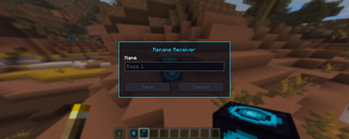
Craft a Portal Device — a handheld unit with a glowing portal screen. Then place Portal Receivers anywhere you like in the world: at your base, down in the mines, by a village, at a friend's place. Name each receiver whatever you want through a simple menu.
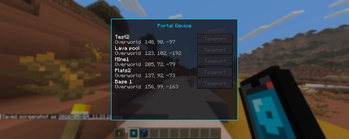
When you want to travel, pull out your Portal Device, right-click, and you'll see a list of all your receivers. Pick one — and you're there.
Features
Handheld Portal Device — your personal remote for teleportation
Portal Receivers — place as many as you want, wherever you want
Name your destinations — label every receiver so you always find the right one
Personal and private — your receivers belong only to you; other players can't use or rename them
Dynamic list — break a receiver and it automatically disappears from your list
Atmospheric details — portal particles and a faint hum bring your receivers to life
Cooldown — teleporting has a cooldown, so it stays balanced instead of feeling like cheating
Good to know
Portal Device works in both singleplayer and on servers. On a server, every player needs the mod installed.
Available Versions
How to Install Portaldevice on Your Server
Order Server
Order a Minecraft Java server with at least 3 GB RAM (4 GB recommended).
Set neoforge Loader
In the panel under "Egg", select the neoforge loader and matching Minecraft version (26.1.2).
Install Mod
Open the mod browser in the dashboard and search for "Portaldevice". Click "Install" – done! Alternatively, upload the .jar via SFTP to the /mods folder.
Compatibility
Mod Loaders
Minecraft Versions
26.1.2, 26.1.1, 26.1
Server-side
✓ RequiredRecommended RAM
4 GB(min. 3 GB)Frequently Asked Questions
Portaldevice server crashes on startup – what to do?
Most common cause: wrong neoforge version or insufficient RAM. Check the server log (latest.log) for "OutOfMemoryError" or "Mixin" errors. With Mado Hosting: ensure at least 3 GB RAM is allocated and the loader matches the mod version (26.1.2). You can switch loaders with one click in the panel.
Is Portaldevice compatible with neoforge?
Portaldevice officially supports neoforge for Minecraft 26.1.2, 26.1.1, 26.1. The Mado dashboard automatically detects incompatible loader combinations.
Server lagging with Portaldevice – how to optimize performance?
Recommended RAM: 4 GB (per 8 players). Use /spark profiler to check if Portaldevice consumes the most tick time. Common fixes: reduce server view-distance to 8-10, install "performant" or "starlight" as supplementary mods on Forge. With Mado Hosting, your server runs on NVMe SSDs with dedicated CPU cores for minimal latency.
Similar Mods
![[EMF] Entity Model Features](https://cdn.modrinth.com/data/4I1XuqiY/6e5bbd0d06b1741bfdab6c0cfab6de8fdaf0064c_96.webp)


Rent Modded Server
Install Portaldevice with just one click on your server.