
Pot Warning
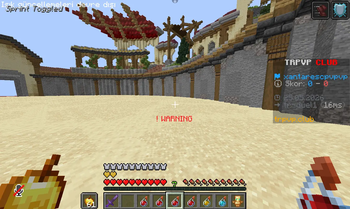
Can't see when your potions are running out? This mode is perfect for you!
Screenshots
About this Mod
Pot Warning Mod!
1.21.x
English
Can't see when your potions are running out? This mode is perfect for you! A warning will appear under the cross when your Strength, Fire Resistance, and Speed potions are about to run out in 8 seconds, letting you know when your potions are about to expire.You can understand
I created this mod for potion games to give players an advantage and prevent sudden carelessness from leading to defeat. I hope you like it and support it.
by xant700
Türkçe
İksirlerinizin ne zaman biteceğini göremiyor musunuz? Bu mod tam size göre! Güç, Ateşe Dayanıklılık ve Hız iksirlerinizin 8 saniye içinde bitmesine az kala crossunuzun altında bir uyarı belirecektir.
Bu modu, oyunculara avantaj sağlamak ve ani dikkatsizliklerin yenilgiye yol açmasını önlemek için diapot,nethpot gibi oyun modları için oluşturdum. Umarım beğenir ve desteklersiniz.
xant700 tarafından
Available Versions
How to Install Pot Warning on Your Server
Order Server
Order a Minecraft Java server with at least 3 GB RAM (4 GB recommended).
Set fabric Loader
In the panel under "Egg", select the fabric loader and matching Minecraft version (1.21.11).
Install Mod
Open the mod browser in the dashboard and search for "Pot Warning". Click "Install" – done! Alternatively, upload the .jar via SFTP to the /mods folder.
Compatibility
Mod Loaders
Minecraft Versions
1.21.11, 1.21.10, 1.21.9 (+9 more)
Server-side
✗ UnsupportedRecommended RAM
4 GB(min. 3 GB)Frequently Asked Questions
Pot Warning server crashes on startup – what to do?
Most common cause: wrong fabric version or insufficient RAM. Check the server log (latest.log) for "OutOfMemoryError" or "Mixin" errors. With Mado Hosting: ensure at least 3 GB RAM is allocated and the loader matches the mod version (1.21.11). You can switch loaders with one click in the panel.
Is Pot Warning compatible with fabric?
Pot Warning officially supports fabric for Minecraft 1.21.11, 1.21.10, 1.21.9. The Mado dashboard automatically detects incompatible loader combinations.
Server lagging with Pot Warning – how to optimize performance?
Recommended RAM: 4 GB (per 8 players). Use /spark profiler to check if Pot Warning consumes the most tick time. Common fixes: reduce server view-distance to 8-10, install "performant" or "starlight" as supplementary mods on Forge. With Mado Hosting, your server runs on NVMe SSDs with dedicated CPU cores for minimal latency.
Similar Mods




Rent Modded Server
Install Pot Warning with just one click on your server.