
Potion Slimes
Brew potions into slimes that will fight for you and inherit or inflict the potion they were brewed with.
Screenshots


About this Mod
Potion Slimes
This mod adds the ability to brew Potions into slimes that will fight for you, and inherit or inflict the effects of the potion they were brewed with.
Slime Potions
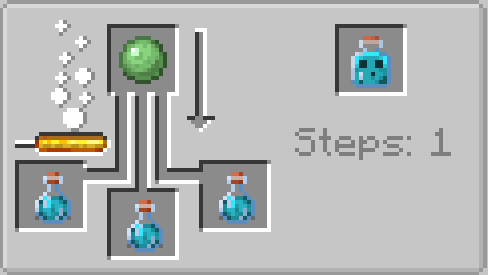
A slime potion can be brewed by placing up to three potions of any regular type (not including splash or lingering potions) in a brewing stand with a Slime Ball. Upon being used, a slime potion will be thrown a short distance, or placed on the block you're looking at if crouching. Upon impacting the ground or an entity, the potion will break, releasing the slime trapped within. If the slime was brewed from a potion that contained positive effects, like Swiftness or Strength, the slime will apply that effect to itself. If the slime was brewed from a potion that contained negative effects, like Slowness or Weakness, the slime will instead inflict that effect on entities it damages. The Heal and Harm effects are unique, boosting the max health and attack damage of the created slime.
Potion Slimes will be tamed by the player that threw the slime potion, and they will defend you like a pet. Additionally, if the potion hit an entity, the slimes will immediately begin targetting the same entity, so long as it isn't you or one of your allies. Upon taking sufficient damage, a basic Potion Slime will split into four smaller slimes with the same effect, but less health and attack damage.
A Potion Slime will only last as long as the potion it was brewed from would have lasted, so they will despawn after a while. For potions that normally contain instant effects, like Healing and Harming, they will last for 25 seconds.
Large Slime Potions
By further brewing a slime potion with a Slime Block, you can create a Large Slime Potion, which will spawn a larger slime that has more health and deals slightly more damage. Upon taking sufficient damage, a Large Potion Slime will split into two regular Potion Slimes, which can split again into four small Potion Slimes.
Have a question, feedback, or suggestion? Join my discord server!
Available Versions
How to Install Potion Slimes on Your Server
Order Server
Order a Minecraft Java server with at least 3 GB RAM (4 GB recommended).
Set forge Loader
In the panel under "Egg", select the forge loader and matching Minecraft version (1.20.1).
Install Mod
Open the mod browser in the dashboard and search for "Potion Slimes". Click "Install" – done! Alternatively, upload the .jar via SFTP to the /mods folder.
Compatibility
Mod Loaders
Minecraft Versions
1.20.1
Server-side
✓ RequiredRecommended RAM
4 GB(min. 3 GB)Frequently Asked Questions
Potion Slimes server crashes on startup – what to do?
Most common cause: wrong forge version or insufficient RAM. Check the server log (latest.log) for "OutOfMemoryError" or "Mixin" errors. With Mado Hosting: ensure at least 3 GB RAM is allocated and the loader matches the mod version (1.20.1). You can switch loaders with one click in the panel.
Is Potion Slimes compatible with forge and neoforge?
Potion Slimes officially supports forge, neoforge for Minecraft 1.20.1. The Mado dashboard automatically detects incompatible loader combinations.
Server lagging with Potion Slimes – how to optimize performance?
Recommended RAM: 4 GB (per 8 players). Use /spark profiler to check if Potion Slimes consumes the most tick time. Common fixes: reduce server view-distance to 8-10, install "performant" or "starlight" as supplementary mods on Forge. With Mado Hosting, your server runs on NVMe SSDs with dedicated CPU cores for minimal latency.
Similar Mods




Rent Modded Server
Install Potion Slimes with just one click on your server.