
Potion Timer PPL
Adds a simple timer for the Weakness potion effect duration.
Screenshots

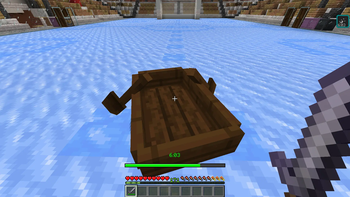


About this Mod
🧪 Таймер спортивного зелья




Таймер спортивного зелья добавляет простой таймер времени действия зелья слабости.
Больше не будет ситуаций когда эффект зелья прошёл и ты даже не заметил.
✅ Возможности:
- Простой цветной таймер (60 секунд и более - Зелёный, менее 60 секунд - Жёлтый, менее 30 секунд - Красный).
- Прогресс-бар для комфортного отслеживания.
- Звуковые сигналы когда осталось мало времени.
- Виньетка по краям экрана.
- Гибкая настройка мода. Вы можете включить/выключить необходимые функции и тонко их настроить.
- Полностью клиентский мод без необходимости устанавливать на сервер.
Работает только с эффектом слабости и не мешает другим эффектам.
Простой и удобный мод который поможет вам отслеживать остаток спортивного зелья.
📸 Скриншоты:


EN Description
🧪 Sport Potion Timer
Sport Potion Timer adds a simple timer for the Weakness potion effect duration.
No more situations where the potion effect wears off without you even noticing.
✅ Features:
- Simple color-coded timer (60+ seconds - Green, less than 60 seconds - Yellow, less than 30 seconds - Red).
- A progress bar for comfortable tracking.
- Sound alerts when time is running low.
- A vignette effect at the edges of the screen.
- Flexible mod configuration. You can enable/disable the features you need and fine-tune them.
- Fully client-side mod. No need to install it on the server.
It only works with the Weakness effect and does not interfere with other effects.
A simple and convenient mod that helps you track the remaining duration of your sport potion.
📸 Screenshots:
Available Versions
How to Install Potion Timer PPL on Your Server
Order Server
Order a Minecraft Java server with at least 3 GB RAM (4 GB recommended).
Set fabric Loader
In the panel under "Egg", select the fabric loader and matching Minecraft version (1.21.8).
Install Mod
Open the mod browser in the dashboard and search for "Potion Timer PPL". Click "Install" – done! Alternatively, upload the .jar via SFTP to the /mods folder.
Compatibility
Mod Loaders
Minecraft Versions
1.21.8
Server-side
✗ UnsupportedRecommended RAM
4 GB(min. 3 GB)Frequently Asked Questions
Potion Timer PPL server crashes on startup – what to do?
Most common cause: wrong fabric version or insufficient RAM. Check the server log (latest.log) for "OutOfMemoryError" or "Mixin" errors. With Mado Hosting: ensure at least 3 GB RAM is allocated and the loader matches the mod version (1.21.8). You can switch loaders with one click in the panel.
Is Potion Timer PPL compatible with fabric and neoforge?
Potion Timer PPL officially supports fabric, neoforge for Minecraft 1.21.8. The Mado dashboard automatically detects incompatible loader combinations.
Server lagging with Potion Timer PPL – how to optimize performance?
Recommended RAM: 4 GB (per 8 players). Use /spark profiler to check if Potion Timer PPL consumes the most tick time. Common fixes: reduce server view-distance to 8-10, install "performant" or "starlight" as supplementary mods on Forge. With Mado Hosting, your server runs on NVMe SSDs with dedicated CPU cores for minimal latency.
Similar Mods




![[ETF] Entity Texture Features](https://cdn.modrinth.com/data/BVzZfTc1/af683d206d50b05258d865b0d6e4aa2f2cee12f2_96.webp)

Rent Modded Server
Install Potion Timer PPL with just one click on your server.