
Potions Please
Adjust the duration of minecraft potions
Screenshots
About this Mod
Potions Please
Server-side fabric mod for Minecraft 1.21.5 to alter vanilla potion durations by injecting the POTION_DURATION_SCALE Component.
Potion Sources
This mod only affects potions generated through the following primary sources:
- Brewing
- Villager Trading
- Loot Tables (set_potion function)
- Tipped Arrow crafting
Potions that is created from any other source such as the /give command or the creative inventory do not have the durations modified.
This is because the mod is unable to inject the POTION_DURATION_SCALE Component to the items from those sources.
Configuration
Opening the game for the first time generates a file to config/potionsplease.json5. Configuring this file is used to alter the potion durations.
The JSON keys match minecraft's potion IDs and the next 4 values define the duration in TICKS for each item type.
- DEFAULT_DURATION -> Potion
- SPLASH_DURATION -> Splash Potion
- (Vanilla splash potions have the same duration as regular potions)
- LINGER_DURATION -> Lingering Potion
- (Vanilla lingering potions only apply 25% of the regular potion duration)
- TIPPED_DURATION -> Tipped Arrow
- (Vanilla tipped arrows only apply 12.5% of the regular potion duration)
{
  "minecraft:long_strength" : {
    "DEFAULT_DURATION" : 9600,
    "SPLASH_DURATION" : 9600,
    "LINGER_DURATION" : 2400,
    "TIPPED_DURATION" : 1200
  }
}
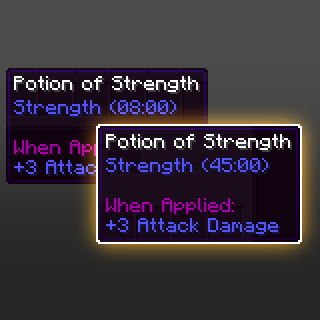
The above example uses the vanilla long_strength (Extended strength) potion durations. In this case drinking the potion regularly will grant the player strength for 8 minutes.
Maybe this isn't long enough so we can change the values to following to instead have default potion grant 45 minutes of strength.
To calculate the number of ticks for the potion duration, you can simply follow this equation: MINUTES × 60(seconds in a minute) × 20(ticks per second)
{
  "minecraft:long_strength" : {
    "DEFAULT_DURATION" : 54000, // 45 × 60 × 20 = 45 minutes in ticks
    "SPLASH_DURATION" : 18000, // 15 × 60 × 20 = 15 minutes in ticks
    "LINGER_DURATION" : 9600, // 8 × 60 × 20 = 8 minutes in ticks
    "TIPPED_DURATION" : 3600 // 3 × 60 × 20 = 3 minutes in ticks
  }
}
Removing a potion from the config disables the duration injection logic for that potion.
Available Versions
How to Install Potions Please on Your Server
Order Server
Order a Minecraft Java server with at least 3 GB RAM (4 GB recommended).
Set fabric Loader
In the panel under "Egg", select the fabric loader and matching Minecraft version (1.21.6).
Install Mod
Open the mod browser in the dashboard and search for "Potions Please". Click "Install" – done! Alternatively, upload the .jar via SFTP to the /mods folder.
Compatibility
Mod Loaders
Minecraft Versions
1.21.6, 1.21.5
Server-side
✓ RequiredRecommended RAM
4 GB(min. 3 GB)Frequently Asked Questions
Potions Please server crashes on startup – what to do?
Most common cause: wrong fabric version or insufficient RAM. Check the server log (latest.log) for "OutOfMemoryError" or "Mixin" errors. With Mado Hosting: ensure at least 3 GB RAM is allocated and the loader matches the mod version (1.21.6). You can switch loaders with one click in the panel.
Is Potions Please compatible with fabric?
Potions Please officially supports fabric for Minecraft 1.21.6, 1.21.5. The Mado dashboard automatically detects incompatible loader combinations.
Server lagging with Potions Please – how to optimize performance?
Recommended RAM: 4 GB (per 8 players). Use /spark profiler to check if Potions Please consumes the most tick time. Common fixes: reduce server view-distance to 8-10, install "performant" or "starlight" as supplementary mods on Forge. With Mado Hosting, your server runs on NVMe SSDs with dedicated CPU cores for minimal latency.
Similar Mods




Rent Modded Server
Install Potions Please with just one click on your server.