Pottery Sherd Duplication
Let's you duplicate pottery sherds through crafting similar to how you duplicate smithing templates!
Screenshots
About this Mod
DESCRIPTION
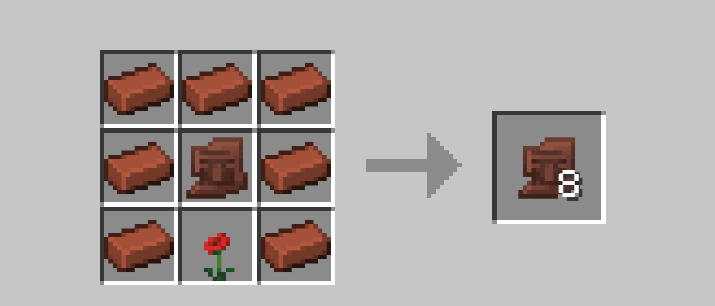
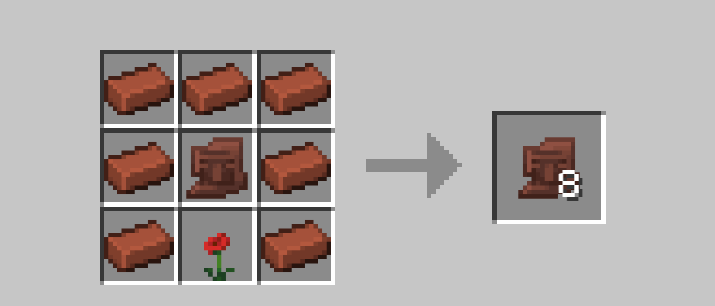
This datapack adds 23 new recipes that allow you to duplicate each pottery sherd in a crafting table, similar to how you duplicate smithing templates. Each recipe involves the pottery sherd you want to duplicate, 7 bricks, and an item associated with the pottery sherd. (refer to the table at the end of this page)
RECIPE LAYOUT
The recipe is also unlocked after obtaining the respective sherd, so you can check the recipe book.
- the sherd you want to dupe in the center of the grid
- the related item in the middle of the bottom row (below the sherd)
- bricks in the remaining empty slots
INSTALLATION GUIDE
go to your saves folder located here on Windows:
C:\Users(your name)\AppData\Roaming\.minecraft\saves
put the zipped file in the data packs folder, and either restart your world or execute /reload
OTHER THINGS TO NOTE
- for feedback, bug reports, or other help, join the discord server from the links section of this page!
- list of all the items used for each sherd:
| Pottery Sherd | Associated Item |
|---|---|
| Angler Pottery Sherd | Fishing Rod |
| Archer Pottery Sherd | Bow |
| Arms Up Pottery Sherd | Rotten Flesh |
| Blade Pottery Sherd | Golden Sword |
| Brewer Pottery Sherd | Water Bottle/Any Potion |
| Burn Pottery Sherd | Flint and Steel |
| Danger Pottery Sherd | Gunpowder |
| Explorer Pottery Sherd | Map |
| Flow Pottery Sherd | Wind Charge |
| Friend Pottery Sherd | Poppy |
| Guster Pottery Sherd | Breeze Rod |
| Heart Pottery Sherd | Heart of the Sea |
| Heartbreak Pottery Sherd | Ghast Tear |
| Howl Pottery Sherd | Wolf Armor |
| Miner Pottery Sherd | Golden Pickaxe |
| Mourner Pottery Sherd | Sculk Block |
| Plenty Pottery Sherd | Chest |
| Prize Pottery Sherd | Amethyst Shard |
| Scrape Pottery Sherd | Golden Axe |
| Sheaf Pottery Sherd | Wheat |
| Shelter Pottery Sherd | Acacia Sapling |
| Skull Pottery Sherd | Bone |
| Snort Pottery Sherd | Moss Block |
Available Versions
How to Install Pottery Sherd Duplication on Your Server
Order Server
Order a Minecraft Java server with at least 3 GB RAM (4 GB recommended).
Set datapack Loader
In the panel under "Egg", select the datapack loader and matching Minecraft version (26.1.2).
Install Mod
Open the mod browser in the dashboard and search for "Pottery Sherd Duplication". Click "Install" – done! Alternatively, upload the .jar via SFTP to the /mods folder.
Compatibility
Mod Loaders
Minecraft Versions
26.1.2, 26.1.1, 26.1 (+19 more)
Server-side
✓ RequiredRecommended RAM
4 GB(min. 3 GB)Frequently Asked Questions
Pottery Sherd Duplication server crashes on startup – what to do?
Most common cause: wrong datapack version or insufficient RAM. Check the server log (latest.log) for "OutOfMemoryError" or "Mixin" errors. With Mado Hosting: ensure at least 3 GB RAM is allocated and the loader matches the mod version (26.1.2). You can switch loaders with one click in the panel.
Is Pottery Sherd Duplication compatible with datapack and fabric and forge and neoforge and quilt?
Pottery Sherd Duplication officially supports datapack, fabric, forge, neoforge, quilt for Minecraft 26.1.2, 26.1.1, 26.1. Note: Forge and Fabric mods are NOT cross-compatible – pick one loader and stick with it. The Mado dashboard automatically detects incompatible loader combinations.
Server lagging with Pottery Sherd Duplication – how to optimize performance?
Recommended RAM: 4 GB (per 8 players). Use /spark profiler to check if Pottery Sherd Duplication consumes the most tick time. Common fixes: reduce server view-distance to 8-10, install "performant" or "starlight" as supplementary mods on Forge. With Mado Hosting, your server runs on NVMe SSDs with dedicated CPU cores for minimal latency.
Similar Mods

![[ETF] Entity Texture Features](https://cdn.modrinth.com/data/BVzZfTc1/af683d206d50b05258d865b0d6e4aa2f2cee12f2_96.webp)
![[EMF] Entity Model Features](https://cdn.modrinth.com/data/4I1XuqiY/6e5bbd0d06b1741bfdab6c0cfab6de8fdaf0064c_96.webp)



Rent Modded Server
Install Pottery Sherd Duplication with just one click on your server.