
Pepeland Utils
Mod which provides some useful features for Pepeland players
Screenshots
About this Mod







Mod which provides some useful features for Pepeland players
Pepeland is private vanilla smp server in Minecraft. If you don't play on that server - don't install this mod.
Current list of features
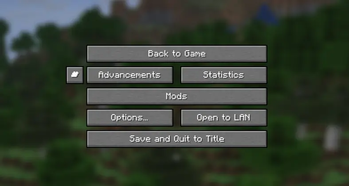
- Lobby button in game menu (or with key)
- World border size debug hud entry (thanks
wiihxhxfor idea)(2.0+) - Ability to disable join/leave messages rendering
(2.2+) - Restart indicator (client side boss bar)
(2.7+) - Advanced global chat system. Press a hotkey and communicate in global chat just like you would in regular chat!
(2.6+) - Red screen for errors (for example, when unable to enter a world)
(2.7+) - Ability to sit or lay down using a hotkey
(2.7+) - Ping indicator and show ping key
(2.9+) - Diamond counter
(2.10+) - Chat filter
(2.10+) - Capes and tab icons for states. Write to GitHub to request a state!
(3.1+) - Resource pack auto updater
(3.2+) - Players tab highlighting
(3.2+)
Dependencies
Required
Optional
- Mod Menu: Adds ability to configure mod
Recommended
- ViaFabricPlus (1.21.9+): To play on Pepeland with 1.21.9+ version
- Mod Menu Badges Lib: It is already included in the mod jar, but it is better to install it to have the latest updates
🇷🇺 Описание на русском
Мод, предоставляющий несколько полезных функций для игроков Pepeland'аPepeland - приватный ванильный сервер в Minecraft. Если вы не играете на данном сервере - не устанавливайте этот мод.
Текущий список функций
- Лобби-кнопка в меню паузы (или с помощью горячей кнопки)
- Радиус границы мира в F3 (спасибо
wiihxhxза идею)(2.0)+ - Возможность отключения сообщений о входе/выходе игроков
(2.2+) - Индикатор рестарта сервера (клиентский босс бар)
(2.7+) - Продвинутая система глобального чата. Нажмите горячую клавишу и общайтесь в глобальном чате так же, как бы вы общались в обычном!
(2.6+) - Красный экран при ошибках (например, при невозможности зайти в мир)
(2.7+) - Возможность сесть или лечь, используя горячую клавишу
(2.7+) - Индикатор пинга и горячая клавиша для отображения пинга
(2.9+) - Индикатор количества алмазов
(2.10+) - Чат фильтр
(2.10+) - Плащи и иконки в табе для объединений. Напишите в GitHub для заявки на объединение!
(3.1+) - Автоматическое обновление ресурс пака
(3.2+) - Подсветка игроков в табе
(3.2+)
Зависимости
Обязательные
Опциональные
- Mod Menu: Добавляет возможность настраивать мод
Рекомендуемые
- ViaFabricPlus (1.21.9+): Чтобы играть на Pepeland с версией выше 1.21.9 (включительно)
- Mod Menu Badges Lib: Уже включен в Jar файл, но лучше его установить для последних актуальных обновлений
Available Versions
How to Install Pepeland Utils on Your Server
Order Server
Order a Minecraft Java server with at least 3 GB RAM (4 GB recommended).
Set fabric Loader
In the panel under "Egg", select the fabric loader and matching Minecraft version (1.21.11).
Install Mod
Open the mod browser in the dashboard and search for "Pepeland Utils". Click "Install" – done! Alternatively, upload the .jar via SFTP to the /mods folder.
Compatibility
Mod Loaders
Minecraft Versions
1.21.11, 1.21.10, 1.21.9 (+3 more)
Server-side
✗ UnsupportedRecommended RAM
4 GB(min. 3 GB)Frequently Asked Questions
Pepeland Utils server crashes on startup – what to do?
Most common cause: wrong fabric version or insufficient RAM. Check the server log (latest.log) for "OutOfMemoryError" or "Mixin" errors. With Mado Hosting: ensure at least 3 GB RAM is allocated and the loader matches the mod version (1.21.11). You can switch loaders with one click in the panel.
Is Pepeland Utils compatible with fabric?
Pepeland Utils officially supports fabric for Minecraft 1.21.11, 1.21.10, 1.21.9. The Mado dashboard automatically detects incompatible loader combinations.
Server lagging with Pepeland Utils – how to optimize performance?
Recommended RAM: 4 GB (per 8 players). Use /spark profiler to check if Pepeland Utils consumes the most tick time. Common fixes: reduce server view-distance to 8-10, install "performant" or "starlight" as supplementary mods on Forge. With Mado Hosting, your server runs on NVMe SSDs with dedicated CPU cores for minimal latency.
Similar Mods




![[ETF] Entity Texture Features](https://cdn.modrinth.com/data/BVzZfTc1/af683d206d50b05258d865b0d6e4aa2f2cee12f2_96.webp)
![[EMF] Entity Model Features](https://cdn.modrinth.com/data/4I1XuqiY/6e5bbd0d06b1741bfdab6c0cfab6de8fdaf0064c_96.webp)
Rent Modded Server
Install Pepeland Utils with just one click on your server.