
Pre-Placement Block Rotation
A client-side mod that lets you manually rotate and flip blocks before placing them, bypassing Minecraft's strict placement rules.
Screenshots
About this Mod




⚠️ BETA NOTICE
This mod is currently in Beta.
The current release is Singleplayer Only.
We are actively working on making the system compatible with Multiplayer servers, but due to how Minecraft handles block placement and synchronization, additional work is required.
Until then, please treat this version as experimental.
Expect:
• Possible bugs
• Incomplete block compatibility
• Future improvements
Your feedback helps a lot!
🧱 What This Mod Does
Ever struggled to place an Observer, Piston, or Stair facing the exact direction you want?
Vanilla Minecraft often forces you to:
• Look in specific directions
• Build temporary scaffolding
• Place blocks multiple times just to get the correct orientation
Pre-Placement Block Rotation removes those restrictions.
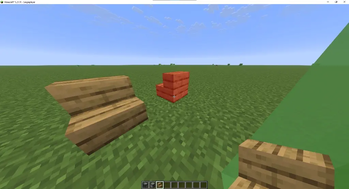
Rotate and flip blocks before placing them, giving you full control over orientation — even when looking straight up, straight down, or from awkward angles.
No more dirt towers.
No more breaking and replacing blocks.
Just place it correctly the first time.
✨ Features
👻 Perfect Sync Ghost Preview
See exactly how the block will be placed before clicking.
A translucent preview shows the final rotation and orientation in real time so you know exactly what you're placing.
🔓 Breaks Vanilla Direction Locks
Minecraft normally locks certain blocks depending on where you're looking.
This mod bypasses those restrictions.
Example:
Look straight down → place an Observer facing North.
No scaffolding required.
🧱 Universal Block Support
Works with most directional blocks including:
• Observers
• Pistons
• Dispensers
• Logs & Pillars
• Stairs
• Slabs
• Chests
• Furnaces
• Many more vanilla blocks
⚡ Quick Toggle
Enable or disable the mod instantly whenever you need it.
No menus required.
🎮 Default Controls
All controls can be changed in:
Minecraft → Options → Controls → Rotation Placement
| Key | Action |
|---|---|
| R | Toggle Mod ON / OFF |
| Right Arrow | Rotate Block Horizontally |
| Up Arrow | Flip Block Vertically |
⚙️ Compatibility
✔ Fabric Loader required
✔ Client-side mod
✔ Safe to install on servers (but functionality is singleplayer only for now)
Supported Minecraft versions:
1.21 → 1.21.9
💡 Perfect For
• Redstone engineers
• Technical builders
• Creative builders
• Anyone tired of Minecraft's placement restrictions
Build faster and place blocks exactly how you want.
Want to request a mod for free? Join the Discord Server
Available Versions
How to Install Pre-Placement Block Rotation on Your Server
Order Server
Order a Minecraft Java server with at least 3 GB RAM (4 GB recommended).
Set fabric Loader
In the panel under "Egg", select the fabric loader and matching Minecraft version (1.21.8).
Install Mod
Open the mod browser in the dashboard and search for "Pre-Placement Block Rotation". Click "Install" – done! Alternatively, upload the .jar via SFTP to the /mods folder.
Compatibility
Mod Loaders
Minecraft Versions
1.21.8, 1.21.7, 1.21.6 (+6 more)
Server-side
✓ RequiredRecommended RAM
4 GB(min. 3 GB)Frequently Asked Questions
Pre-Placement Block Rotation server crashes on startup – what to do?
Most common cause: wrong fabric version or insufficient RAM. Check the server log (latest.log) for "OutOfMemoryError" or "Mixin" errors. With Mado Hosting: ensure at least 3 GB RAM is allocated and the loader matches the mod version (1.21.8). You can switch loaders with one click in the panel.
Is Pre-Placement Block Rotation compatible with fabric?
Pre-Placement Block Rotation officially supports fabric for Minecraft 1.21.8, 1.21.7, 1.21.6. The Mado dashboard automatically detects incompatible loader combinations.
Server lagging with Pre-Placement Block Rotation – how to optimize performance?
Recommended RAM: 4 GB (per 8 players). Use /spark profiler to check if Pre-Placement Block Rotation consumes the most tick time. Common fixes: reduce server view-distance to 8-10, install "performant" or "starlight" as supplementary mods on Forge. With Mado Hosting, your server runs on NVMe SSDs with dedicated CPU cores for minimal latency.
Similar Mods




Rent Modded Server
Install Pre-Placement Block Rotation with just one click on your server.