
Preclassic Blocks
old blocks from rd-32211 to 0.30 and maybe alpha and probably beta.
Screenshots
About this Mod
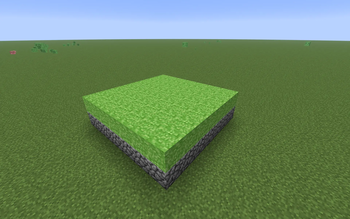
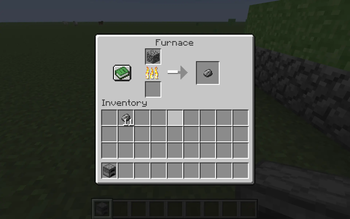
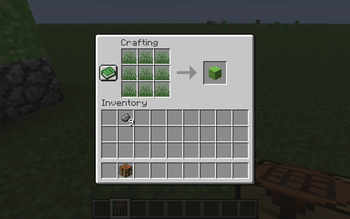
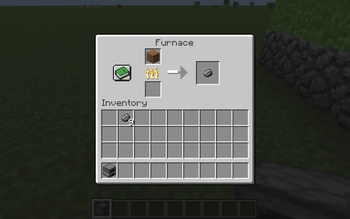
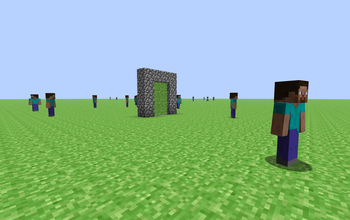
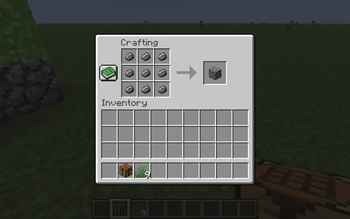
This Project Adds the old and first Blocks from version rd-132211 to 0.30 and probably alpha and beta. This mod brings back nostalga and building plans! For example, the "Rocks" block from rd-132211 can be crafted from 9 "rock" items and THAT can be obtained by smelting dirt. yes DIRT because you see tiny stones in it. I made sure that ALL the blocks can be obtainable in survival. All of the textures are and will be cropped images of the terrain.png image in the jar files of the old versions.
COMPATIBILITY OF OTHER MODS: I suggest if you use sodium in your default instance, install sodium and if you use Iris for shaders, than use Iris. Optifine isn't easy to install in Fabric. Plus im too lazy to add neoforge. Plus if you want, add Essential to it. Its YOUR choice. Just remember, Survival is possible for MOST of the blocks but I suggest Creative so you can build with these good ol blocks. REMEMBER, ALL of the textures will be from the terrain.png image from the jar files, except for some items which are custom.
IMPACT TO DEVICE: It should not impact the device unless it runs MACOS 9 OR WINDOWS 98 OR WHATEVER, jokes aside there are no shaders, should be no impact to peformance just more blocks and classic entities. The mod SHOULD work on a low end pcs like windows 7 or 8 or 2015 windows 10 builds. I havent tried in those systems because of wifi problems on my POTATO PC, I mainly use a laptop. Plus you dont even need a god gpu like a 5090 NO. NOT EVEN A 960.
Available Versions
How to Install Preclassic Blocks on Your Server
Order Server
Order a Minecraft Java server with at least 3 GB RAM (4 GB recommended).
Set fabric Loader
In the panel under "Egg", select the fabric loader and matching Minecraft version (26.1.2).
Install Mod
Open the mod browser in the dashboard and search for "Preclassic Blocks". Click "Install" – done! Alternatively, upload the .jar via SFTP to the /mods folder.
Compatibility
Mod Loaders
Minecraft Versions
26.1.2
Server-side
✗ UnsupportedRecommended RAM
4 GB(min. 3 GB)Frequently Asked Questions
Preclassic Blocks server crashes on startup – what to do?
Most common cause: wrong fabric version or insufficient RAM. Check the server log (latest.log) for "OutOfMemoryError" or "Mixin" errors. With Mado Hosting: ensure at least 3 GB RAM is allocated and the loader matches the mod version (26.1.2). You can switch loaders with one click in the panel.
Is Preclassic Blocks compatible with fabric?
Preclassic Blocks officially supports fabric for Minecraft 26.1.2. The Mado dashboard automatically detects incompatible loader combinations.
Server lagging with Preclassic Blocks – how to optimize performance?
Recommended RAM: 4 GB (per 8 players). Use /spark profiler to check if Preclassic Blocks consumes the most tick time. Common fixes: reduce server view-distance to 8-10, install "performant" or "starlight" as supplementary mods on Forge. With Mado Hosting, your server runs on NVMe SSDs with dedicated CPU cores for minimal latency.
Similar Mods

![[ETF] Entity Texture Features](https://cdn.modrinth.com/data/BVzZfTc1/af683d206d50b05258d865b0d6e4aa2f2cee12f2_96.webp)
![[EMF] Entity Model Features](https://cdn.modrinth.com/data/4I1XuqiY/6e5bbd0d06b1741bfdab6c0cfab6de8fdaf0064c_96.webp)



Rent Modded Server
Install Preclassic Blocks with just one click on your server.