
Pride!
Adds flags with realistic Wind Physics + Restores Bedrock-exclusive Pride content for Java Edition!
Screenshots

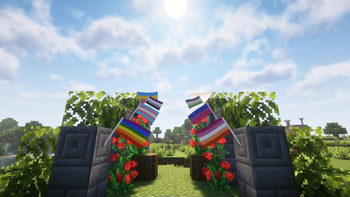

About this Mod
Pride!
Pride Flags? In Minecraft? How queer!
Most flag mods usually have static/simple banner-like designs that (while looking more vanilla,) often feel like they don't draw attention or add a 'living' feeling to builds.
Pride! adds flags that are both responsive to the world's environment and use entity-style directional lighting.

Additionally, two other visual styles can be selected/created (upright, large).
Note: Currently, this contains only a handful (~10 depending on what you consider as being a variant) of pride flags. You can suggest more here!
Environmental
Flags in Pride! use a simple wind/cloth simulation per-flag that reacts based off the current weather. A rainy day will cause flags to sway more aggressively.

Flags can be crafted in any shape with wool, a stick, and string. Right-click to open up a menu to change the flag displayed. These can be placed in an item frame to show up in the world. (the larger, placed variant takes an extra stick to craft.)
Restored Content
Pride! also restores the (effectively removed) Progress Pride Cape and Elytra, which cannot be used in Java Edition even if owned on Bedrock Edition.
Versions 1.6 and later create a settings file at [minecraft folder]/config/flags_config.txt, which allows you to enable this feature and replace capes/elytra (for players with capes, without capes, or just all players) with the Progress Pride version. This also affects mobs wearing elytra when enabled.
Note: your cape is not visible to other players, even when using Pride! on the server-side. This allows the cape replacer to work on vanilla servers.
Modpack Usage
This mod can be added/distributed through any modpack! I've tried to keep rendering code/workarounds detached from other systems, so mod compatibility should be decent.
Available Versions
How to Install Pride! on Your Server
Order Server
Order a Minecraft Java server with at least 3 GB RAM (4 GB recommended).
Set fabric Loader
In the panel under "Egg", select the fabric loader and matching Minecraft version (1.21.10).
Install Mod
Open the mod browser in the dashboard and search for "Pride!". Click "Install" – done! Alternatively, upload the .jar via SFTP to the /mods folder.
Compatibility
Mod Loaders
Minecraft Versions
1.21.10, 1.21.9, 1.21.8 (+6 more)
Server-side
~ OptionalRecommended RAM
4 GB(min. 3 GB)Frequently Asked Questions
Pride! server crashes on startup – what to do?
Most common cause: wrong fabric version or insufficient RAM. Check the server log (latest.log) for "OutOfMemoryError" or "Mixin" errors. With Mado Hosting: ensure at least 3 GB RAM is allocated and the loader matches the mod version (1.21.10). You can switch loaders with one click in the panel.
Is Pride! compatible with fabric and quilt?
Pride! officially supports fabric, quilt for Minecraft 1.21.10, 1.21.9, 1.21.8. The Mado dashboard automatically detects incompatible loader combinations.
Server lagging with Pride! – how to optimize performance?
Recommended RAM: 4 GB (per 8 players). Use /spark profiler to check if Pride! consumes the most tick time. Common fixes: reduce server view-distance to 8-10, install "performant" or "starlight" as supplementary mods on Forge. With Mado Hosting, your server runs on NVMe SSDs with dedicated CPU cores for minimal latency.
Similar Mods

![[ETF] Entity Texture Features](https://cdn.modrinth.com/data/BVzZfTc1/af683d206d50b05258d865b0d6e4aa2f2cee12f2_96.webp)
![[EMF] Entity Model Features](https://cdn.modrinth.com/data/4I1XuqiY/6e5bbd0d06b1741bfdab6c0cfab6de8fdaf0064c_96.webp)



Rent Modded Server
Install Pride! with just one click on your server.