
Professional Villagers
Enchantments level with librarians, reroll trades, reset professions, dismiss wandering traders, and more! All features are optional.
Screenshots
About this Mod
Professional Villagers
A small server-side/singleplayer mod for Fabric that makes villagers slightly easier to work with.
(Note: Has only been tested in singleplayer so far!)
Features:
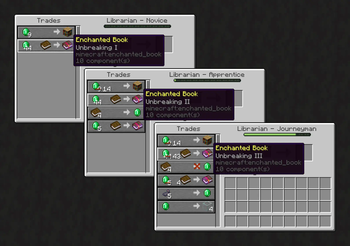
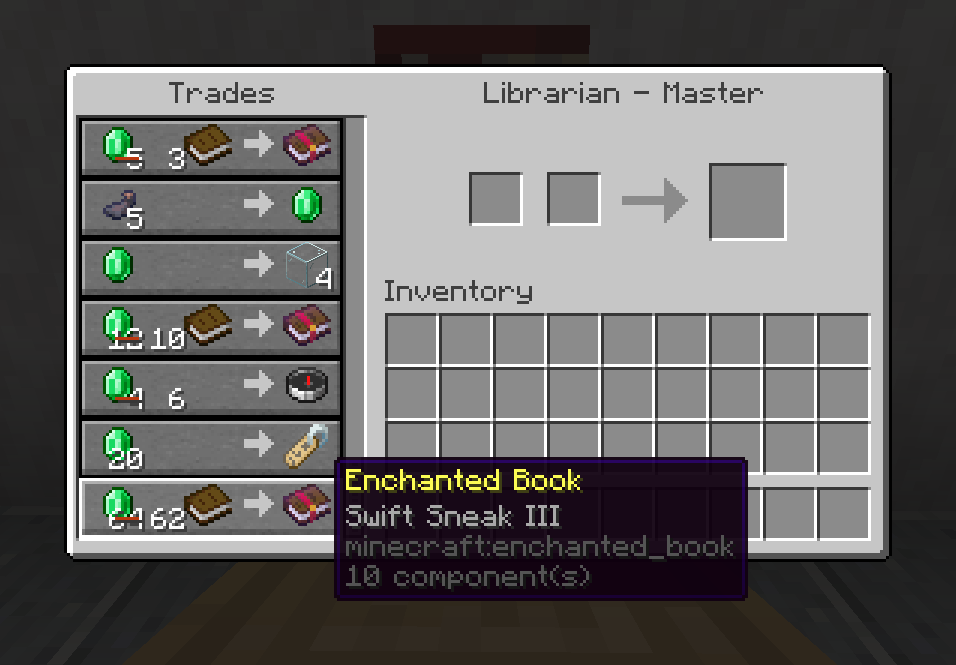
- Enchantments level up with librarians instead of having a set level.
- Interacting (right-click) with a villager while holding an emerald block resets its trade offers. Only works if the villager doesn't have any experience.
- Interacting with a wandering trader while holding an emerald block dismisses it after 5 seconds. Doesn't dismiss traders spawned by spawn eggs.
- Interacting with a villager while holding a poisonous potato resets its trade offers, level and experience. The villager must have the Weakness effect, same as when curing a zombie villager with a golden apple. The potato is consumed in the process.
- Interacting with a librarian while holding an enchanted book teaches it a random enchantment from said book. Can be done once per master-level librarian. The book is consumed in the process.
- Modifies the trade offers of selected professions:
- Farmers always have the pumpkin trade.
- Fishermen always have the raw cod trade.
- Toolsmiths always have the diamond hoe and diamond shovel trades.
- All features are optional.
Configuration:
Either edit the config file (professional-villagers.ini) found in the Fabric config folder (requires a restart for the changes to take effect), or (optionally) use Mod Menu to edit the options in game.
My other mods:
- Cleaner Menus (client side)
- Unobtrusive Effects (client side)
- A Minor Convenience (server side)
- Game Tweaks (server side)
Available Versions
How to Install Professional Villagers on Your Server
Order Server
Order a Minecraft Java server with at least 3 GB RAM (4 GB recommended).
Set fabric Loader
In the panel under "Egg", select the fabric loader and matching Minecraft version (26.2).
Install Mod
Open the mod browser in the dashboard and search for "Professional Villagers". Click "Install" – done! Alternatively, upload the .jar via SFTP to the /mods folder.
Compatibility
Mod Loaders
Minecraft Versions
26.2, 26.1.2, 26.1.1 (+9 more)
Server-side
✓ RequiredRecommended RAM
4 GB(min. 3 GB)Frequently Asked Questions
Professional Villagers server crashes on startup – what to do?
Most common cause: wrong fabric version or insufficient RAM. Check the server log (latest.log) for "OutOfMemoryError" or "Mixin" errors. With Mado Hosting: ensure at least 3 GB RAM is allocated and the loader matches the mod version (26.2). You can switch loaders with one click in the panel.
Is Professional Villagers compatible with fabric?
Professional Villagers officially supports fabric for Minecraft 26.2, 26.1.2, 26.1.1. The Mado dashboard automatically detects incompatible loader combinations.
Server lagging with Professional Villagers – how to optimize performance?
Recommended RAM: 4 GB (per 8 players). Use /spark profiler to check if Professional Villagers consumes the most tick time. Common fixes: reduce server view-distance to 8-10, install "performant" or "starlight" as supplementary mods on Forge. With Mado Hosting, your server runs on NVMe SSDs with dedicated CPU cores for minimal latency.
Similar Mods




Rent Modded Server
Install Professional Villagers with just one click on your server.