Progression Overhaul
Makes Minecraft's progression system a bit harder so a normal survival world cant be beaten in like 5 minutes. (Mostly the early game is effected)
Screenshots
About this Mod




A progression mod for 1.21.8 that makes minecraft playthroughs more fun, simplest way I can explain this mod.
Features:
- Flint tools added
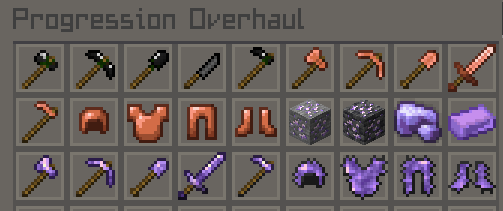
- Copper tools backported to 1.21.8
- Full on progression system that requires you to have the past tier to mine the new ore
- A bunch of QOL features like Mod Menu support and tooltips that tell you if you can mine that material or not
- Added a full new Amethyst tool and armor tier that's a level above diamond and is NEEDED to mine netherite.
Progression:
Flint > Wood > Stone > Copper > Iron > Gold > Diamond > Amethyst > Netherite > Endium
You must have the last tier to mine the next tier, so you cannot mine diamond with iron, you must have gold first (yes gold pickaxes can now mine diamonds)
First Playthrough Instructions
You must first collect sticks from breaking leaves on trees, then find some flint by breaking gravel (2 flint), then craft a flint knife, using that knife, start cutting down a bunch of short and tall grass to collect String, with that string, flint, and sticks, you can finally make a flint axe. Starting your playthrough.
Extra notes:
- This is my first ever fabric project not using MCreator so if you find any bugs report them on the github bugs page, the link for which you can find on the sidepanel on the right.
- The icon pack used for the icons below the banner is this: Social Connect Icons Pack
Available Versions
How to Install Progression Overhaul on Your Server
Order Server
Order a Minecraft Java server with at least 3 GB RAM (4 GB recommended).
Set fabric Loader
In the panel under "Egg", select the fabric loader and matching Minecraft version (26.1.2).
Install Mod
Open the mod browser in the dashboard and search for "Progression Overhaul". Click "Install" – done! Alternatively, upload the .jar via SFTP to the /mods folder.
Compatibility
Mod Loaders
Minecraft Versions
26.1.2, 26.1.1, 26.1 (+5 more)
Server-side
✓ RequiredRecommended RAM
4 GB(min. 3 GB)Frequently Asked Questions
Progression Overhaul server crashes on startup – what to do?
Most common cause: wrong fabric version or insufficient RAM. Check the server log (latest.log) for "OutOfMemoryError" or "Mixin" errors. With Mado Hosting: ensure at least 3 GB RAM is allocated and the loader matches the mod version (26.1.2). You can switch loaders with one click in the panel.
Is Progression Overhaul compatible with fabric?
Progression Overhaul officially supports fabric for Minecraft 26.1.2, 26.1.1, 26.1. The Mado dashboard automatically detects incompatible loader combinations.
Server lagging with Progression Overhaul – how to optimize performance?
Recommended RAM: 4 GB (per 8 players). Use /spark profiler to check if Progression Overhaul consumes the most tick time. Common fixes: reduce server view-distance to 8-10, install "performant" or "starlight" as supplementary mods on Forge. With Mado Hosting, your server runs on NVMe SSDs with dedicated CPU cores for minimal latency.
Similar Mods




Rent Modded Server
Install Progression Overhaul with just one click on your server.