
Screenshots

About this Mod

Fabric and newer Minecraft versions coming soon.



Vanilla ping/latency calculation always seemed incredibly inaccurate and delayed to me.
Info
They only send the latency value to clients once every 30 seconds:
public void tick() {
   if (++this.sendAllPlayerInfoIn > 600) {
      this.broadcastAll(new ClientboundPlayerInfoPacket(ClientboundPlayerInfoPacket.Action.UPDATE_LATENCY, this.players));
      this.sendAllPlayerInfoIn = 0;
   }
}
And this is how they "calculate" it:
int i = (int)(Util.getMillis() - this.keepAliveTime);
this.player.latency = (this.player.latency * 3 + i) / 4;
This mod goes around Vanilla and measures latency with a similar custom packet, but takes a proper average of 5 last RTT (round-trip-time) results.
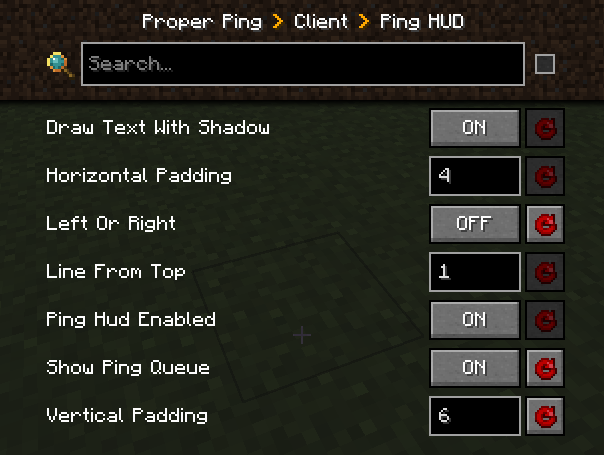
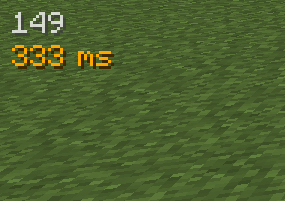
Besides that, it also adds a customizable hud element to always see your ping with options such as:
- Hide completely
- Position anywhere on the screen
- Show last 5 latency measurements in the same hud element
- Show numerical readings for other players on the server instead of abstract bars (there is a config option serverside to change the frequency of the server broadcasting these values to everyone)
Example config with default values
["Ping HUD"]
	#Enable ping HUD
	pingHudEnabled = true
	#Additionally show 5 last ping values
	showPingQueue = false
	#Draw text with a shadow
	drawTextWithShadow = true
	#Draw ping either on the left side (true), or on the right (false)
	leftOrRight = true
	#How many scaled GUI pixels to start drawing from the edge of the screen
	#Range: > 0
	horizontalPadding = 4
	#On which line counting from the top to start drawing from
	#Range: > 0
	lineFromTop = 1
	#How many scaled GUI pixels to start drawing from the top of the screen
	#Range: > 0
	verticalPadding = 4

[Other]
	#Show numbers in milliseconds in player list
	playerListNumbers = true
Example of a full display with the last 5 measurements turned on, numerical player list values, positioned on the right side of the screen:
FAQ
Q: Forge?
A: Forge.
Q: Can I include your mod in a video?
A: As long as you include a link to the mod/modpack (if it happens to be in one), absolutely
Q: Can I add your mod to a modpack?
A: CurseForge/Modrinth modpacks are cool.
Available Versions
How to Install Proper Ping on Your Server
Order Server
Order a Minecraft Java server with at least 3 GB RAM (4 GB recommended).
Set forge Loader
In the panel under "Egg", select the forge loader and matching Minecraft version (1.20.1).
Install Mod
Open the mod browser in the dashboard and search for "Proper Ping". Click "Install" – done! Alternatively, upload the .jar via SFTP to the /mods folder.
Compatibility
Mod Loaders
Minecraft Versions
1.20.1, 1.19.2
Server-side
✓ RequiredRecommended RAM
4 GB(min. 3 GB)Frequently Asked Questions
Proper Ping server crashes on startup – what to do?
Most common cause: wrong forge version or insufficient RAM. Check the server log (latest.log) for "OutOfMemoryError" or "Mixin" errors. With Mado Hosting: ensure at least 3 GB RAM is allocated and the loader matches the mod version (1.20.1). You can switch loaders with one click in the panel.
Is Proper Ping compatible with forge?
Proper Ping officially supports forge for Minecraft 1.20.1, 1.19.2. The Mado dashboard automatically detects incompatible loader combinations.
Server lagging with Proper Ping – how to optimize performance?
Recommended RAM: 4 GB (per 8 players). Use /spark profiler to check if Proper Ping consumes the most tick time. Common fixes: reduce server view-distance to 8-10, install "performant" or "starlight" as supplementary mods on Forge. With Mado Hosting, your server runs on NVMe SSDs with dedicated CPU cores for minimal latency.
Similar Mods




![[ETF] Entity Texture Features](https://cdn.modrinth.com/data/BVzZfTc1/af683d206d50b05258d865b0d6e4aa2f2cee12f2_96.webp)
![[EMF] Entity Model Features](https://cdn.modrinth.com/data/4I1XuqiY/6e5bbd0d06b1741bfdab6c0cfab6de8fdaf0064c_96.webp)
Rent Modded Server
Install Proper Ping with just one click on your server.