
Provenance
Provenance is a mod that allows developers to add abilities to players, as well as the systems to manage and execute them.
Screenshots
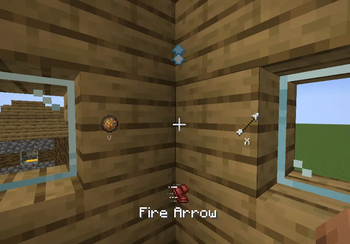
About this Mod
Provenance
Provenance is a library mod that developers can use to easily and quickly add custom abilities and weaknesses to players.
This mod is for developers it does not contain any playable content of it's own!
This mod was originally created and intended for use on The Broken Script SMP server, but has since expanded in functionality to include many powerful features.
Quick Start Guide
W.I.P
Full documentation still needs to be written, it will be provided here soon!
What can it do?
Abilities
Provenance primarily functions through abilities granted to players, there are many different types of abilities depending on the use case
- One-shot
- Toggleable
- Entity Hit
- Ambient (also used for weaknesses)
Modularity
Provenance allows for the use of commands and "Ability Injector" items to add, remove, and re-assign abilities at runtime.
This feature is incredibly useful during development and when managing servers with this mod installed, as if an ability gets abused it can simply be revoked!
Archetypes
Archetypes hold information about a player's abilities and weaknesses
- Food / items edible to the player
- Ambient effects (e.g. taking damage when in water)
- Set of abilities available to the player
Controls
Provenance adds a smoothly animated and minimalist radial menu and HUD to the game.
The Radial menu can be opened with the default keybind of "R" middle clicking an ability in the menu will enter keybind assignment mode for the clicked ability, allowing it to be executed without opening the menu!
Cooldowns appear in the bottom left corner (as well as in the menu when open)
Available Versions
How to Install Provenance on Your Server
Order Server
Order a Minecraft Java server with at least 3 GB RAM (4 GB recommended).
Set neoforge Loader
In the panel under "Egg", select the neoforge loader and matching Minecraft version (1.21.1).
Install Mod
Open the mod browser in the dashboard and search for "Provenance". Click "Install" – done! Alternatively, upload the .jar via SFTP to the /mods folder.
Compatibility
Mod Loaders
Minecraft Versions
1.21.1
Server-side
✓ RequiredRecommended RAM
4 GB(min. 3 GB)Frequently Asked Questions
Provenance server crashes on startup – what to do?
Most common cause: wrong neoforge version or insufficient RAM. Check the server log (latest.log) for "OutOfMemoryError" or "Mixin" errors. With Mado Hosting: ensure at least 3 GB RAM is allocated and the loader matches the mod version (1.21.1). You can switch loaders with one click in the panel.
Is Provenance compatible with neoforge?
Provenance officially supports neoforge for Minecraft 1.21.1. The Mado dashboard automatically detects incompatible loader combinations.
Server lagging with Provenance – how to optimize performance?
Recommended RAM: 4 GB (per 8 players). Use /spark profiler to check if Provenance consumes the most tick time. Common fixes: reduce server view-distance to 8-10, install "performant" or "starlight" as supplementary mods on Forge. With Mado Hosting, your server runs on NVMe SSDs with dedicated CPU cores for minimal latency.
Similar Mods




Rent Modded Server
Install Provenance with just one click on your server.