
Ptdye Plus
A mod for the Create: Prepare to Dye modpack
Screenshots
About this Mod
Ptdye Plus







Introducing a Java mod designed exclusively for the Create: Prepare to Dye (CPTD) modpack!
This mod includes code for features and bug fixes not achievable with KubeJS, the JavaScript framework used by the CPTD team.
Keep in mind that this mod is primarily tested for use within the CPTD modpack, and using it elsewhere may lead to unexpected behavior.
Key Features:
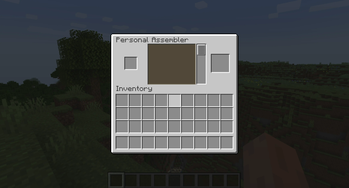
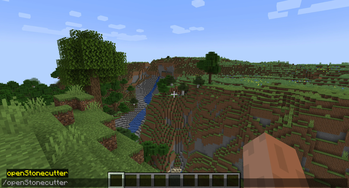
- Command to access the stonecutter GUI: /openStonecutter
- By using the "/openStonecutter" command, players can directly access the stonecutter's GUI, making it more convenient to craft devices.
- Key bind to open ponder based on what block the player is looking at, set to B by default
- Adds line to Jade tooltip on blocks that have a ponder indicating which button to press to open ponder
For Devs:
- To download gradle dependencies click the
Reload All Gradle Projectsbutton (refresh/recycle icon) in the top left of the gradle task window (IntelliJ) - Run the game by debugging the
runClientgradle task and runBuild ProjectorCTRL+F9to hotswap your code changes.
Available Versions
How to Install Ptdye Plus on Your Server
Order Server
Order a Minecraft Java server with at least 3 GB RAM (4 GB recommended).
Set forge Loader
In the panel under "Egg", select the forge loader and matching Minecraft version (1.20.1).
Install Mod
Open the mod browser in the dashboard and search for "Ptdye Plus". Click "Install" – done! Alternatively, upload the .jar via SFTP to the /mods folder.
Compatibility
Mod Loaders
Minecraft Versions
1.20.1, 1.19.2
Server-side
✗ UnsupportedRecommended RAM
4 GB(min. 3 GB)Frequently Asked Questions
Ptdye Plus server crashes on startup – what to do?
Most common cause: wrong forge version or insufficient RAM. Check the server log (latest.log) for "OutOfMemoryError" or "Mixin" errors. With Mado Hosting: ensure at least 3 GB RAM is allocated and the loader matches the mod version (1.20.1). You can switch loaders with one click in the panel.
Is Ptdye Plus compatible with forge?
Ptdye Plus officially supports forge for Minecraft 1.20.1, 1.19.2. The Mado dashboard automatically detects incompatible loader combinations.
Server lagging with Ptdye Plus – how to optimize performance?
Recommended RAM: 4 GB (per 8 players). Use /spark profiler to check if Ptdye Plus consumes the most tick time. Common fixes: reduce server view-distance to 8-10, install "performant" or "starlight" as supplementary mods on Forge. With Mado Hosting, your server runs on NVMe SSDs with dedicated CPU cores for minimal latency.
Similar Mods




![[ETF] Entity Texture Features](https://cdn.modrinth.com/data/BVzZfTc1/af683d206d50b05258d865b0d6e4aa2f2cee12f2_96.webp)
![[EMF] Entity Model Features](https://cdn.modrinth.com/data/4I1XuqiY/6e5bbd0d06b1741bfdab6c0cfab6de8fdaf0064c_96.webp)
Rent Modded Server
Install Ptdye Plus with just one click on your server.