
Public Ender Chest
A Minecraft server-side mod that adds a public inventory accessible via an Ender Chest.
Screenshots
About this Mod

Public Ender Chest
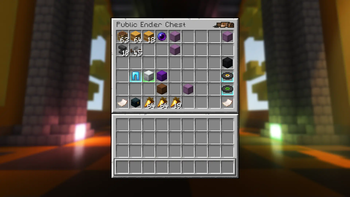
This server-side, configurable Fabric Minecraft mod adds a new public inventory accessible via Ender Chest blocks.
The mod also includes a built-in logging system for server admins to keep track of changes to this public inventory, and other useful configuration options.
Sponsored by Ember Host
Check out Ember Host if you are looking for a Minecraft server host that offers exceptional value for price. You can support my development by using the banner below, which gives a 50% cut for every first purchase to me, alongside a 10% discount to you.

Features
Accessing the Public Ender Chest inventory
Players are able to access the public inventory by crouching and then right-clicking an Ender Chest block.
Players can also hold an Ender Chest item in their hand and then right-click to open it.
Players can toggle the usage of the public inventory
using the command /publicenderchest usePublicInventory [true|false],
so that it doesn't get in the way of placing blocks on an Ender Chest block.
When users hover their mouse over an item stack in the public inventory,
they will be able to see the player who inserted that item into the inventory,
as well as how long ago it was inserter.
Server operators can also access the Public Ender Chest inventory using the command /publicenderchest openPublicEnderChestInventory.
Configuration
The mod has a configuration file which can be found in /config/publicenderchest.toml.
Here, you can configure a couple of things:
- Player Blacklist: You can toggle and use a blacklist which will prevent added players from being able to access the public Ender Chest inventory.
- Dimension Blacklist: You can toggle and use a blacklist for dimensions where players are not allowed to use the Public Ender Chest inventory.
- Database Purge Older Than Days: You can configure the entries that the mod will purge based on how old they are.
Server operators bypass both the player and dimension blacklists.
You will also find commands available to operators to edit these settings
(except the blacklist settings themselves) by using /publicenderchest config.
The config can also be reloaded by using /publicenderchest config reload.
Logging system
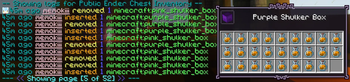
The mod has an integrated logging system
that allows server admins to see how players have interacted with the Public Ender Chest inventory.
You can see when the interaction happened, who did it,
how many items were inserted or removed, and the Item stack itself.
To query the database, you can use the following command.
/publicenderchest database query [before|after] <days> <hours> <minutes> <seconds> <playerName>
The days, hours, minutes,
and seconds are a time parameter that will determine the queried logs based on the chosen time search type:
- Before: Returns all the logs from the beginning until the current time minus the time specified in the command. For example, by running
/publicenderchest database query before 0 1 0 0, you will see all the logs that happened between the start and one hour ago. - After: Returns all the logs that happened between the current time and the current time minus the time specified in the command. For example, if you run
/publicenderchest database query 1 0 0 0, you will see all the logs that happened between now and 1 day ago.
You should favor using after queries, since the mod will have to look for considerably less log entries, compared to using a before query, which will go all the way back to the beginning starting from the specified time parameter.
There is also an optional playerName parameter that you can use to look for actions done by a specific player. The logs returned will correspond to those made by players with the given name, regardless of players' UUID.
When performing a query, the logs will be shown in your chat in a paginated style.
- Hover your mouse over the player's username to see their full UUID. Click on the username to copy the UUID to your clipboard.
- Hover your mouse over the Item identifier to see the full Item stack information.
At the bottom of the logs, you will see two icons << and >>,
which you can click to turn to the previous or the next page.
Finally, there is also a command to purge the database...
/publicenderchest database purge
...which will purge database logs
which are older than the time specified in the mod's purge_older_than_x_days config setting.
You can also use...
/publicenderchest database purge <entriesOlderThanDays>
...to purge entries
using the entriesOlderThanDays parameter specified in the command rather than the setting in the mod's config.
The database is also automatically purged upon server shutdown.
All the database related commands are only available to operators.
Optional client-side functionality
You can optionally install this mod in your client.
Doing so will let you right-click an Ender Chest item in your inventory
while holding the Cntrl or Alt keys to open the Public Ender Chest inventory.
Furthermore,
installing the mod in the client will allow for proper syncing of item stack information between the server and the client,
allowing for proper usage of mods like Item Scroller,
and reducing item stack flickering when doing quick item stack movements between inventories.
Support
If you would like to report a bug, or make a suggestion, you can do so via the mod's issue tracker.
Credits
- Thanks to Kioku for the mod's icon and banner.
Available Versions
How to Install Public Ender Chest on Your Server
Order Server
Order a Minecraft Java server with at least 3 GB RAM (4 GB recommended).
Set fabric Loader
In the panel under "Egg", select the fabric loader and matching Minecraft version (1.21.11).
Install Mod
Open the mod browser in the dashboard and search for "Public Ender Chest". Click "Install" – done! Alternatively, upload the .jar via SFTP to the /mods folder.
Compatibility
Mod Loaders
Minecraft Versions
1.21.11, 1.21.10, 1.21.8 (+6 more)
Server-side
✓ RequiredRecommended RAM
4 GB(min. 3 GB)Frequently Asked Questions
Public Ender Chest server crashes on startup – what to do?
Most common cause: wrong fabric version or insufficient RAM. Check the server log (latest.log) for "OutOfMemoryError" or "Mixin" errors. With Mado Hosting: ensure at least 3 GB RAM is allocated and the loader matches the mod version (1.21.11). You can switch loaders with one click in the panel.
Is Public Ender Chest compatible with fabric?
Public Ender Chest officially supports fabric for Minecraft 1.21.11, 1.21.10, 1.21.8. The Mado dashboard automatically detects incompatible loader combinations.
Server lagging with Public Ender Chest – how to optimize performance?
Recommended RAM: 4 GB (per 8 players). Use /spark profiler to check if Public Ender Chest consumes the most tick time. Common fixes: reduce server view-distance to 8-10, install "performant" or "starlight" as supplementary mods on Forge. With Mado Hosting, your server runs on NVMe SSDs with dedicated CPU cores for minimal latency.
Similar Mods




Rent Modded Server
Install Public Ender Chest with just one click on your server.