
pvp-analyzer
Track your PvP performance in real time. Records accuracy, cooldown timing, overflicks, reach distribution, shield hits, and jump resets — then gives you personalized tips to improve. Press F6 to record, fight, press F6 again.
Screenshots
About this Mod
PvP Analyzer
Record your fights. See where you're losing. Get better.
PvP Analyzer is a lightweight client-side Fabric mod that tracks your combat performance in real time and gives you actionable feedback after every fight. No server-side component needed — it just watches what you do and tells you what to fix.
How It Works
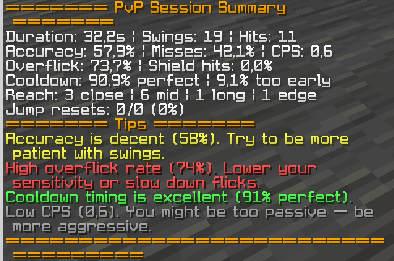
Press F6 to start recording before a fight. Fight. Press F6 again to stop. You get a full breakdown in chat plus a live HUD overlay with color-coded stats.
That's it. No config files, no setup, no menus.
What It Tracks
Accuracy & Timing
- Hit/miss ratio — what percentage of your swings actually connect
- Cooldown timing — are you clicking too early and losing damage?
- CPS — are you swinging faster than the cooldown allows?
Aim Quality
- Overflick detection — tracks when your crosshair passes through the target, meaning you flicked past them
- Shield hit percentage — how often you're wasting hits on a blocking player
Spacing & Reach
- Reach distribution — categorizes every hit as close (<2.0), mid (2.0-2.8), long (2.9-3.0), or edge (3.0+)
- Shows if you're fighting too close, too far, or right in the sweet spot
Defense
- Jump reset tracking — detects when you jump within 3 ticks of taking knockback
- Jump reset percentage — compared to total KB events received
Post-Fight Tips
After each session, the mod analyzes your stats and generates personalized tips:
❌ *Accuracy is low (38%). Focus on tracking before clicking.
⚠ *Moderate overflicks (12%). Practice smoother tracking.
⚠ *23% of hits were too early. Wait for full cooldown — you're losing damage.
✅ *Excellent jump resets (78%)! You're minimizing KB well.
Tips adjust based on your actual numbers — they're not generic advice.
Live HUD
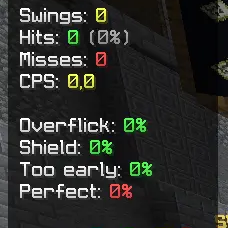
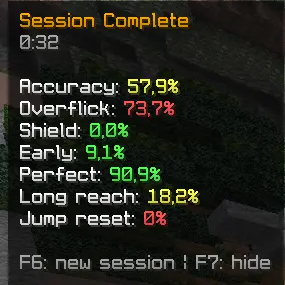
A compact overlay in the top-left corner shows your stats updating in real time during the fight. Color coded: green = you're doing well, yellow = room to improve, red = needs work.
Toggle the HUD with F7.
Keybinds
| Key | Action |
|---|---|
| F6 | Start / stop recording |
| F7 | Show / hide HUD overlay |
Installation
- Install Fabric Loader for 1.21.8
- Install Fabric API
- Drop
pvp-analyzer-1.0.0.jarinto yourmodsfolder - Launch the game
FAQ
Does this modify gameplay in any way?*
No. It only observes and records. No packets are modified, no inputs are changed, nothing is automated. It's a pure analytics tool.
Will this get me banned?
It's a client-side observer mod — it doesn't interact with the server beyond normal gameplay. It's equivalent to recording your screen and reviewing the footage, but with automatic stat tracking.
Does it work on servers?
Yes, any server. It tracks your client-side actions and events. No server permission needed.
Does it affect FPS?
Negligible. The tracking logic runs a few comparisons per tick. The HUD is a small text overlay. You won't notice it.
Requires: Fabric Loader 0.16.14+ · Fabric API · Minecraft 1.21+
Environment: Client only
License: MIT
Github repo: https://github.com/FriendlyNeighbourhoodSpider/pvp-analyzer
Available Versions
How to Install pvp-analyzer on Your Server
Order Server
Order a Minecraft Java server with at least 3 GB RAM (4 GB recommended).
Set fabric Loader
In the panel under "Egg", select the fabric loader and matching Minecraft version (1.21.8).
Install Mod
Open the mod browser in the dashboard and search for "pvp-analyzer". Click "Install" – done! Alternatively, upload the .jar via SFTP to the /mods folder.
Compatibility
Mod Loaders
Minecraft Versions
1.21.8
Server-side
✗ UnsupportedRecommended RAM
4 GB(min. 3 GB)Frequently Asked Questions
pvp-analyzer server crashes on startup – what to do?
Most common cause: wrong fabric version or insufficient RAM. Check the server log (latest.log) for "OutOfMemoryError" or "Mixin" errors. With Mado Hosting: ensure at least 3 GB RAM is allocated and the loader matches the mod version (1.21.8). You can switch loaders with one click in the panel.
Is pvp-analyzer compatible with fabric?
pvp-analyzer officially supports fabric for Minecraft 1.21.8. The Mado dashboard automatically detects incompatible loader combinations.
Server lagging with pvp-analyzer – how to optimize performance?
Recommended RAM: 4 GB (per 8 players). Use /spark profiler to check if pvp-analyzer consumes the most tick time. Common fixes: reduce server view-distance to 8-10, install "performant" or "starlight" as supplementary mods on Forge. With Mado Hosting, your server runs on NVMe SSDs with dedicated CPU cores for minimal latency.
Similar Mods




Rent Modded Server
Install pvp-analyzer with just one click on your server.