
More Visuals
A powerful and minimalistic PvP assistant for Fabric 1.16.5 with a fully customizable HUD and useful combat tools.
Screenshots
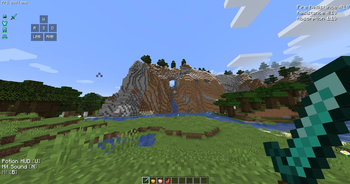
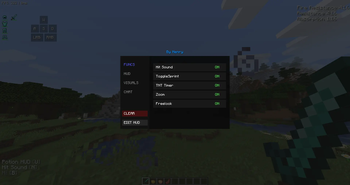
About this Mod
⚔️ PvP Client
A powerful PvP Assistant designed to enhance your combat experience in Minecraft 1.16.5.
This mod provides a comprehensive suite of tools and visuals to give you an edge in battles while keeping your interface clean and informative.
🌟 Key Features:
🔊 Hit Sound: Get instant audio feedback (Anvil or EXP sounds) when you land a hit on your opponent.
🛡️ Armor Durability HUD: Monitor the status and durability of your armor and held weapon.
☀️ Visual Day: Lock your game time to a clear, bright noon for perfect visibility at all times.
🧪 Potion HUD: A clean and organized list of your active status effects, allowing you to stay focused on the fight.
⌨️ Keystrokes: Stylish on-screen display of your WASD and mouse clicks.
🏃 ToggleSprint: Automates your sprinting, freeing up your fingers for better movement and combat.
🔥 Low Fire: Lowers the fire overlay on your screen, ensuring that burning doesn't block your vision during intense PvP.
💬 Chat Binds: Set up custom keys to instantly send commands or messages to the chat.
Available Versions
How to Install More Visuals on Your Server
Order Server
Order a Minecraft Java server with at least 3 GB RAM (4 GB recommended).
Set fabric Loader
In the panel under "Egg", select the fabric loader and matching Minecraft version (1.16.5).
Install Mod
Open the mod browser in the dashboard and search for "More Visuals". Click "Install" – done! Alternatively, upload the .jar via SFTP to the /mods folder.
Compatibility
Mod Loaders
Minecraft Versions
1.16.5
Server-side
✗ UnsupportedRecommended RAM
4 GB(min. 3 GB)Frequently Asked Questions
More Visuals server crashes on startup – what to do?
Most common cause: wrong fabric version or insufficient RAM. Check the server log (latest.log) for "OutOfMemoryError" or "Mixin" errors. With Mado Hosting: ensure at least 3 GB RAM is allocated and the loader matches the mod version (1.16.5). You can switch loaders with one click in the panel.
Is More Visuals compatible with fabric?
More Visuals officially supports fabric for Minecraft 1.16.5. The Mado dashboard automatically detects incompatible loader combinations.
Server lagging with More Visuals – how to optimize performance?
Recommended RAM: 4 GB (per 8 players). Use /spark profiler to check if More Visuals consumes the most tick time. Common fixes: reduce server view-distance to 8-10, install "performant" or "starlight" as supplementary mods on Forge. With Mado Hosting, your server runs on NVMe SSDs with dedicated CPU cores for minimal latency.
Similar Mods




Rent Modded Server
Install More Visuals with just one click on your server.