
pvp tweaks
PvP Tweaks is a mod in development that will give you the ability to Tweak every PVP sound, visual & Textures to your exact preference. Custom explosion sounds, crystal pop volume, fire height, shield position, item sizes & more
Screenshots
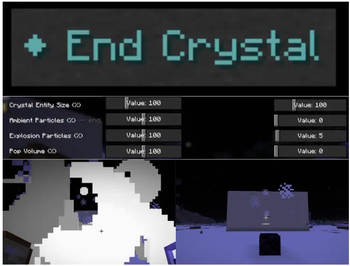
About this Mod
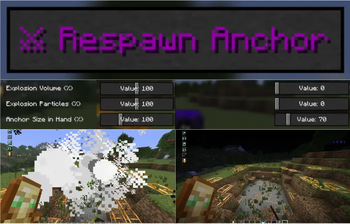
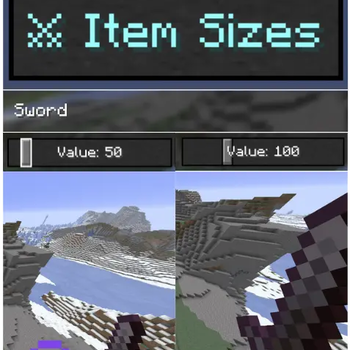
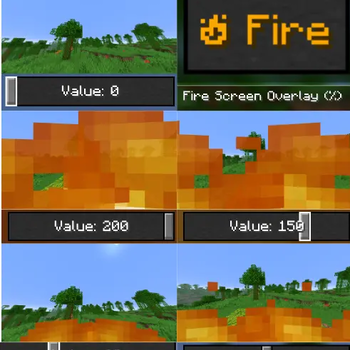
PVP Tweaks consolidates essential combat, and visual utilities into one high-performance, client-side mod for Minecraft 1.21.11. This mod adds a button called "pvp tweaks", and clicking on it will take you to a dedicated tweaks screen, which will allow you to tweak items related to PVP. Such as totems, shield position, fire display, fire height, crystals, anchors, animations, paradices, sounds, item display size.
The mod also adds special features, such as Armor HUD, and the ability to choose custom sounds for in-game events, vanilla sounds, and also import your own sounds.
Note to Players & Server Admins: This mod is designed purely for quality-of-life. It does not provide any "cheats," automation, or unfair advantages. It simply allows you to fine-tune your client's
visuals and responsiveness to ensure your game runs smoothly in competitive environments.
🕹️ How to Use
- Accessing the Config:
- In-Game: Press ESC and click the PVP Tweaks button at the top.
- Mod Menu: If installed, go to your Mods list, select PVP Tweaks, and click the Configure button.
- HUDs: Use the Adjuster buttons inside the config to drag elements on-screen.
- Sounds: Open the Sound Picker in any category, search for an Sound Or you can import one of your own , and click save.
⚔️ Core Features
🚀 Performance Optimizers
Designed to mitigate PING and latency effects for a smoother combat experience:
- Crystal Optimizer: Immediate client-side removal of End Crystal entities upon attack, allowing for zero-delay re-placement.
- Anchor Optimizer: Replaces exploded Respawn Anchors with a client-side placeholder (Fern) instantly, keeping the coordinate clear for immediate placement before server confirmation.
- Fairness Guarantee: These features do not interact with server-side logic; they are strictly visual/client-side collision tweaks to ensure your client's view matches the game's state.
📊 HUD Utilities
Fully customizable HUD elements with real-time editing:
- CPS HUD: Left/Right CPS tracker with customizable scale, position, color, shadow, and a "Smart Rainbow" mode.
- Armor Durability HUD: Track armor and hand items. Includes low-durability blink alerts and custom sound triggers.
- Live Adjusters: Use dedicated screens to drag and drop HUD elements anywhere on your screen.
🔊 Audio & Visual Control
- Per-Event Volume: Independent sliders (0-200%) for End Crystals, Respawn Anchors, TNT, and hits.
- Sound Picker: Built-in browser for all vanilla sound events with live preview.
- Custom Sounds: Import .mp3, .ogg, .wav, or .flac files directly without creating a resource pack.
- Visuals: Fire height presets, custom fire overlay, first-person item scaling, and a real-time Shield Adjuster (position/rotation).
📁 Profiles & Vanilla Settings
- Presets: Built-in "Competitive" preset for one-click high-performance optimization.
- Vanilla Settings (in older versions and from legacy menus) Tab: Quick shortcuts for essential settings like FOV, Sensitivity, Auto-Jump, and Fullscreen.
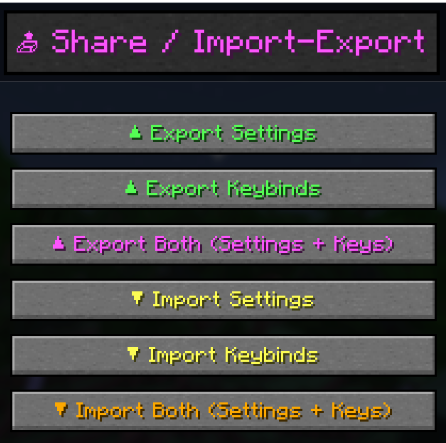
- Profile System: Save/load custom setups and share them easily via the system clipboard. in 1.4.8:
You can import and export keybindings and mod settings of your choice.
"Vision" tab, including Fulbright, pumpkin blur removal, and a small client-side version of my existing mod, "Plants Control". Option to change the size of the armor in hand, in the "Item Size" tab. Option to prevent low-drivability sound from repeating in the armor
📥 Installation
- Install Fabric Loader
- Install dependencies (look "Version dependencies" to see what dependencies you need):
Fabric API, Cloth Config, Mod Menu. - Place pvp-tweaks.jar into your mods folder.
Version dependencies:
Fabric Loader (in all versions)
Fabric API (in all versions)
Cloth Config (only below PT-V1.8.7)
Mod Menu (only below PT-V1.8.7)
Fabric Language Kotlin (Only on 1.8.9)
Note:
The mod was tested primarily on version 1.21.11 (linux Mint, gnome, x11)
, So all other versions are in beta, And not all the features listed will exist on them, but should work fine.
Thanks to beta tester "bitzonx" for the perfect feedbacks.
Note: MP3/WAV import functionality in the old versions of the mod(1.4.8 and below), requires ffmpeg (https://ffmpeg.org) installed on your system.
I am a solo developer, and while I strive for stability, bugs can occasionally slip through.
- Where to Report: Please Open an issue on GitHub (https://github.com/viper-trick/pvp-tweaks/issues). Include your log file (.minecraft/logs/latest.log) and a description of the issue.
- Support: You can also reach out via email: [email protected].
PS, to make the work on the project easier, AI was used in the project, the code was tested and verified (L.B.L) by a human.
📌 License & Code Usage
This mod is released under All Rights Reserved. I work hard to keep this project organized and stable. If you would like to use this code for other projects or integrate it elsewhere, please email me at [email protected] to
ask first. I am open to requests,And I'll probably agree most of the time. but I do not permit reuploads of this mod or modified versions to any platform (Modrinth, CurseForge, etc.) without explicit permission.
Thank you for respecting the time and effort put into this project.
Available Versions
How to Install pvp tweaks on Your Server
Order Server
Order a Minecraft Java server with at least 3 GB RAM (4 GB recommended).
Set fabric Loader
In the panel under "Egg", select the fabric loader and matching Minecraft version (1.21.11).
Install Mod
Open the mod browser in the dashboard and search for "pvp tweaks". Click "Install" – done! Alternatively, upload the .jar via SFTP to the /mods folder.
Compatibility
Mod Loaders
Minecraft Versions
1.21.11, 1.21.10, 1.21.9 (+5 more)
Server-side
✗ UnsupportedRecommended RAM
4 GB(min. 3 GB)Frequently Asked Questions
pvp tweaks server crashes on startup – what to do?
Most common cause: wrong fabric version or insufficient RAM. Check the server log (latest.log) for "OutOfMemoryError" or "Mixin" errors. With Mado Hosting: ensure at least 3 GB RAM is allocated and the loader matches the mod version (1.21.11). You can switch loaders with one click in the panel.
Is pvp tweaks compatible with fabric?
pvp tweaks officially supports fabric for Minecraft 1.21.11, 1.21.10, 1.21.9. The Mado dashboard automatically detects incompatible loader combinations.
Server lagging with pvp tweaks – how to optimize performance?
Recommended RAM: 4 GB (per 8 players). Use /spark profiler to check if pvp tweaks consumes the most tick time. Common fixes: reduce server view-distance to 8-10, install "performant" or "starlight" as supplementary mods on Forge. With Mado Hosting, your server runs on NVMe SSDs with dedicated CPU cores for minimal latency.
Similar Mods




Rent Modded Server
Install pvp tweaks with just one click on your server.