
QOGL (Quality-Of-Game-Life)
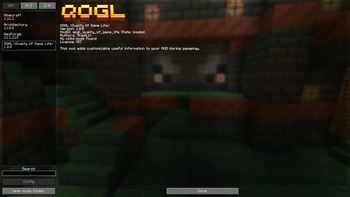
Adds a configurable HUD overlay showing days survived, session playtime, real time, coordinates, and FPS.
Screenshots


About this Mod
QOGL (Quality Of Game Life)
A small, clean, and configurable HUD overlay that shows useful information while you play.
Description (EN)
Features
- Days survived (world day counter)
- Session playtime (time spent in the current session)
- Real time (your system clock)
- Coordinates (X / Y / Z)
- FPS
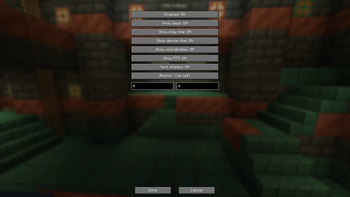
- In-game config screen with a two-page UI: Info / Position
- Toggle modules (what to show)
- Position settings (anchor + X/Y offsets)
- “- / +” offset controls (hold Shift for x10 step)
- Text shadow toggle
- English & Russian translations
Configuration
Open the config screen via:
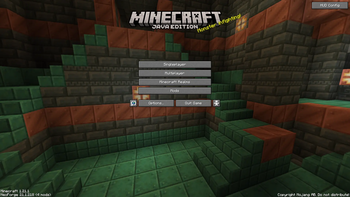
- Options → HUD Config
The config file is saved automatically in the config folder.
Compatibility / Versions
Separate builds are provided:
- Minecraft 1.20.1: Fabric / Forge
- Minecraft 1.21.1: Fabric / NeoForge
Описание (RU)
Возможности
- Количество прожитых дней (счётчик дней мира)
- Время игры за текущую сессию
- Время устройства (системные часы)
- Координаты (X / Y / Z)
- FPS
- Меню настроек в игре с двумя страницами: Инфо / Позиция
- Включение/выключение элементов HUD
- Настройка позиции (якорь + смещение X/Y)
- Смещение через кнопки “- / +” (удерживай Shift для шага x10)
- Переключение тени текста
- Переводы: русский и английский
Настройка
Открыть меню настроек можно через:
- Настройки (Options) → Настройки HUD
Файл конфигурации сохраняется автоматически в папке config.
Совместимость / версии
Отдельные сборки:
- Minecraft 1.20.1: Fabric / Forge
- Minecraft 1.21.1: Fabric / NeoForge
Available Versions
How to Install QOGL (Quality-Of-Game-Life) on Your Server
Order Server
Order a Minecraft Java server with at least 3 GB RAM (4 GB recommended).
Set fabric Loader
In the panel under "Egg", select the fabric loader and matching Minecraft version (1.21.1).
Install Mod
Open the mod browser in the dashboard and search for "QOGL (Quality-Of-Game-Life)". Click "Install" – done! Alternatively, upload the .jar via SFTP to the /mods folder.
Compatibility
Mod Loaders
Minecraft Versions
1.21.1, 1.20.1
Server-side
✗ UnsupportedRecommended RAM
4 GB(min. 3 GB)Frequently Asked Questions
QOGL (Quality-Of-Game-Life) server crashes on startup – what to do?
Most common cause: wrong fabric version or insufficient RAM. Check the server log (latest.log) for "OutOfMemoryError" or "Mixin" errors. With Mado Hosting: ensure at least 3 GB RAM is allocated and the loader matches the mod version (1.21.1). You can switch loaders with one click in the panel.
Is QOGL (Quality-Of-Game-Life) compatible with fabric and forge and neoforge?
QOGL (Quality-Of-Game-Life) officially supports fabric, forge, neoforge for Minecraft 1.21.1, 1.20.1. Note: Forge and Fabric mods are NOT cross-compatible – pick one loader and stick with it. The Mado dashboard automatically detects incompatible loader combinations.
Server lagging with QOGL (Quality-Of-Game-Life) – how to optimize performance?
Recommended RAM: 4 GB (per 8 players). Use /spark profiler to check if QOGL (Quality-Of-Game-Life) consumes the most tick time. Common fixes: reduce server view-distance to 8-10, install "performant" or "starlight" as supplementary mods on Forge. With Mado Hosting, your server runs on NVMe SSDs with dedicated CPU cores for minimal latency.
Similar Mods




![[ETF] Entity Texture Features](https://cdn.modrinth.com/data/BVzZfTc1/af683d206d50b05258d865b0d6e4aa2f2cee12f2_96.webp)
![[EMF] Entity Model Features](https://cdn.modrinth.com/data/4I1XuqiY/6e5bbd0d06b1741bfdab6c0cfab6de8fdaf0064c_96.webp)
Rent Modded Server
Install QOGL (Quality-Of-Game-Life) with just one click on your server.