
Quacky's Better Keybinds
Want to double bind without trouble? Want to just have several keys mapped to 1 slot since why not? Heres the mod for you! Maybe banned from pvp servers.
Screenshots
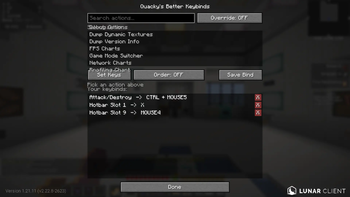
About this Mod
Quacky's Better Keybinds
Rebind any action to anything — multiple keys, mouse buttons, and combos.
Client-side only. Works on Lunar, Modrinth App, Feather, and vanilla Fabric.
Features
- Bind anything — every action in the Controls menu, vanilla and modded, is bindable.
- Multiple binds per action — give one action as many key combos as you want.
- Combos — chain keys and mouse buttons together (
Shift + Left Click,Ctrl + Alt + P). - Order-sensitive option — per bind, require the exact press order, or allow any order.
- Smart conflict resolution — the most specific combo always wins.
- Multi-key capture — press your whole combo; it auto-finalizes after 3 seconds idle.
- Mouse support — all 8 mouse buttons, including side buttons.
- Live bind list — see every bind in one panel, remove any with one click.
- ModMenu config — everything lives in a clean in-game GUI.
Install
- Install Fabric Loader ≥ 0.19.2 for MC 1.21.11.
- Drop into
mods/:- Fabric API
0.141.4+1.21.11or newer - Mod Menu
17.0.0or newer quackys-better-keybinds-1.0.0.jar
- Fabric API
Client-only — no server-side install needed.
Usage
- Open Mod Menu → Quacky's Better Keybinds.
- Search for the action you want in the search bar.
- Click the action to select it.
- Click Set Keys, then press your combo (one key or many). It locks in after 3s.
- Toggle Order to choose whether press order matters for that combo.
- Click Save Bind — it appears under Your keybinds and saves instantly.
- Remove any bind with the red X. Close the screen to persist.
Compatibility
| Minecraft | 1.21.11 only (API drift means cross-version isn't a single jar) |
| Loaders | Fabric. Lunar / Modrinth / Feather work as long as they ship 1.21.11 |
| Conflicts | None known — binds drive the game's real KeyMappings, so modded actions work too |
Known limitations
- Binds never fire while a screen or menu is open, so they can't operate GUIs.
- Actions are read from the game's keybind list — an action with no registered KeyMapping can't be bound.
License
MIT. Quack responsibly.
Other Mods
Make sure to check out my organisation to find other mods! Helps a lot and lets me make more mods — and maybe a common library in the future :)
Available Versions
How to Install Quacky's Better Keybinds on Your Server
Order Server
Order a Minecraft Java server with at least 3 GB RAM (4 GB recommended).
Set fabric Loader
In the panel under "Egg", select the fabric loader and matching Minecraft version (26.1.2).
Install Mod
Open the mod browser in the dashboard and search for "Quacky's Better Keybinds". Click "Install" – done! Alternatively, upload the .jar via SFTP to the /mods folder.
Compatibility
Mod Loaders
Minecraft Versions
26.1.2, 26.1.1, 26.1 (+1 more)
Server-side
✗ UnsupportedRecommended RAM
4 GB(min. 3 GB)Frequently Asked Questions
Quacky's Better Keybinds server crashes on startup – what to do?
Most common cause: wrong fabric version or insufficient RAM. Check the server log (latest.log) for "OutOfMemoryError" or "Mixin" errors. With Mado Hosting: ensure at least 3 GB RAM is allocated and the loader matches the mod version (26.1.2). You can switch loaders with one click in the panel.
Is Quacky's Better Keybinds compatible with fabric?
Quacky's Better Keybinds officially supports fabric for Minecraft 26.1.2, 26.1.1, 26.1. The Mado dashboard automatically detects incompatible loader combinations.
Server lagging with Quacky's Better Keybinds – how to optimize performance?
Recommended RAM: 4 GB (per 8 players). Use /spark profiler to check if Quacky's Better Keybinds consumes the most tick time. Common fixes: reduce server view-distance to 8-10, install "performant" or "starlight" as supplementary mods on Forge. With Mado Hosting, your server runs on NVMe SSDs with dedicated CPU cores for minimal latency.
Similar Mods




Rent Modded Server
Install Quacky's Better Keybinds with just one click on your server.