
Quick Stash
Automatically sorts items from your player inventory into nearby chests, barrels, and other containers.
Screenshots
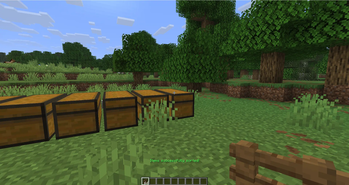
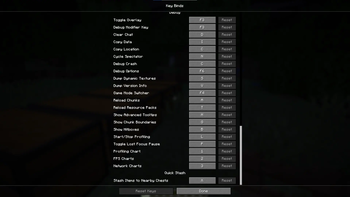
About this Mod


Quick Stash ⚡
Quick Stash is a lightweight Fabric mod that lets players instantly stash matching items from their inventory into nearby chests/containers with a single key press — without stealing hotbar tools or armor. It’s designed to be simple, server-safe, and respectful of vanilla behaviour.
🚀 What Quick Stash does
Press the configured hotkey (default: X) while in-game and Quick Stash will:
- Search around the player for container blocks (Chests, Barrels, Shulker Boxes, etc.).
- For each item in the player's inventory (excluding Hotbar, Armor and Offhand), attempt to move it into containers that already contain the same item and have available stack space.
- The transfer happens entirely server-side to avoid ghost items and desyncs.
- If any items were moved, the player hears a pleasant confirmation sound (
ENTITY_EXPERIENCE_ORB_PICKUP).
⚙️ Features
- One-press stashing: user-friendly single-key workflow.
- Server-side logic: all item movement is performed on the server to eliminate synchronization issues.
- Hotbar-safe: items in the hotbar (first 9 slots), armor and offhand are never touched.
- Container-aware: only containers that already have at least one stack of the same item are considered — preserves expected player behaviour.
🔧 Compatibility
- Built for Fabric Loader and the Fabric API.
Example usage
- Join or host a Fabric server with Quick Stash installed.
- Stand near your chests.
- Press the Quick Stash hotkey (
Xby default). - Watch items move into the chests that already hold the same items.
Short FAQ
Q: Does Quick Stash take items from my hotbar or armor?
A: No — the mod intentionally ignores the hotbar (first 9 slots), armor slots and offhand so you won't lose tools or held items.
Q: Is this mod singleplayer-safe?
A: Yes — the networking packet is handled locally in singleplayer because a local integrated server receives the packet and executes the server logic.
Also, if you are interested, you can visit my website to contact me or learn something new about me: https://dalvsync.github.io
Available Versions
How to Install Quick Stash on Your Server
Order Server
Order a Minecraft Java server with at least 3 GB RAM (4 GB recommended).
Set fabric Loader
In the panel under "Egg", select the fabric loader and matching Minecraft version (26.1.2).
Install Mod
Open the mod browser in the dashboard and search for "Quick Stash". Click "Install" – done! Alternatively, upload the .jar via SFTP to the /mods folder.
Compatibility
Mod Loaders
Minecraft Versions
26.1.2, 26.1.1, 26.1 (+17 more)
Server-side
✓ RequiredRecommended RAM
4 GB(min. 3 GB)Frequently Asked Questions
Quick Stash server crashes on startup – what to do?
Most common cause: wrong fabric version or insufficient RAM. Check the server log (latest.log) for "OutOfMemoryError" or "Mixin" errors. With Mado Hosting: ensure at least 3 GB RAM is allocated and the loader matches the mod version (26.1.2). You can switch loaders with one click in the panel.
Is Quick Stash compatible with fabric?
Quick Stash officially supports fabric for Minecraft 26.1.2, 26.1.1, 26.1. The Mado dashboard automatically detects incompatible loader combinations.
Server lagging with Quick Stash – how to optimize performance?
Recommended RAM: 4 GB (per 8 players). Use /spark profiler to check if Quick Stash consumes the most tick time. Common fixes: reduce server view-distance to 8-10, install "performant" or "starlight" as supplementary mods on Forge. With Mado Hosting, your server runs on NVMe SSDs with dedicated CPU cores for minimal latency.
Similar Mods




Rent Modded Server
Install Quick Stash with just one click on your server.