QuickAdditions StationAPI
A StationAPI mod for Minecraft Beta 1.7.3 that adds in features that were requested, but didn't have enough time to make a full fledged mod for the request.
Screenshots
About this Mod
QuickAdditions StationAPI for Minecraft Beta 1.7.3
A StationAPI mod for Minecraft Beta 1.7.3 that adds in features that were requested, but didn't have enough time to make more real solutions.
- Requires Zastavka API (used to make music biome/dimension specific and to get current BGM)
Quick Additions
Mod now works on Multiplayer with GlassConfigAPI version 3.0+ used to sync configs!
Entity Spawning Mechanics
- Adds ability to control which vanilla entities can spawn from biome spawn mechanics.
- Adds ability to disable living entity despawning.
- Adds ability to disable saddled pig despawning.
- Also adds the ability to skip saddled pigs in the passive spawn count.
- Allowing passive spawn capacity to be filled with normal despawning passive mobs and not just the new saddled pigs.
- Also adds the ability to skip saddled pigs in the passive spawn count.
- Adds ability to change max mob spawn capacity for different creature types.
- Monster, passive (animals), and squid max spawn capacity can be changed.
- Adds ability to change mob spawn group size.
- Disabled when PumpkinMoon is installed, as PumpkinMoon will take over setting spawn group size.
- Adds ability to change max light level at which monsters can spawn.
Weather
- Adds ability to set a Y level above which it will always snow.
- Adds ability to disable rain in savanna biomes.
- Adds ability to cancel weather reset when sleeping and the weather is clear.
- This makes rain and snow more common.
- Adds ability to configure rain/thunder time until and duration.
- Also adds the ability to disable rain/thunder entirely.
Music
- Adds ability to lower ambient nether portal, rain, ghast, and cave sounds.
- Adds ability to change background music countdown timer min and max interval values.
- Also adds the ability to disable random background music entirely.
- Adds ability to add custom background music to the game.
- On first run of the mod a folder named
custom-musicwill be created. - Add
.ogg,.mus, or.wavfiles to this folder, and they will have a random chance to play in-game.- No other file types are supported by default in Minecraft or by this mod.
- You can make the added songs only play in certain dimensions or biomes by adding specific tags to the song name.
- Firstly the song must end with
-specific.XXXwhereXXXis one of the three acceptable file typesogg,mus, orwav. - Then simply specify which dimension using
-overworld-,-nether-, or-levelX-in the song name.- Where
Xin-levelX-is the numerical value of the level ID. - (nether =
-1, overworld =0, skylands =1, modded-dimension = some number greater than 1 probably)
- Where
- You can also make songs biome specific by specifying the biome with a biome tag such as
-tundra-or-savanna-.- See full list of vanilla b1.7.3 biomes below
- All tag names MUST be lowercase to work and have the
-symbol on either side of the tag.- Example song name:
HappyDisco-nether-rainforest-specific.ogg- This song would play in the nether or in the rainforest biome.
- Example song name:
- Firstly the song must end with
- On first run of the mod a folder named
- Adds ability to disable default Minecraft background music.
- Adds ability to view currently playing music in the debug overlay (F3).
- Compatible with Better F3 using their module system.
- Adds ability to add main menu songs.
- On first run of the mod a folder named
main-menu-themewill be created. - Add
.ogg,.mus, or.wavfiles to this folder, these songs will play on the title screen.- A single song is chosen randomly upon entering the title screen and plays.
- Song names cannot be the same as vanilla b1.7.3 streaming resource files, if they are the song will not play when chosen.
- No other file types are supported by default in Minecraft or by this mod.
- Adds ability to have main menu song override background music.
- (Vanilla b1.7.3 has Minecraft background music continue to play on main menu if started in-game)
- On first run of the mod a folder named
Misc.
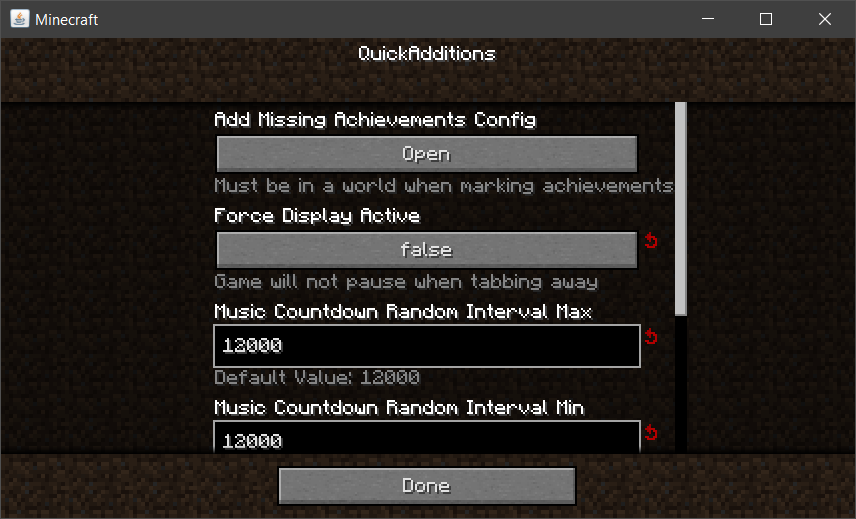
- Adds ability to give the player missing achievements that they may have already achieved.
- Load into a world and access mod config from pause menu using ModMenu.
- Adding back missing achievements will not work from the main menu or when game is not running.
- Adds ability to force display active even when tabbing away from the screen.
- Adds ability to speed up night rather than skip it.
- (Takes about 30 seconds to sleep the entire night away using this method)
- Adds ability to exit beds by clicking or swinging the hand.
- Adds ability to configure percentage of sleeping players needed to skip nighttime.
- 0% will be treated as one player fully asleep required to skip the night.
- Adds ability to configure server spawn protection radius.
- Overridden by UniTweaks.
- Set the value for spawn protection radius in the server.properties file instead when UniTweaks is loaded.
- Overridden by UniTweaks.
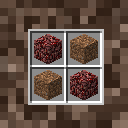
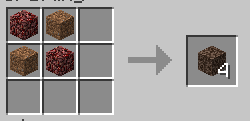
- Adds ability to add a crafting recipe for soul sand.
- See gallery images for recipe.
List of b1.7.3 Biomes
- Rainforest -> biome tag =
-rainforest- - Swampland -> biome tag =
-swampland- - Seasonal Forest -> biome tag =
-seasonal forest- - Forest -> biome tag =
-forest- - Savanna -> biome tag =
-savanna- - Shrubland -> biome tag =
-shrubland- - Taiga -> biome tag =
-taiga- - Desert -> biome tag =
-desert- - Plains -> biome tag =
-plains- - Ice Desert -> biome tag =
-ice desert- - Tundra -> biome tag =
-tundra- - Hell -> biome tag =
-hell-this is the biome that the nether uses - Sky -> biome tag =
-sky-this is the biome that the skylands uses - ModdedBiome -> biome tag =
-moddedbiome-modded biomes are supported just make the biome name lowercase as a tag!
Installation using Prism Launcher
- Download an instance of Babric for Prism Launcher: https://github.com/Glass-Series/babric-prism-instance
- Install Java 17 and set the instance to use it: https://adoptium.net/temurin/releases/
- Add GlassConfigAPI 3.0.2+ to the mod folder for the instance: https://modrinth.com/mod/glass-config-api
- Add Glass Networking to the mod folder for the instance: https://modrinth.com/mod/glass-networking
- Add StationAPI to the mod folder for the instance: https://modrinth.com/mod/stationapi
- Add ZastavkaAPI to the mod folder for the instance: https://modrinth.com/mod/zastavkaapi
- (Optional) Add Mod Menu to the mod folder for the instance: https://modrinth.com/mod/modmenu-beta
- Add this mod to the mod folder for the instance: https://github.com/telvarost/QuickAdditions-StationAPI/releases
- Run and enjoy! 👍
Feedback
Got any suggestions on what should be added next? Feel free to share it by creating an issue. Know how to code and want to do it yourself? Then look below on how to get started.
Contributing
Thanks for considering contributing! To get started fork this repository, make your changes, and create a PR.
If you are new to StationAPI consider watching the following videos on Babric/StationAPI Minecraft modding: https://www.youtube.com/watch?v=9-sVGjnGJ5s&list=PLa2JWzyvH63wGcj5-i0P12VkJG7PDyo9T
Available Versions
How to Install QuickAdditions StationAPI on Your Server
Order Server
Order a Minecraft Java server with at least 3 GB RAM (4 GB recommended).
Set babric Loader
In the panel under "Egg", select the babric loader and matching Minecraft version (b1.7.3).
Install Mod
Open the mod browser in the dashboard and search for "QuickAdditions StationAPI". Click "Install" – done! Alternatively, upload the .jar via SFTP to the /mods folder.
Compatibility
Mod Loaders
Minecraft Versions
b1.7.3
Server-side
~ OptionalRecommended RAM
4 GB(min. 3 GB)Frequently Asked Questions
QuickAdditions StationAPI server crashes on startup – what to do?
Most common cause: wrong babric version or insufficient RAM. Check the server log (latest.log) for "OutOfMemoryError" or "Mixin" errors. With Mado Hosting: ensure at least 3 GB RAM is allocated and the loader matches the mod version (b1.7.3). You can switch loaders with one click in the panel.
Is QuickAdditions StationAPI compatible with babric and fabric?
QuickAdditions StationAPI officially supports babric, fabric for Minecraft b1.7.3. The Mado dashboard automatically detects incompatible loader combinations.
Server lagging with QuickAdditions StationAPI – how to optimize performance?
Recommended RAM: 4 GB (per 8 players). Use /spark profiler to check if QuickAdditions StationAPI consumes the most tick time. Common fixes: reduce server view-distance to 8-10, install "performant" or "starlight" as supplementary mods on Forge. With Mado Hosting, your server runs on NVMe SSDs with dedicated CPU cores for minimal latency.
Similar Mods




Rent Modded Server
Install QuickAdditions StationAPI with just one click on your server.