
QuickAlias
Lightweight client-side command alias utility.
Screenshots


About this Mod




QuickAlias is a client-side utility modification designed to optimize command interaction efficiency within Minecraft. It features a comprehensive visual alias editor, hierarchical command menus, dynamic variable parsing, and a quick access command panel.
This mod aims to resolve the tediousness associated with manual entry of repetitive command strings. Users can construct customized command hierarchies and access them seamlessly via standard chat auto-completion or the convenient visual overlay panel.

✨ Key Features
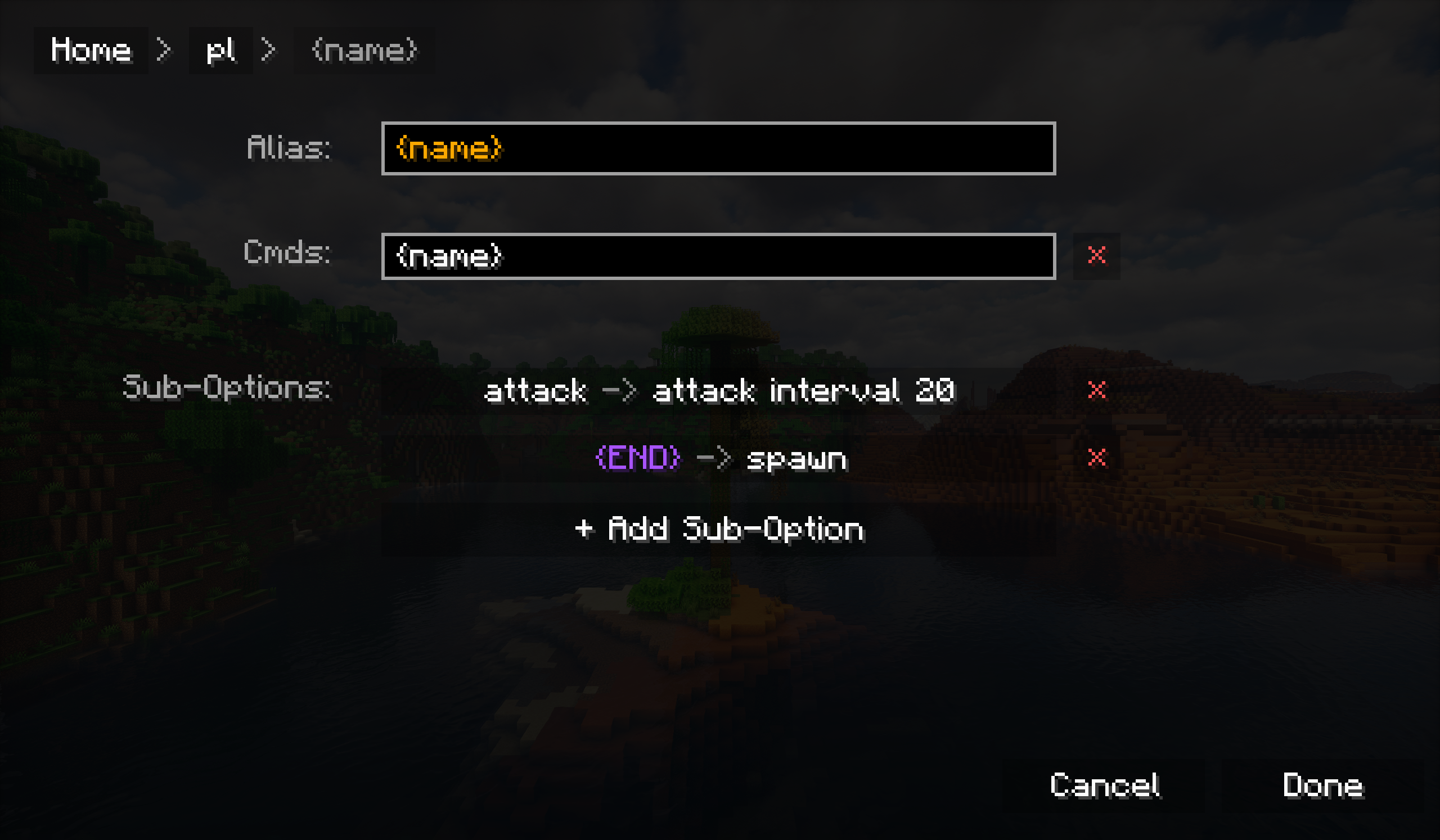
- 🎨 Integrated Visual Editor: Eliminates the need for manual JSON configuration. Efficiently create, edit, reorganize, or import alias configurations directly through the in-game GUI (accessible via the chat interface settings).
- 🌳 Hierarchical Command Structures: Supports the creation of nested menu systems. For example, define a root alias
Warp, and cascade sub-options such asHome,Hub, andMiningunder it. - 🚀 Macro Functionality: Allows binding multiple commands to a single alias identifier. A single trigger can execute a predefined sequence of operations in order.
- 🧩 Dynamic Variable System:
- System Constants: Automatically resolves contextual values including current coordinates (
{X},{Y},{Z}), player ID ({ID}), and dimension info ({DIM}). - Custom Arguments: Supports defining dynamic aliases such as
/invite {player}. The system intelligently captures user input and dynamically replaces the corresponding variables in the command.
- System Constants: Automatically resolves contextual values including current coordinates (
- ⌨️ Native Integration:
- Auto-Completion: Custom aliases seamlessly integrate into the game's chat suggestion system, providing an interaction experience consistent with vanilla commands.
- Smart Suggestions: Variables named
{id}automatically prompt online player names, while{dim}suggests dimension IDs.
- 🖥️ Overlay Navigation: The chat interface integrates a shortcut entry (the
/icon), which summons a visual alias navigation menu, enabling command execution without typing.
📖 Usage Guide
1. Creating a Basic Alias
- Open the Chat interface.
- Click the Settings (⚙) icon to enter the QuickAlias configuration panel.
- Click the
+button to create a new root alias. - Alias Name: Enter the trigger keyword (e.g.,
home). - Command: Enter the command content to be executed (e.g.,
/tp <x> <y> <z>). - Save the settings. You can now call this alias via
/homein the chat bar.
2. Using Variables (Arguments)
To create an alias that accepts dynamic arguments (such as a player name):
- Create a root alias, for example,
hi. - Add a Sub-Option to it.
- Name the sub-option
{id}(Curly braces indicate this node is a variable). - In the
{id}node's command list, enter:hello {id}. - Execution: Enter
/hi Stevein the chat bar, and the system will executehello Steve(text without a slash "/" will be sent as a chat message).
3. Built-in Placeholders
The following placeholders can be used in any command configuration:
{X},{Y},{Z}- Current coordinate values (retains one decimal place).{ID}- Current player name.{DIM}- Registered resource name of the current dimension.
📥 Installation
- Installation: Simply place the
.jarfile into themodsfolder in your game directory. - Compatibility: This is a client-side only mod; it functions on multiplayer servers without requiring server-side installation.
Available Versions
How to Install QuickAlias on Your Server
Order Server
Order a Minecraft Java server with at least 3 GB RAM (4 GB recommended).
Set fabric Loader
In the panel under "Egg", select the fabric loader and matching Minecraft version (26.1.1).
Install Mod
Open the mod browser in the dashboard and search for "QuickAlias". Click "Install" – done! Alternatively, upload the .jar via SFTP to the /mods folder.
Compatibility
Mod Loaders
Minecraft Versions
26.1.1, 26.1, 1.21.1 (+7 more)
Server-side
✗ UnsupportedRecommended RAM
4 GB(min. 3 GB)Frequently Asked Questions
QuickAlias server crashes on startup – what to do?
Most common cause: wrong fabric version or insufficient RAM. Check the server log (latest.log) for "OutOfMemoryError" or "Mixin" errors. With Mado Hosting: ensure at least 3 GB RAM is allocated and the loader matches the mod version (26.1.1). You can switch loaders with one click in the panel.
Is QuickAlias compatible with fabric and forge and neoforge and quilt?
QuickAlias officially supports fabric, forge, neoforge, quilt for Minecraft 26.1.1, 26.1, 1.21.1. Note: Forge and Fabric mods are NOT cross-compatible – pick one loader and stick with it. The Mado dashboard automatically detects incompatible loader combinations.
Server lagging with QuickAlias – how to optimize performance?
Recommended RAM: 4 GB (per 8 players). Use /spark profiler to check if QuickAlias consumes the most tick time. Common fixes: reduce server view-distance to 8-10, install "performant" or "starlight" as supplementary mods on Forge. With Mado Hosting, your server runs on NVMe SSDs with dedicated CPU cores for minimal latency.
Similar Mods




![[ETF] Entity Texture Features](https://cdn.modrinth.com/data/BVzZfTc1/af683d206d50b05258d865b0d6e4aa2f2cee12f2_96.webp)
![[EMF] Entity Model Features](https://cdn.modrinth.com/data/4I1XuqiY/6e5bbd0d06b1741bfdab6c0cfab6de8fdaf0064c_96.webp)
Rent Modded Server
Install QuickAlias with just one click on your server.