
QuickMate
Chain destruction with one click, rapid batch building — elevate your construction efficiency to new heights.
Screenshots
About this Mod
QuickMate



A powerful Minecraft Fabric chain mining mod providing intelligent scanning and batch destruction features
✨ Features
🔍 Intelligent Scanning System
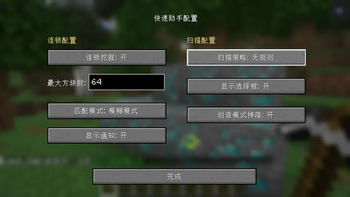
- Multiple Scanning Strategies: Supports irregular, horizontal line, vertical line, staircase, 3x3 tunnel, and various other scanning modes.
- Precise/Fuzzy Matching: Choose to destroy only identical blocks or similar block types.
- Real-time Preview: Highlights the range of blocks to be destroyed with selection boxes.
- Configurable Maximum Count: Limits the maximum number of blocks for a single chain destruction (1-2048).
⛏️ Chain Destruction
- Server-Side Authority: All scanning and destruction logic is executed server-side to prevent cheating.
- Automatic Batch Destruction: After destroying one block, automatically destroys all matching adjacent blocks.
- Game Mode Adaptation:
- Survival Mode: Generates drops normally.
- Creative Mode: Option to generate drops or not.
- Efficient Performance: Utilizes concurrent data structures, supporting multiple players simultaneously.
🎮 User-Friendly
- Key Bindings: Toggle chain mining on/off with a single keystroke.
- Configuration Interface: Beautiful graphical configuration interface.
- Multi-language Support: Supports both Chinese and English.
- Real-time Notifications: Optional function activation/deactivation prompts.
📦 Installation
Prerequisites
- Minecraft 1.21.8
- Fabric Loader
- Fabric API
- NeoForge API
Installation Steps
- Download the latest version of QuickMate
.jarfile. - Place the file into the
.minecraft/modsfolder. - Launch the game to start using it.
🎯 Usage
Basic Operations
- Open Configuration Interface: Press the default key (can be modified in control settings).
- Enable Chain Mining: Toggle the status via the configuration interface or key binding.
- Aim at Target Block: Look at the block you want to mine.
- Start Mining: Break the block normally; the chain function will automatically take effect.
Available Versions
How to Install QuickMate on Your Server
Order Server
Order a Minecraft Java server with at least 3 GB RAM (4 GB recommended).
Set fabric Loader
In the panel under "Egg", select the fabric loader and matching Minecraft version (1.21.8).
Install Mod
Open the mod browser in the dashboard and search for "QuickMate". Click "Install" – done! Alternatively, upload the .jar via SFTP to the /mods folder.
Compatibility
Mod Loaders
Minecraft Versions
1.21.8, 1.21.7, 1.21.6 (+1 more)
Server-side
✓ RequiredRecommended RAM
4 GB(min. 3 GB)Frequently Asked Questions
QuickMate server crashes on startup – what to do?
Most common cause: wrong fabric version or insufficient RAM. Check the server log (latest.log) for "OutOfMemoryError" or "Mixin" errors. With Mado Hosting: ensure at least 3 GB RAM is allocated and the loader matches the mod version (1.21.8). You can switch loaders with one click in the panel.
Is QuickMate compatible with fabric and neoforge?
QuickMate officially supports fabric, neoforge for Minecraft 1.21.8, 1.21.7, 1.21.6. The Mado dashboard automatically detects incompatible loader combinations.
Server lagging with QuickMate – how to optimize performance?
Recommended RAM: 4 GB (per 8 players). Use /spark profiler to check if QuickMate consumes the most tick time. Common fixes: reduce server view-distance to 8-10, install "performant" or "starlight" as supplementary mods on Forge. With Mado Hosting, your server runs on NVMe SSDs with dedicated CPU cores for minimal latency.
Similar Mods




![[ETF] Entity Texture Features](https://cdn.modrinth.com/data/BVzZfTc1/af683d206d50b05258d865b0d6e4aa2f2cee12f2_96.webp)
![[EMF] Entity Model Features](https://cdn.modrinth.com/data/4I1XuqiY/6e5bbd0d06b1741bfdab6c0cfab6de8fdaf0064c_96.webp)
Rent Modded Server
Install QuickMate with just one click on your server.