
Quilt Loading Screen
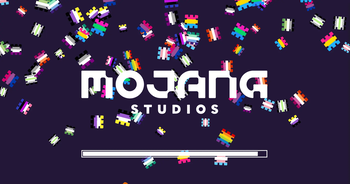
A loading screen based off of The Quilt Community's server banner.
Screenshots

About this Mod
Screenshots in the Gallery tab above!
Requires Quilt Loader and QSL.
This is a loading screen based off of The Quilt Community's (former) server banner.
Not sure what Quilt is? Check it out! --> https://quiltmc.org
The mod consists of several patches from the Quilt logo falling like snow, which then rapidly fall off the screen once loading ends.
This also applies with the F3-T resource pack reload.
Every June, Quilt Loading Screen turns on Pride Mode and the patches consist of pride flags instead! You can also turn this on manually all the time via a config option if you have Mod Menu installed.
简体
截图在上面的 "Gallery"(图库)标签中!
需要Quilt Loader和QSL。
这是一个基于The Quilt Community(前)服务器横幅的加载画面。
不知道Quilt是什么?看看吧! --> https://quiltmc.org
该模型由Quilt标志的几个补丁组成,像雪一样落下,然后在加载结束后迅速从屏幕上掉下来。
这也适用于F3-T资源包的重新加载。
每年六月,Quilt加载屏幕都会开启骄傲模式,补丁由骄傲的旗帜组成! 如果你安装了Mod Menu,你也可以通过一个配置选项手动一直打开它。
任何人都可以把我的mods上传到mcmod.cn。我不会说中文,所以我不能自己做这个! 如果你想了解更多信息,请发邮件给我 [email protected]。
Available Versions
How to Install Quilt Loading Screen on Your Server
Order Server
Order a Minecraft Java server with at least 3 GB RAM (4 GB recommended).
Set fabric Loader
In the panel under "Egg", select the fabric loader and matching Minecraft version (1.20.1).
Install Mod
Open the mod browser in the dashboard and search for "Quilt Loading Screen". Click "Install" – done! Alternatively, upload the .jar via SFTP to the /mods folder.
Compatibility
Mod Loaders
Minecraft Versions
1.20.1, 1.19.3, 1.19.2 (+13 more)
Server-side
✗ UnsupportedRecommended RAM
4 GB(min. 3 GB)Frequently Asked Questions
Quilt Loading Screen server crashes on startup – what to do?
Most common cause: wrong fabric version or insufficient RAM. Check the server log (latest.log) for "OutOfMemoryError" or "Mixin" errors. With Mado Hosting: ensure at least 3 GB RAM is allocated and the loader matches the mod version (1.20.1). You can switch loaders with one click in the panel.
Is Quilt Loading Screen compatible with fabric and quilt?
Quilt Loading Screen officially supports fabric, quilt for Minecraft 1.20.1, 1.19.3, 1.19.2. The Mado dashboard automatically detects incompatible loader combinations.
Server lagging with Quilt Loading Screen – how to optimize performance?
Recommended RAM: 4 GB (per 8 players). Use /spark profiler to check if Quilt Loading Screen consumes the most tick time. Common fixes: reduce server view-distance to 8-10, install "performant" or "starlight" as supplementary mods on Forge. With Mado Hosting, your server runs on NVMe SSDs with dedicated CPU cores for minimal latency.
Similar Mods

![[ETF] Entity Texture Features](https://cdn.modrinth.com/data/BVzZfTc1/af683d206d50b05258d865b0d6e4aa2f2cee12f2_96.webp)
![[EMF] Entity Model Features](https://cdn.modrinth.com/data/4I1XuqiY/6e5bbd0d06b1741bfdab6c0cfab6de8fdaf0064c_96.webp)




Rent Modded Server
Install Quilt Loading Screen with just one click on your server.