
RA: Redstone Additions
Introduces redstone logic gates and a compact clock designed for space-efficient builds.
Screenshots
About this Mod
Purpose of the Mod
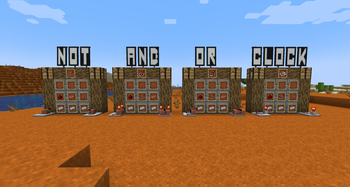
Adds OR, XOR, NOT, and AND boolean logic gates and a CLOCK with the idea of designing more compact redstone machines with potentially better performance.
Recipes and Usage
AND Gate:
| | | |
| | | |
|  | | |
| | |
|  |
|_JE1.png/32px-Redstone_Repeater_(item)_JE1.png?1b9a2) |
| |
|
|  | | |
| | |
Usage
2 Inputs 1 Output 1 Input on Left 1 Input on Right 1 Output on redstone torch side
| L | R | Output |
|---|---|---|
| 0 | 0 | 0 |
| 0 | 1 | 0 |
| 1 | 0 | 0 |
| 1 | 1 | 1 |
NOT Gate:
| X | X | X |
|---|---|---|
|
|
|
|
|
|
Usage
1 Input and 1 Output Output is the opposite of the input So if Redstone is powered in, it will come out off.
| Input | Output |
|---|---|
| 0 | 1 |
| 1 | 0 |
(X)OR Gate:
XOR and OR is the same block
| X | X | X |
|---|---|---|
|
|
|
|
|
|
Usage
2 Inputs 1 Output 1 Input on Left 1 Input on Right 1 Output on Redstone torch side
OR:
| L | R | Output |
|---|---|---|
| 0 | 0 | 0 |
| 1 | 0 | 1 |
| 0 | 1 | 1 |
| 1 | 1 | 1 |
| XOR: | ||
| L | R | Output |
| -- | -- | -- |
| 0 | 0 | 0 |
| 1 | 0 | 1 |
| 0 | 1 | 1 |
| 1 | 1 | 0 |
CLOCK:
| X | X | X |
|---|---|---|
|
|
|
|
|
|
Usage
1 Output: Flips between on and off at a rate specified by the delay which is changed when right clicked
| Delay # | Flips per Second |
|---|---|
| 1 | 20 |
| 5 | 4 |
| 10 | 2 |
| 15 | 1.333 |
| 20 | 1 |
Potential Performance Increase with Clocks
NOTE!
I never made this mod to make a better performant way for using Redstone, I more built this to learn modding and to save space in Redstone designs. Do not download this mod for the potential performance increase
If you have any information to add regarding of if the test is accurate or flawed, I would love to hear about it.
Base Rules for each test:
Both worlds were duplicates using Minecrafts built in recreate button Sim distance: 12 chunks Render Distance: 12 chunks Super flat world with "Redstone Ready" preset. Peaceful, no structures. Windowed mode Forge install with just Redstone Additions and WorldEdit
Redstone Additions Clock
For the Redstone Additions test, 10,201 (100x100 grid) clocks were set with WorldEdit with a delay set to 1 (flips 20 times a tick)

Vanilla Clock
For the vanilla clock, this is a design I have came across from just playing the game, I am unsure the exact speed it flips but just watching the flip rate, it feels similar to the speed of Redstone Additions Clock with a delay =1 world edit was also used to copy and stack in a 100x100 grid effectively placing 10,000 individual instances of this design.

The conclusions
Through my own research on what each value means in the f3 menu through the following Minecraft Wiki Link, it would seem that using the mod lowers the total amount of memory while also lowering speed it takes to process a tick. The mod also has an increased amount packets received from the Integrated Server by roughly 10x. You can compare these values and anything else I might have missed by looking at both images above.
NOTE!
I never made this mod to make a better performant way for using Redstone, I more built this to learn modding and to save space in Redstone designs. Do not download this mod for the potential performance increase
If you have any information to add regarding of if the test is accurate or flawed, I would love to hear about it.
Available Versions
How to Install RA: Redstone Additions on Your Server
Order Server
Order a Minecraft Java server with at least 3 GB RAM (4 GB recommended).
Set forge Loader
In the panel under "Egg", select the forge loader and matching Minecraft version (1.21.10).
Install Mod
Open the mod browser in the dashboard and search for "RA: Redstone Additions". Click "Install" – done! Alternatively, upload the .jar via SFTP to the /mods folder.
Compatibility
Mod Loaders
Minecraft Versions
1.21.10, 1.20.1
Server-side
✓ RequiredRecommended RAM
4 GB(min. 3 GB)Frequently Asked Questions
RA: Redstone Additions server crashes on startup – what to do?
Most common cause: wrong forge version or insufficient RAM. Check the server log (latest.log) for "OutOfMemoryError" or "Mixin" errors. With Mado Hosting: ensure at least 3 GB RAM is allocated and the loader matches the mod version (1.21.10). You can switch loaders with one click in the panel.
Is RA: Redstone Additions compatible with forge?
RA: Redstone Additions officially supports forge for Minecraft 1.21.10, 1.20.1. The Mado dashboard automatically detects incompatible loader combinations.
Server lagging with RA: Redstone Additions – how to optimize performance?
Recommended RAM: 4 GB (per 8 players). Use /spark profiler to check if RA: Redstone Additions consumes the most tick time. Common fixes: reduce server view-distance to 8-10, install "performant" or "starlight" as supplementary mods on Forge. With Mado Hosting, your server runs on NVMe SSDs with dedicated CPU cores for minimal latency.
Similar Mods




![[ETF] Entity Texture Features](https://cdn.modrinth.com/data/BVzZfTc1/af683d206d50b05258d865b0d6e4aa2f2cee12f2_96.webp)

Rent Modded Server
Install RA: Redstone Additions with just one click on your server.