
RadioCraft Mod
Bring your world in Minecraft to life with your own music. RadioCraft adds a fully interactive radio block that allows players to play custom audio directly inside the game using external sources.
Screenshots
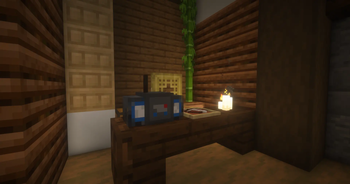
About this Mod
🇺🇸 English
RadioCraft – Play your own music in Minecraft
Adds a radio block that allows you to play custom audio using external URLs.
Radio block
URL audio support
⚠️ Disclaimer
This mod does not provide or include any audio content.
All audio played through this mod is sourced from external URLs provided by the user.
Users are fully responsible for the content they choose to access and use.
🇪🇸 Español
RadioCraft – Reproduce tu propia música en Minecraft
Agrega un bloque de radio que permite reproducir audio personalizado mediante URLs externas.
Bloque de radio
Soporte para enlaces de audio
⚠️ Aviso
Este mod no proporciona ni incluye contenido de audio.
Todo el audio reproducido proviene de enlaces externos proporcionados por el usuario.
El usuario es completamente responsable del contenido que decide utilizar.
Available Versions
How to Install RadioCraft Mod on Your Server
Order Server
Order a Minecraft Java server with at least 3 GB RAM (4 GB recommended).
Set fabric Loader
In the panel under "Egg", select the fabric loader and matching Minecraft version (26.1.2).
Install Mod
Open the mod browser in the dashboard and search for "RadioCraft Mod". Click "Install" – done! Alternatively, upload the .jar via SFTP to the /mods folder.
Compatibility
Mod Loaders
Minecraft Versions
26.1.2
Server-side
✓ RequiredRecommended RAM
4 GB(min. 3 GB)Frequently Asked Questions
RadioCraft Mod server crashes on startup – what to do?
Most common cause: wrong fabric version or insufficient RAM. Check the server log (latest.log) for "OutOfMemoryError" or "Mixin" errors. With Mado Hosting: ensure at least 3 GB RAM is allocated and the loader matches the mod version (26.1.2). You can switch loaders with one click in the panel.
Is RadioCraft Mod compatible with fabric?
RadioCraft Mod officially supports fabric for Minecraft 26.1.2. The Mado dashboard automatically detects incompatible loader combinations.
Server lagging with RadioCraft Mod – how to optimize performance?
Recommended RAM: 4 GB (per 8 players). Use /spark profiler to check if RadioCraft Mod consumes the most tick time. Common fixes: reduce server view-distance to 8-10, install "performant" or "starlight" as supplementary mods on Forge. With Mado Hosting, your server runs on NVMe SSDs with dedicated CPU cores for minimal latency.
Similar Mods

![[ETF] Entity Texture Features](https://cdn.modrinth.com/data/BVzZfTc1/af683d206d50b05258d865b0d6e4aa2f2cee12f2_96.webp)
![[EMF] Entity Model Features](https://cdn.modrinth.com/data/4I1XuqiY/6e5bbd0d06b1741bfdab6c0cfab6de8fdaf0064c_96.webp)



Rent Modded Server
Install RadioCraft Mod with just one click on your server.