
Rain&Thunder Countdown
Simple yet fully customizable and togglable rain and thunder countdown
Screenshots
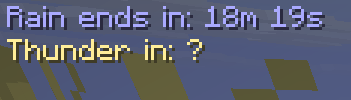
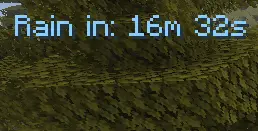
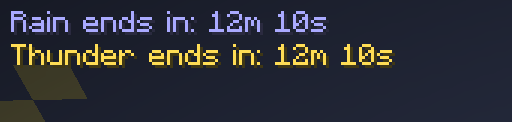
About this Mod
FOR THE MOD TO WORK YOU NEED TO WAIT FOR RAIN!!! THEN EVERYTHING WILL WORK(mod needs to hook up the rain lines) DO NOT WORRY
Thunder Countdown
Ever wondered how long until it starts raining — or when that thunderstorm will finally end? Thunder Countdown adds a clean, lightweight HUD overlay that shows you exactly that, in real time.
Features
Rain countdown — shows how long until the next rain starts when the weather is clear
Rain timer — shows how long until the rain stops while it's raining
Thunder timer — shows how long until the thunderstorm ends while it's active
Reads real Minecraft weather data directly — no fake timers, no guessing
Fully customizable via Mod Menu + Cloth Config:
Toggle rain and thunder timers independently
Choose a custom color for each timer state (clear / raining / thundering)
Full English and Russian localization — the HUD and settings automatically follow your in-game language
How it works
The mod reads the internal weather timers straight from the Minecraft server every second and sends them to the client. Nothing is simulated — what you see is exactly what Minecraft has scheduled.
FOR THE MOD TO WORK YOU NEED TO WAIT FOR RAIN!!! THEN EVERYTHING WILL WORK(mod needs to hook up the rain lines) DO NOT WORRY
Note on thunder: Minecraft does not plan thunderstorms in advance. The thunder timer is only shown while a thunderstorm is already active. During regular rain, the thunder indicator shows ? because the game hasn't decided yet.
Dependencies
Mod Required: Fabric API✅ Required: Cloth Config✅ Required: Mod Menu✅
Compatibility
Minecraft 26.1.x
Fabric Loader ≥ 0.19.2
Java 25+
Author
Made by raskajanie
Licensed under MIT.
Available Versions
How to Install Rain&Thunder Countdown on Your Server
Order Server
Order a Minecraft Java server with at least 3 GB RAM (4 GB recommended).
Set fabric Loader
In the panel under "Egg", select the fabric loader and matching Minecraft version (26.1.2).
Install Mod
Open the mod browser in the dashboard and search for "Rain&Thunder Countdown". Click "Install" – done! Alternatively, upload the .jar via SFTP to the /mods folder.
Compatibility
Mod Loaders
Minecraft Versions
26.1.2
Server-side
✓ RequiredRecommended RAM
4 GB(min. 3 GB)Frequently Asked Questions
Rain&Thunder Countdown server crashes on startup – what to do?
Most common cause: wrong fabric version or insufficient RAM. Check the server log (latest.log) for "OutOfMemoryError" or "Mixin" errors. With Mado Hosting: ensure at least 3 GB RAM is allocated and the loader matches the mod version (26.1.2). You can switch loaders with one click in the panel.
Is Rain&Thunder Countdown compatible with fabric?
Rain&Thunder Countdown officially supports fabric for Minecraft 26.1.2. The Mado dashboard automatically detects incompatible loader combinations.
Server lagging with Rain&Thunder Countdown – how to optimize performance?
Recommended RAM: 4 GB (per 8 players). Use /spark profiler to check if Rain&Thunder Countdown consumes the most tick time. Common fixes: reduce server view-distance to 8-10, install "performant" or "starlight" as supplementary mods on Forge. With Mado Hosting, your server runs on NVMe SSDs with dedicated CPU cores for minimal latency.
Similar Mods




Rent Modded Server
Install Rain&Thunder Countdown with just one click on your server.