
Raise & Resurrection & Ascend
Configurable downed state and revival mechanics before final player death.
Screenshots
About this Mod
Raise & Resurrection & Ascend
Raise & Resurrection & Ascend adds a configurable downed state before final player death.
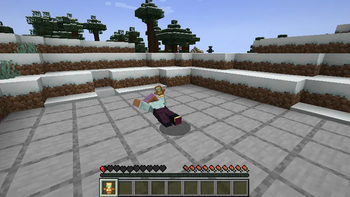
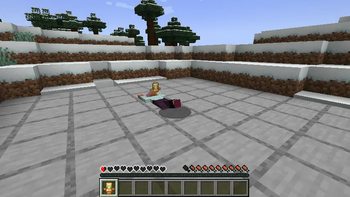
When lethal damage would reduce a player to zero health, the player enters a crawling downed state instead of dying immediately. Other players can revive them with configured items, packs can call the revive command from datapack functions, and the downed player can give up by holding the configured key.
Features
- Lethal damage puts players into a downed state before final death.
- Downed players are forced into the crawling/swimming pose and stay at 1 health.
- Default downed duration is 30 seconds.
- Other players can right-click a downed player with a configured item to revive them.
- Default revive item is
minecraft:totem_of_undying. - Totem-style revival effects are applied on revive.
- Kill-to-revive is available and disabled by default.
- Hold G for 2 seconds by default to give up while downed.
/raise_resurrection_ascend revive <targets>allows datapack functions, commands, spells, or pack mechanics to revive downed players.
Default configuration
[downed]
downedDurationTicks = 600
giveUpHoldTicks = 40

[revival]
reviveItems = ["minecraft:totem_of_undying"]
consumeReviveItem = true
enableKillRevive = false
Requirements
- Minecraft 1.21.1
- NeoForge
Available Versions
How to Install Raise & Resurrection & Ascend on Your Server
Order Server
Order a Minecraft Java server with at least 3 GB RAM (4 GB recommended).
Set neoforge Loader
In the panel under "Egg", select the neoforge loader and matching Minecraft version (1.21.1).
Install Mod
Open the mod browser in the dashboard and search for "Raise & Resurrection & Ascend". Click "Install" – done! Alternatively, upload the .jar via SFTP to the /mods folder.
Compatibility
Mod Loaders
Minecraft Versions
1.21.1
Server-side
✓ RequiredRecommended RAM
4 GB(min. 3 GB)Frequently Asked Questions
Raise & Resurrection & Ascend server crashes on startup – what to do?
Most common cause: wrong neoforge version or insufficient RAM. Check the server log (latest.log) for "OutOfMemoryError" or "Mixin" errors. With Mado Hosting: ensure at least 3 GB RAM is allocated and the loader matches the mod version (1.21.1). You can switch loaders with one click in the panel.
Is Raise & Resurrection & Ascend compatible with neoforge?
Raise & Resurrection & Ascend officially supports neoforge for Minecraft 1.21.1. The Mado dashboard automatically detects incompatible loader combinations.
Server lagging with Raise & Resurrection & Ascend – how to optimize performance?
Recommended RAM: 4 GB (per 8 players). Use /spark profiler to check if Raise & Resurrection & Ascend consumes the most tick time. Common fixes: reduce server view-distance to 8-10, install "performant" or "starlight" as supplementary mods on Forge. With Mado Hosting, your server runs on NVMe SSDs with dedicated CPU cores for minimal latency.
Similar Mods




Rent Modded Server
Install Raise & Resurrection & Ascend with just one click on your server.