Random World Names
Generates random names for new worlds
Screenshots

About this Mod
Random world names
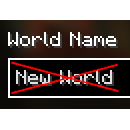
Generates random world names for the world creation screen. Just New World gets boring after a while, doesn't it?
The default list of names allows for over 10 billion different combinations.
There are only two cases the default name is used:
- Either your computer is too slow to generate a new name within the configured time limit (default 2 seconds)
- Or you have so many worlds that no unique combinations could be found
Configuration (from version 1.1.0)
Config file
The config file (as of version 1.1.0) offers the following options:
| Name | Description | Default value |
|---|---|---|
name_length |
The number of words (name entries) to generate a name from | 3 |
delimiter |
The delimiter to use for joining the entries | (Space) |
timeout |
The generation timeout (seconds) | 2 |
In-Game configuration is possible if ModMenu is installed.
Resource pack configuration
Additional names can be added using resource packs, and unwanted packs may be blacklisted.
Adding names
Location: assets/random-world-names/names.json
Structure: Json Array
Example:
[
    "name1",
    "name2",
    "name3",
    ...
]
Blacklisting Packs
Location: assets/random-world-names/blacklist.json
Structure: Json Array
Example:
[
    "pack-id",
    "other-pack-id",
    "third-pack-id",
    ...
]
Note: The default names can be disabled by adding random-world-names to the blacklist.
Configuration for versions < 1.1.0
Versions below 1.1.0 only contain the functionality to add names using the names.json file.
That's it!
License
This mod is licensed under the LGPL-3.0 (or any later version) license.
For details, please see the included License file.
Available Versions
How to Install Random World Names on Your Server
Order Server
Order a Minecraft Java server with at least 3 GB RAM (4 GB recommended).
Set fabric Loader
In the panel under "Egg", select the fabric loader and matching Minecraft version (26.2).
Install Mod
Open the mod browser in the dashboard and search for "Random World Names". Click "Install" – done! Alternatively, upload the .jar via SFTP to the /mods folder.
Compatibility
Mod Loaders
Minecraft Versions
26.2, 26.2-rc-2, 26.1.2 (+13 more)
Server-side
✗ UnsupportedRecommended RAM
4 GB(min. 3 GB)Frequently Asked Questions
Random World Names server crashes on startup – what to do?
Most common cause: wrong fabric version or insufficient RAM. Check the server log (latest.log) for "OutOfMemoryError" or "Mixin" errors. With Mado Hosting: ensure at least 3 GB RAM is allocated and the loader matches the mod version (26.2). You can switch loaders with one click in the panel.
Is Random World Names compatible with fabric and quilt?
Random World Names officially supports fabric, quilt for Minecraft 26.2, 26.2-rc-2, 26.1.2. The Mado dashboard automatically detects incompatible loader combinations.
Server lagging with Random World Names – how to optimize performance?
Recommended RAM: 4 GB (per 8 players). Use /spark profiler to check if Random World Names consumes the most tick time. Common fixes: reduce server view-distance to 8-10, install "performant" or "starlight" as supplementary mods on Forge. With Mado Hosting, your server runs on NVMe SSDs with dedicated CPU cores for minimal latency.
Similar Mods




![[ETF] Entity Texture Features](https://cdn.modrinth.com/data/BVzZfTc1/af683d206d50b05258d865b0d6e4aa2f2cee12f2_96.webp)
![[EMF] Entity Model Features](https://cdn.modrinth.com/data/4I1XuqiY/6e5bbd0d06b1741bfdab6c0cfab6de8fdaf0064c_96.webp)
Rent Modded Server
Install Random World Names with just one click on your server.