
ReachHUD
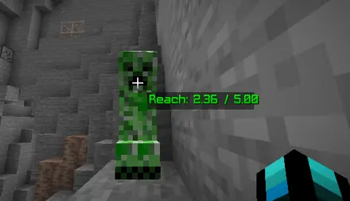
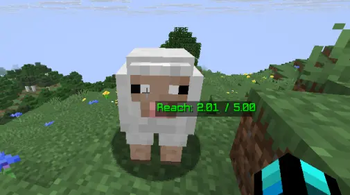
ReachHUD is a lightweight client-side mod that displays real-time reach distance when aiming at entities such as players, mobs, and animals.
Screenshots
About this Mod
🧠 ReachHUD — Real-Time Reach Indicator for PvP
ReachHUD is a lightweight client-side mod that displays real-time reach distance when aiming at entities such as players, mobs, and animals. It helps players instantly see how far their hit connection is during combat, making PvP fights more precise and competitive.
Perfect For PvP servers, lifesteal SMP, practice duels, at competitive gameplay.
⚔️ What it does in PvP:
📏 Shows real-time distance between you and your target
🎯 Detects entity you are aiming at (players, mobs, animals)
🟢 Dynamic color indicator:
Green = within reach (hit is valid)
Red = out of reach
⚡ Updates instantly while fighting (no delay / real-time feedback)
🧠 Automatically adapts to server-side reach changes (custom weapons, plugins, etc.)
🔥 Why it’s useful:
In PvP, milliseconds and distance matter. ReachHUD helps you:
Improve aim consistency
Understand your true hit range
Detect extended reach weapons (like spears or custom items)
Train muscle memory for spacing
Avoid “false hits” or misjudged distance
🎮 Best for:
Lifesteal SMP servers
Practice PvP servers
Duels (1v1 / 2v2)
Crystal PvP / Sword PvP training
Competitive Minecraft gameplay
⚙️ Features:
Clean HUD overlay
Toggle ON/OFF with keybind

Rebindable controls
Lightweight (no performance impact)
Client-side only (works without server mods)
Available Versions
How to Install ReachHUD on Your Server
Order Server
Order a Minecraft Java server with at least 3 GB RAM (4 GB recommended).
Set fabric Loader
In the panel under "Egg", select the fabric loader and matching Minecraft version (1.21.11).
Install Mod
Open the mod browser in the dashboard and search for "ReachHUD". Click "Install" – done! Alternatively, upload the .jar via SFTP to the /mods folder.
Compatibility
Mod Loaders
Minecraft Versions
1.21.11, 1.21.10, 1.21.9
Server-side
✗ UnsupportedRecommended RAM
4 GB(min. 3 GB)Frequently Asked Questions
ReachHUD server crashes on startup – what to do?
Most common cause: wrong fabric version or insufficient RAM. Check the server log (latest.log) for "OutOfMemoryError" or "Mixin" errors. With Mado Hosting: ensure at least 3 GB RAM is allocated and the loader matches the mod version (1.21.11). You can switch loaders with one click in the panel.
Is ReachHUD compatible with fabric?
ReachHUD officially supports fabric for Minecraft 1.21.11, 1.21.10, 1.21.9. The Mado dashboard automatically detects incompatible loader combinations.
Server lagging with ReachHUD – how to optimize performance?
Recommended RAM: 4 GB (per 8 players). Use /spark profiler to check if ReachHUD consumes the most tick time. Common fixes: reduce server view-distance to 8-10, install "performant" or "starlight" as supplementary mods on Forge. With Mado Hosting, your server runs on NVMe SSDs with dedicated CPU cores for minimal latency.
Similar Mods




Rent Modded Server
Install ReachHUD with just one click on your server.