
ReadStar
A mod adds configurable and more realistic stars.
About this Mod
Version 1.21.1 is no longer updated.
ReadStar — NeoForge 26.1 Astronomy Mod
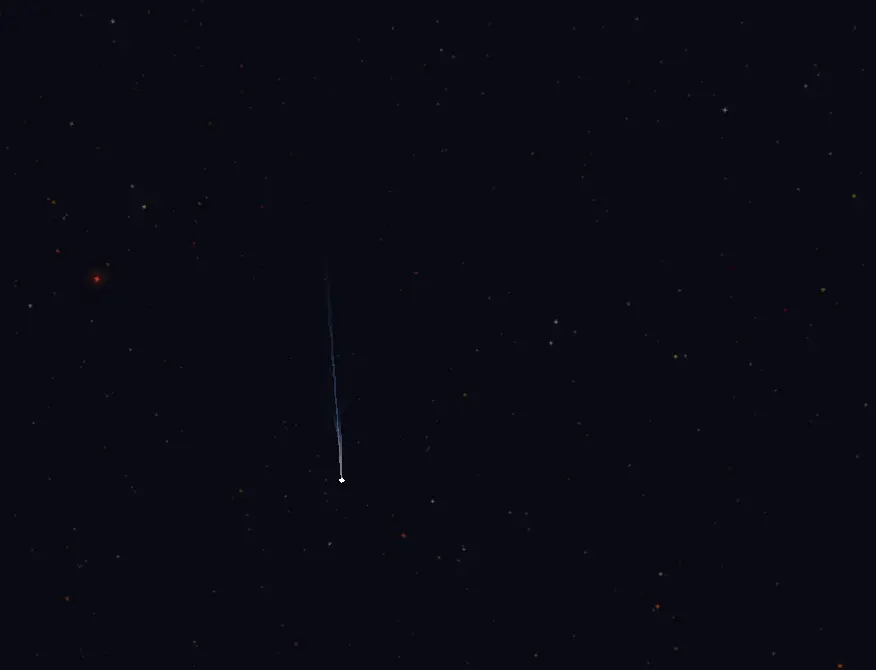
A Minecraft sky mod driven by real celestial mechanics and star catalog data, featuring planetary orbital systems, star catalogs, FOV-aware rendering, and server-synchronized celestial configuration.
Author: FrozenStream
Features
- Real Star Catalog — 12,000+ real stars from Gaia DR3 (color) + BSC5 (bright star fallback), with per-star brightness and glow
- Real Celestial Mechanics — Keplerian orbital system with unlimited nesting depth
- Atmospheric Scattering — HSV-based atmosphere color & glow computation with full-sky overlay and stellar halo
- Comet Rendering — Bézier dust + ion dual-tail structure with dynamic wobble
- FOV-Aware Rendering — Custom shader keeps star screen size constant across FOV changes
- Zero-Code Customization — Add 8 moon phases to any body by simply placing PNGs
- Server Sync — Celestial config managed server-side, auto-synced to all clients
Quick Start
./gradlew build          # Build
./gradlew runClient      # Run client
./gradlew runData        # Data generation (atlas config)
./gradlew runServer      # Run server
The celestial system is defined via data pack at data/readstar/celestial/system.json, and the star catalog via resource pack at assets/readstar/custom/stars/stars.json.
Config changes take effect with F3+T. Data pack changes require /reload or restart.
Configuration
Config file: run/config/readstar-common.toml
| Option | Default | Description |
|---|---|---|
starCoreSize |
0.648 |
Star core quad size multiplier |
starGlowSize |
1.5 |
Bright star glow quad size multiplier |
starFovCompensationStrength |
0.8 |
Star size FOV compensation. 1.0 = full, 0.0 = none |
starFovBrightnessStrength |
1.0 |
Star brightness boost when zoomed in. 0.0 = none |
celestialApparentSizeFactor |
4000.0 |
Celestial body apparent size factor |
celestialApparentSizeMin |
1.024 |
Minimum apparent size clamp |
FOV-Aware Rendering
Stars use a custom shader that separates each point into position and offset:
| Attribute | Meaning | Behavior |
|---|---|---|
Position (vec3) |
Celestial sphere coordinate, shared by 4 vertices | Transformed by MVP, naturally affected by FOV |
Offset (vec3) |
Billboard corner offset, unique per vertex | Multiplied by FovCompensation for size correction |
Formula: FovCompensation = tan(fov/2) / tan(35°) × strength + (1 - strength)
Shader: worldPos = Position + Offset × FovCompensation
Per-Star Brightness
Based on Vmag with independent decay thresholds:
| Parameter | Formula | Notes |
|---|---|---|
| Alpha | clamp(1 - max(0, Vmag-3)/12, 0.4, 1) |
Full brightness at Vmag ≤ 3 |
| RGB | clamp(1 - max(0, Vmag-1)/19, 0.7, 1) |
Full brightness at Vmag ≤ 1 |
| Size | clamp(1 - Vmag/12, 0.5, 1) × starCoreSize |
Larger Vmag = smaller dot |
Glow quads only for Vmag < 2.0: < 0.5 → high / < 1.5 → medium / < 2.0 → low.
Data Pack — Celestial System
Path: data/readstar/celestial/system.json
Place at saves/<world>/datapacks/<pack>/data/readstar/celestial/system.json or server world/datapacks/.
Structure
{
  "System": {
    "<name>": {
      "mass": <double>,
      "radius": <double>,
      "luminance": <int>,
      "unstableDirtySnowball": <bool>,
      "hasAtmosphere": <bool>,
      "atmosphereHSV": <int>,
      "starHSV": <int>,
      "axis": [<x>, <y>, <z>],
      "orbit": {
        "semiMajorAxis": <double>,
        "eccentricity": <double>,
        "inclination": <double>,
        "argumentOfPeriapsis": <double>,
        "longitudeOfAscendingNode": <double>,
        "initialMeanAnomaly": <double>
      },
      "children": { "<name>": { ... } }
    }
  }
}
Field Reference
| Field | Description |
|---|---|
mass |
Mass (kg). 0 = fixed at parent position |
radius |
Radius (m). Apparent size = max(1.024, radius / distance × factor) |
luminance |
Self-luminosity 0~15. >0 = star; children auto-resolve hostStar upward |
unstableDirtySnowball |
Comet flag. true renders dual-tail structure |
hasAtmosphere |
Has atmosphere (controls overlay and glow rendering) |
atmosphereHSV |
Atmosphere HSV color, packed int (H<<16 | S<<8 | V). H=hue, S=saturation, V=density (0~255) |
starHSV |
Body's own color, same encoding. Luminous = emission, non-luminous = surface reflection |
axis |
Rotation axis. Zero vector defaults to (0,0,-1) |
orbit.semiMajorAxis |
Semi-major axis (m). 0 = no orbit |
orbit.eccentricity |
Eccentricity. 0 = circular |
orbit.inclination |
Orbital inclination (radians) |
orbit.argumentOfPeriapsis |
Argument of periapsis (radians) |
orbit.longitudeOfAscendingNode |
Longitude of ascending node (radians) |
orbit.initialMeanAnomaly |
Initial mean anomaly (radians) |
Names are case-insensitive. children: {} = no children. Nesting depth is unlimited.
Complete Example
Sun → Earth + Mars → Moon. Real solar system data.
{
  "System": {
    "Sun": {
      "mass": 1.989e30, "radius": 6.957e8, "luminance": 15,
      "unstableDirtySnowball": false, "hasAtmosphere": false, "atmosphereHSV": 0, "starHSV": 2172671,
      "axis": [0, 0, 0],
      "orbit": { "semiMajorAxis": 0, "eccentricity": 0, "inclination": 0, "argumentOfPeriapsis": 0, "longitudeOfAscendingNode": 0, "initialMeanAnomaly": 0 },
      "children": {
        "Earth": {
          "mass": 5.972e24, "radius": 6.371e6, "luminance": 0,
          "unstableDirtySnowball": false, "hasAtmosphere": true, "atmosphereHSV": 9738751, "starHSV": 9732275,
          "axis": [0, 0, 0],
          "orbit": { "semiMajorAxis": 1.496e11, "eccentricity": 0.0167, "inclination": 0, "argumentOfPeriapsis": 1.796, "longitudeOfAscendingNode": 0, "initialMeanAnomaly": 6.240 },
          "children": {
            "Moon": {
              "mass": 7.342e22, "radius": 1.737e6, "luminance": 0,
              "unstableDirtySnowball": false, "hasAtmosphere": false, "atmosphereHSV": 0, "starHSV": 1707468,
              "axis": [0, 0, 0.5],
              "orbit": { "semiMajorAxis": 3.844e8, "eccentricity": 0.0549, "inclination": 0.0899, "argumentOfPeriapsis": 0, "longitudeOfAscendingNode": 0, "initialMeanAnomaly": 0 },
              "children": {}
            }
          }
        },
        "Mars": {
          "mass": 6.417e23, "radius": 3.390e6, "luminance": 0,
          "unstableDirtySnowball": false, "hasAtmosphere": true, "atmosphereHSV": 1336835, "starHSV": 1356697,
          "axis": [0, 0, 0],
          "orbit": { "semiMajorAxis": 2.279e11, "eccentricity": 0.0934, "inclination": 0.0323, "argumentOfPeriapsis": 0, "longitudeOfAscendingNode": 0.865, "initialMeanAnomaly": 0 },
          "children": {}
        }
      }
    }
  }
}
Inheritance & Time
hostStar: resolved recursively upward to nearestluminance > 0ancestor- Position =
parent.position + orbit(parent.mass, gameTime) - Root fixed at
(0, 0, 0) gameTimedrives orbital motion;daylightTime(0~24000) drives rotation/zenith- Moon phases auto-computed from observer-satellite-star geometry
Atmosphere System
Each body can define atmosphere color (HSV) and its own color (HSV), both as packed ints:
atmosphereHSV / starHSV = (H << 16) | (S << 8) | V
| Component | Bits | Range | Meaning |
|---|---|---|---|
| H (Hue) | 16-23 | 0~255 | Hue (0=red → 255 wraps to red) |
| S (Saturation) | 8-15 | 0~255 | Saturation (0=gray, 255=pure color) |
| V (Value) | 0-7 | 0~255 | Density/brightness (atmosphereHSV=density, starHSV=brightness) |
Example values:
| Body | atmosphereHSV | starHSV | Notes |
|---|---|---|---|
| Sun | 0 |
2172671 |
No atmosphere, G-type yellow-white |
| Earth | 9738751 |
9732275 |
Blue sky (H=0.58, S=0.6, V=1.0) |
| Mars | 1336835 |
1356697 |
Faint red-brown (V=0.01, very thin) |
Pack/unpack via CelestialBody.packHSV(h, s, v) and getHueFloat/getSaturationFloat/getValueFloat.
Glow computation (computeGlowColor): halo color = starlight × atmospheric scattering. Hue shifts toward atmosphere; saturation and brightness slightly boosted.
Rendering layers:
1. renderSkyDisc       → vanilla biome sky background
2. Bodies + stars      → luminous / non-luminous + star catalog
3. renderAtmosphereOverlay → translucent full-sky atmosphere (fades at night)
Celestial Textures
Body textures are organized by category, auto-discovered by celestial.json atlas:
assets/<namespace>/textures/environment/celestial/
├── luminous/<name>.png       # Luminous bodies (single image, no phases)
├── non-luminous/<name>/      # Non-luminous bodies (8 moon phase PNGs)
└── halo.png                  # Glow texture (grayscale radial falloff)
Luminous bodies need one PNG in luminous/. Non-luminous bodies need 8 moon phase PNGs in non-luminous/<name>/. readstar:luminous/white_sun.png is a placeholder — replace with your own.
Resource Pack
Star Catalog
Path: assets/readstar/custom/stars/stars.json
Data Sources
Star catalogs are auto-generated by scripts in .data/:
| Script | Source | Output |
|---|---|---|
generate_stars.py |
BSC5 Bright Star Catalogue | stars_named.json (361 IAU-named) + stars_numbered.json (8043 HR-numbered) |
gaia_download.py |
Gaia Archive TAP API | gaia_bright_with_teff.vot (with effective temperature) |
gaia_to_stars.py |
Gaia DR3 + BSC5 fallback | stars_gaia_named.json (361) + stars_gaia_numbered.json (11809) |
Color pipeline: Prefer Gaia GSP-Phot effective temperature → Planckian blackbody → sRGB; fallback to bp_rp color-index mapping. 12 brightest stars (Sirius, Vega, etc.) retain BSC5 data due to Gaia detector saturation.
JSON Format
{
  "Stars": [
    {
      "name": "Sirius",
      "position": [-0.1875, -0.2876, 0.9392],
      "Vmag": -1.46,
      "color": 4294967295
    }
  ]
}
| Field | Description |
|---|---|
name |
Identifier (reserved, no runtime effect) |
position |
Unit sphere direction [x,y,z], normalized to distance 100. Y=North Celestial Pole |
Vmag |
Apparent magnitude (Gaia G-band or BSC5 V-band). Determines glow tier and brightness decay |
color |
ARGB color value; key for atlas sprite generation |
Custom Moon Textures
Core feature: add 8 moon phases to any celestial body by simply placing PNG files — zero code.
Directory
assets/<namespace>/textures/environment/celestial/non-luminous/<body-name>/
<body-name>must matchsystem.jsonname in lowercase- Requires exactly 8 PNGs with fixed filenames:
| File | Phase |
|---|---|
full_moon.png |
Full |
waning_gibbous.png |
Waning Gibbous |
third_quarter.png |
Third Quarter |
waning_crescent.png |
Waning Crescent |
new_moon.png |
New |
waxing_crescent.png |
Waxing Crescent |
first_quarter.png |
First Quarter |
waxing_gibbous.png |
Waxing Gibbous |
Requirements
| Spec | Value |
|---|---|
| Format | PNG, RGBA 32-bit |
| Size | 16×16 or 32×32 recommended |
| Edges | Transparent (alpha=0) |
| Color | Self-colored; no runtime tinting |
Example: Jupiter
assets/readstar/textures/environment/celestial/non-luminous/jupiter/
├── full_moon.png
├── waning_gibbous.png
├── third_quarter.png
├── waning_crescent.png
├── new_moon.png
├── waxing_crescent.png
├── first_quarter.png
└── waxing_gibbous.png
Also define Jupiter's orbit in system.json (see example above).
How It Works
- PNGs under
textures/environment/celestial/auto-discovered by Minecraft's atlas system ReadstarSkyRendererscansmoons/subdirectories and builds GPU buffers by group- Runtime matching by
body.name
Other mods can override textures via resource pack priority.
Sprites & Atlas
Star Atlas
assets/readstar/atlases/star.json declares readstar:star source. At runtime, all color values from stars.json tint base stencils per-pixel:
| Stencil | Path | Purpose |
|---|---|---|
star_base.png |
textures/environment/star/ |
Core (32×32 RGBA) |
star_glow_low.png |
same | Low glow |
star_glow_med.png |
same | Medium glow |
star_glow_high.png |
same | High glow |
Each color → 4 sprites: color_{c}, glow_low_{c}, glow_med_{c}, glow_high_{c}.
Requirements: RGBA 32-bit, 32×32, black edges, glow brightness suppressed ×0.35.
Celestial Atlas
assets/readstar/atlases/celestial.json uses minecraft:directory source, auto-scanning all namespaces under textures/environment/celestial/.
Network Sync
Server loads data/readstar/celestial/*.json and broadcasts via readstar:planet_system packet. Client rebuilds the celestial tree in CelestialBodyManager.initializeFromJson().
Build & Troubleshooting
./gradlew build          # Build JAR
./gradlew runData        # Data generation (atlas config)
./gradlew runClient      # Run client
./gradlew runServer      # Run server
Output: build/libs/readstar-*.jar
| Symptom | Check |
|---|---|
| Purple/black star textures | Is star_base.png 32-bit RGBA? |
| Purple moon phase | Missing PNG or filename mismatch |
| Body not visible | Does it have hostStar (ancestor luminance>0)? |
| Glow/halo not rendering | Is halo.png under textures/environment/celestial/? |
| Atmosphere color wrong | Are atmosphereHSV / starHSV packed correctly? |
| Data pack not applied | /reload or restart |
| Resource pack not updating | F3+T |
| FOV compensation not working | starFovCompensationStrength > 0? |
© 2026 FrozenStream. Licensed under MIT.
Available Versions
How to Install ReadStar on Your Server
Order Server
Order a Minecraft Java server with at least 3 GB RAM (4 GB recommended).
Set neoforge Loader
In the panel under "Egg", select the neoforge loader and matching Minecraft version (26.1.2).
Install Mod
Open the mod browser in the dashboard and search for "ReadStar". Click "Install" – done! Alternatively, upload the .jar via SFTP to the /mods folder.
Compatibility
Mod Loaders
Minecraft Versions
26.1.2, 26.1.1, 1.21.1
Server-side
✓ RequiredRecommended RAM
4 GB(min. 3 GB)Frequently Asked Questions
ReadStar server crashes on startup – what to do?
Most common cause: wrong neoforge version or insufficient RAM. Check the server log (latest.log) for "OutOfMemoryError" or "Mixin" errors. With Mado Hosting: ensure at least 3 GB RAM is allocated and the loader matches the mod version (26.1.2). You can switch loaders with one click in the panel.
Is ReadStar compatible with neoforge?
ReadStar officially supports neoforge for Minecraft 26.1.2, 26.1.1, 1.21.1. The Mado dashboard automatically detects incompatible loader combinations.
Server lagging with ReadStar – how to optimize performance?
Recommended RAM: 4 GB (per 8 players). Use /spark profiler to check if ReadStar consumes the most tick time. Common fixes: reduce server view-distance to 8-10, install "performant" or "starlight" as supplementary mods on Forge. With Mado Hosting, your server runs on NVMe SSDs with dedicated CPU cores for minimal latency.
Similar Mods

![[ETF] Entity Texture Features](https://cdn.modrinth.com/data/BVzZfTc1/af683d206d50b05258d865b0d6e4aa2f2cee12f2_96.webp)
![[EMF] Entity Model Features](https://cdn.modrinth.com/data/4I1XuqiY/6e5bbd0d06b1741bfdab6c0cfab6de8fdaf0064c_96.webp)



Rent Modded Server
Install ReadStar with just one click on your server.