
Real Time Link
Links your Minecraft time to your IRL time!
Screenshots

About this Mod
Real Time Link
This datapack links the time in your Minecraft world to your real-time (if on multiplayer, the time in the server's timezone), down to the nearest minute. It is relatively optimised, using the latest features in 1.19.4 to allow parsing strings.
As opposed to other similar datapacks, this one minimises how often it does weird technical things, making it quite optimised, but there’s room for me to improve on it. You won't notice the time going by, as it updates super smoothly :D
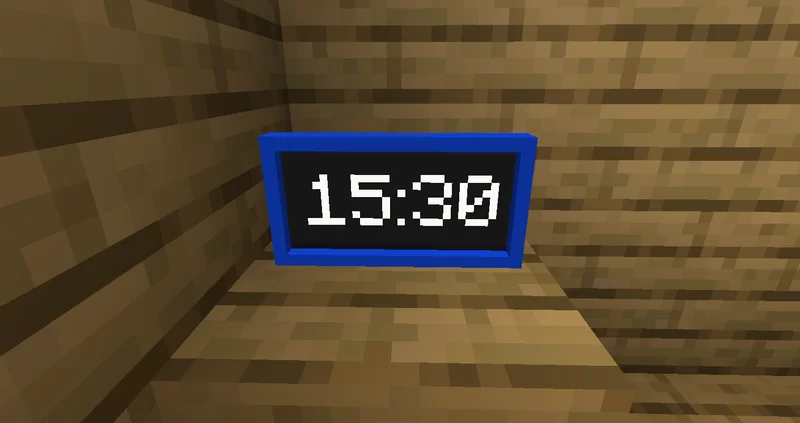
It also adds a new item - the Digital Clock, which shows the current time in HH:MM.
IMPORTANT NOTES
- This datapack only works in versions 1.19.4 and above!
- This datapack only works if command blocks are enabled.
- The resource pack is optional - you only need to use it if you want to use the Digital Clock item
Digital Clock
The Digital Clock shows your current time/the time of the server. It is accurate (to the time of the server) to within two seconds.
You can craft it with the recipe shown, or use the function /function give:clock

The digital clock requires the resource pack to use it, but it is not required for real-time linking or any other features.
Time Zone Offset
If your server that the datapack is installed on is hosted in a timezone which is, say, 4 hours behind your time zone, then you can offset the time. To do this, run /scoreboard players set .TZ_OFFSET rtime offset, where offset is a number from -11 to 14. If the server is 4 hours behind, you would want to offset the time to be 4 hours ahead of the server, so you would set it to 4.
- This only affects the real-time link, not the digital clock item
Thanks!
Want a Minecraft server, with a 25% discount? Click Here!
Available Versions
How to Install Real Time Link on Your Server
Order Server
Order a Minecraft Java server with at least 3 GB RAM (4 GB recommended).
Set datapack Loader
In the panel under "Egg", select the datapack loader and matching Minecraft version (1.19.4).
Install Mod
Open the mod browser in the dashboard and search for "Real Time Link". Click "Install" – done! Alternatively, upload the .jar via SFTP to the /mods folder.
Compatibility
Mod Loaders
Minecraft Versions
1.19.4
Server-side
✓ RequiredRecommended RAM
4 GB(min. 3 GB)Frequently Asked Questions
Real Time Link server crashes on startup – what to do?
Most common cause: wrong datapack version or insufficient RAM. Check the server log (latest.log) for "OutOfMemoryError" or "Mixin" errors. With Mado Hosting: ensure at least 3 GB RAM is allocated and the loader matches the mod version (1.19.4). You can switch loaders with one click in the panel.
Is Real Time Link compatible with datapack and fabric and forge and quilt?
Real Time Link officially supports datapack, fabric, forge, quilt for Minecraft 1.19.4. Note: Forge and Fabric mods are NOT cross-compatible – pick one loader and stick with it. The Mado dashboard automatically detects incompatible loader combinations.
Server lagging with Real Time Link – how to optimize performance?
Recommended RAM: 4 GB (per 8 players). Use /spark profiler to check if Real Time Link consumes the most tick time. Common fixes: reduce server view-distance to 8-10, install "performant" or "starlight" as supplementary mods on Forge. With Mado Hosting, your server runs on NVMe SSDs with dedicated CPU cores for minimal latency.
Similar Mods




Rent Modded Server
Install Real Time Link with just one click on your server.
Details
- License
- Creative Commons Attribution Non Commercial Share Alike 4.0 International
- Server-side
- Required