
Realistic Death Visuals
Replaces the boring death screen.
Screenshots
About this Mod
Realistic Death Visuals
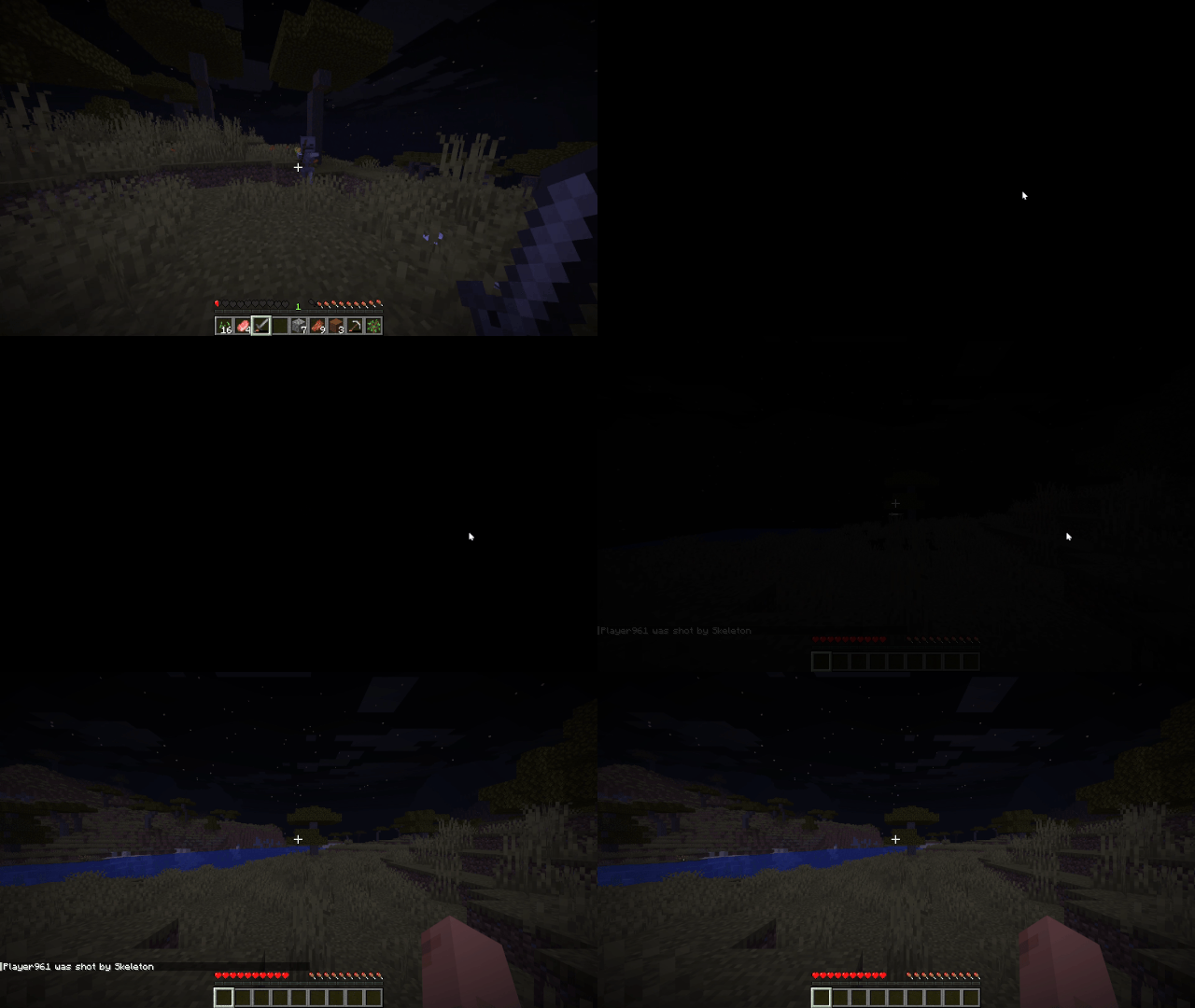
Realistic Death Visuals replaces Minecraft’s default death screen with a more realistic and dramatic death screen that actually feels like you died, instead of just “died”.
Instead of the usual “You Died” screen with the death message, score, and buttons immediately taking over your screen, the moment of death is changed into a short visual transition. You get a quick flash of white, followed by a black screen that feels closer to what it would look like if your character actually lost consciousness or died.
On top of that, the normal death options are removed entirely. The “Respawn” and “Return to Title Screen” buttons are disabled so you don’t get pulled into a menu at all. Instead, the game automatically respawns you, keeping the experience continuous and removing the interruption of the vanilla death screen UI.
The goal of this mod is not to change gameplay, difficulty, or mechanics at all, but to completely change how death feels in the moment. Vanilla Minecraft death screens are very UI-heavy and break immersion instantly, so this replaces that with something more atmospheric and less game-like.
Built for Fabric 1.21.11, and designed to stay lightweight and compatible with most other mods, since it only touches the visual side of the death screen and the flow after death, without changing core gameplay logic.
If you’re looking for a more immersive experience where death feels less like a menu and more like an event, this mod is made for that.
Available Versions
How to Install Realistic Death Visuals on Your Server
Order Server
Order a Minecraft Java server with at least 3 GB RAM (4 GB recommended).
Set fabric Loader
In the panel under "Egg", select the fabric loader and matching Minecraft version (1.21.11).
Install Mod
Open the mod browser in the dashboard and search for "Realistic Death Visuals". Click "Install" – done! Alternatively, upload the .jar via SFTP to the /mods folder.
Compatibility
Mod Loaders
Minecraft Versions
1.21.11
Server-side
✗ UnsupportedRecommended RAM
4 GB(min. 3 GB)Frequently Asked Questions
Realistic Death Visuals server crashes on startup – what to do?
Most common cause: wrong fabric version or insufficient RAM. Check the server log (latest.log) for "OutOfMemoryError" or "Mixin" errors. With Mado Hosting: ensure at least 3 GB RAM is allocated and the loader matches the mod version (1.21.11). You can switch loaders with one click in the panel.
Is Realistic Death Visuals compatible with fabric?
Realistic Death Visuals officially supports fabric for Minecraft 1.21.11. The Mado dashboard automatically detects incompatible loader combinations.
Server lagging with Realistic Death Visuals – how to optimize performance?
Recommended RAM: 4 GB (per 8 players). Use /spark profiler to check if Realistic Death Visuals consumes the most tick time. Common fixes: reduce server view-distance to 8-10, install "performant" or "starlight" as supplementary mods on Forge. With Mado Hosting, your server runs on NVMe SSDs with dedicated CPU cores for minimal latency.
Similar Mods






Rent Modded Server
Install Realistic Death Visuals with just one click on your server.