
RealTimeClockUz
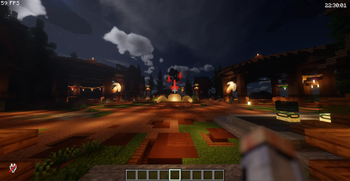
Displays real-world system time on the Minecraft HUD with timezone support and ModMenu settings.
Screenshots
About this Mod
🕒 RealTimeClockUz – Multi Time HUD Clock UZ, EN, RU
O'zbek
🕒 RealTimeClockUz – Multi Time HUD soati
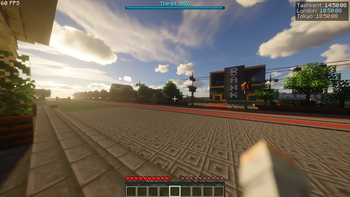
RealTimeClockUz — bu Minecraft uchun Fabric client mod bo‘lib, o‘yin ichida bir nechta real vaqt zonalarini (multi-time) HUD’da ko‘rsatadi. Endi siz bir vaqtning o‘zida turli davlatlar vaqtini kuzatishingiz mumkin.
Misol:
Tashkent: 21:30
London: 17:30
Tokyo: 01:30
version license
⚙ Texnik talablar (minimal)
- Minecraft 1.20.1+ (latest gacha qo‘llab-quvvatlanadi)
- Fabric Loader
- Fabric API
- ModMenu
- Cloth Config
✨ Asosiy imkoniyatlar
- ✅ Bir nechta vaqt zonalarini HUD’da ko‘rsatadi
- ✅ Default zonalar:
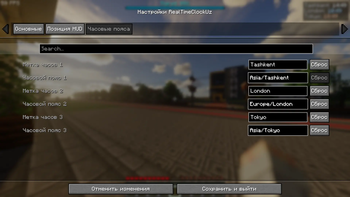
- Asia/Tashkent
- Europe/London
- Asia/Tokyo
- ✅ Vaqt zonalarni qo‘shish / o‘chirish mumkin
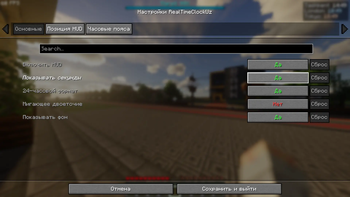
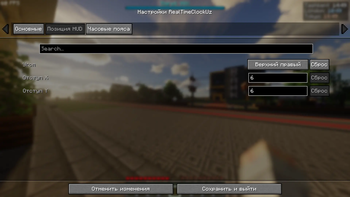
- ✅ ModMenu orqali to‘liq sozlash
- ✅ 12h / 24h format tanlash
- ✅ Soniyalarni yoqish / o‘chirish
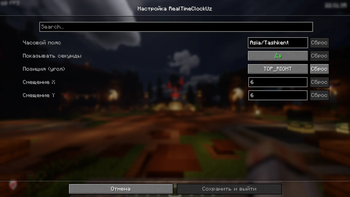
- ✅ HUD joylashuvini sozlash (4 burchak)
- ✅ X / Y offset sozlamalari
- ✅ Har bir vaqt uchun custom nom berish mumkin
- ✅ Lokalizatsiya qo‘llab-quvvatlanadi:
- O'zbek
- English
- Русский
🛠 O‘rnatish
- Fabric Loader o‘rnating
- Fabric API o‘rnating
- ModMenu o‘rnating
- Cloth Config o‘rnating
RealTimeClockUz.jarfaylini mods/ papkaga joylashtiring- O‘yinni ishga tushiring
⚙ Sozlamalar
Mod avtomatik quyidagi config faylni yaratadi:
config/realtimeclock.json
Bu yerda quyidagilarni sozlash mumkin:
- Timezone ro‘yxati
- HUD joylashuvi
- X / Y offset
- 12h / 24h format
- Soniyalarni ko‘rsatish
Shuningdek sozlamalarni ModMenu orqali o‘yin ichida ham o‘zgartirish mumkin.
🚀 Qo‘shimcha imkoniyatlar
- ⚡ Har bir vaqt alohida qatorda chiqadi
- ⚡ Sekundiga 1 marta yangilanadi (lag yo‘q)
- ⚡ Yengil va optimallashtirilgan
❓ Yordam
Savol yoki muammo bo‘lsa:
📬 Telegram: @SarvarGamer_YT
🧑💻 Muallif
👨💻 Developer: SarvarDev
📜 Litsenziya
MIT License – litsenziyasi bo'yicha litsenziyalangan.
English
🕒 RealTimeClockUz – Multi Time HUD Clock
RealTimeClockUz is a lightweight Fabric client-side mod that allows you to display multiple real-world timezones on the Minecraft HUD at the same time.
Example:
Tashkent: 21:30
London: 17:30
Tokyo: 01:30
version license
⚙ Technical Requirements (Minimum)
- Minecraft 1.20.1+ (up to latest)
- Fabric Loader
- Fabric API
- ModMenu
- Cloth Config
✨ Main Features
- ✅ Displays multiple timezones on the HUD
- ✅ Default timezones:
- Asia/Tashkent
- Europe/London
- Asia/Tokyo
- ✅ Add / remove timezones dynamically
- ✅ Full ModMenu configuration
- ✅ 12h / 24h format toggle
- ✅ Optional seconds display
- ✅ Configurable HUD position (4 corners)
- ✅ X / Y offset settings
- ✅ Custom labels for each timezone
- ✅ Localization support:
- Uzbek
- English
- Russian
🛠 Installation
- Install Fabric Loader
- Install Fabric API
- Install ModMenu
- Install Cloth Config
- Put
RealTimeClockUz.jarinto your mods/ folder - Launch the game
⚙ Configuration
The mod automatically creates:
config/realtimeclock.json
You can configure:
- Timezone list
- HUD position
- X / Y offset
- 12h / 24h format
- Seconds display
All settings can also be changed via ModMenu in-game.
🚀 Extra Features
- ⚡ Each timezone is displayed on a separate line
- ⚡ Updates once per second (optimized)
- ⚡ Lightweight and performance-friendly
❓ Support
If you have any questions or issues:
📬 Telegram: @SarvarGamer_YT
🧑💻 Author
Developer: SarvarDev
📜 License
MIT License – Licensed under MIT License.
Available Versions
How to Install RealTimeClockUz on Your Server
Order Server
Order a Minecraft Java server with at least 3 GB RAM (4 GB recommended).
Set fabric Loader
In the panel under "Egg", select the fabric loader and matching Minecraft version (26.1).
Install Mod
Open the mod browser in the dashboard and search for "RealTimeClockUz". Click "Install" – done! Alternatively, upload the .jar via SFTP to the /mods folder.
Compatibility
Mod Loaders
Minecraft Versions
26.1, 1.21.11, 1.21.10 (+16 more)
Server-side
✗ UnsupportedRecommended RAM
4 GB(min. 3 GB)Frequently Asked Questions
RealTimeClockUz server crashes on startup – what to do?
Most common cause: wrong fabric version or insufficient RAM. Check the server log (latest.log) for "OutOfMemoryError" or "Mixin" errors. With Mado Hosting: ensure at least 3 GB RAM is allocated and the loader matches the mod version (26.1). You can switch loaders with one click in the panel.
Is RealTimeClockUz compatible with fabric and quilt?
RealTimeClockUz officially supports fabric, quilt for Minecraft 26.1, 1.21.11, 1.21.10. The Mado dashboard automatically detects incompatible loader combinations.
Server lagging with RealTimeClockUz – how to optimize performance?
Recommended RAM: 4 GB (per 8 players). Use /spark profiler to check if RealTimeClockUz consumes the most tick time. Common fixes: reduce server view-distance to 8-10, install "performant" or "starlight" as supplementary mods on Forge. With Mado Hosting, your server runs on NVMe SSDs with dedicated CPU cores for minimal latency.
Similar Mods

![[ETF] Entity Texture Features](https://cdn.modrinth.com/data/BVzZfTc1/af683d206d50b05258d865b0d6e4aa2f2cee12f2_96.webp)
![[EMF] Entity Model Features](https://cdn.modrinth.com/data/4I1XuqiY/6e5bbd0d06b1741bfdab6c0cfab6de8fdaf0064c_96.webp)



Rent Modded Server
Install RealTimeClockUz with just one click on your server.