
Recipe Crafter
Adds a Recipe Crafter block for visually authoring Minecraft recipes that save to an editable json file!
Screenshots
About this Mod
Recipe Crafter
A mod that lets modpackers and map-makers author Minecraft
recipes visually, inside a workbench block — no KubeJS, datapack JSON, or
external tools required. Recipes are written to a single hand-editable config
file and go live instantly.
Overview
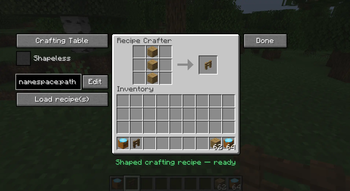
Place a Recipe Crafter block, open it, and build a recipe by dropping items
into a familiar workbench grid. Pick the recipe family from a dropdown, set the
result, fill in an id, and click Save — the recipe is appended toconfig/recipecrafter/recipes.json5 and becomes craftable immediately (no
restart). You can also Export the generated JSON to your clipboard for use
in datapacks/KubeJS, or Load and edit recipes that already exist in the game.
The Recipe Crafter Block
- A standalone block + item (
recipecrafter:recipe_crafter) with a custom
Blockbench model. - Creative-only: ships with no crafting recipe; appears in the Redstone
creative tab, right after the Crafting Table. - Block entity inventory (13 slots) that persists its contents across
open/close and world reloads, and scatters its items like a chest when broken.
Supported Recipe Types
Selected from a dropdown; the GUI swaps to the matching vanilla workbench texture
and slot layout for each:
| Type | Vanilla recipe | Layout |
|---|---|---|
| Crafting Table | crafting_shaped / crafting_shapeless |
3×3 grid + result |
| Furnace | smelting |
single input + result |
| Blast Furnace | blasting |
single input + result |
| Smoker | smoking |
single input + result |
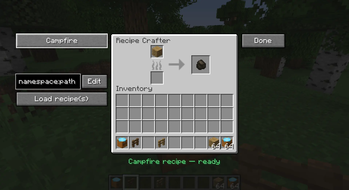
| Campfire | campfire_cooking |
single input + result (smoker panel) |
| Stonecutter | stonecutting |
single input + result |
| Smithing Table | smithing_transform |
template + base + addition + result |
- Shapeless toggle is available for crafting recipes (hidden for other types).
- Shaped crafting auto-computes the minimal pattern bounding box and a
compact key map (so a 1×1 item in the corner becomes a 1×1 recipe, not 3×3). - Cooking recipes capture cook time (with sensible per-type defaults:
200 / 100 / 600 ticks) and experience. - Stonecutting carries the output count.
- Smithing requires all three pieces (template, base, addition).
The Editor GUI
Left panel
- Type dropdown — switch recipe family; the panel texture and slots update live.
- Shapeless checkbox — crafting only.
- Edit field + "Edit" button — type a recipe id (
namespace:path) to load an
existing registered recipe back into the grid for modification. - "Load recipe(s)" button — finds recipes that match the current contents.
Center
- The workbench grid / inputs and a result preview slot you drag the output into.
Right
- Done — opens the confirm screen.
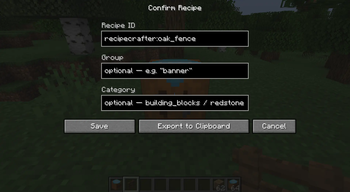
Confirm / Save Screen
Opened via Done. Fields:
- Recipe ID — prefilled as
recipecrafter:<result item>; editable. - Group — optional; placeholder hints + Tab-to-autofill from groups that
already exist in the game. - Category — shown only for crafting/cooking (the types that use it); offers
the valid vanilla categories with Tab-autofill. - Cook time (ticks) and XP — shown only for cooking recipes.
Actions:
- Save — writes the recipe to
recipes.json5, refreshes recipes, and
copies the id to your clipboard. - Export to Clipboard — builds the recipe JSON and copies it (does not save).
- Cancel — returns to the editor with all contents preserved.
After a successful Save or Export, the crafter wipes itself clean
(contents returned to you, type reset) so the next recipe starts fresh. Cancel
leaves everything untouched.
Quality-of-life: commit buttons are greyed until the id is filled and the
recipe is valid, and the screen fields slide and fade in when it opens.
Loading & Looking Up Existing Recipes
- Edit by id decomposes a registered recipe back into the crafter's grid —
supports shaped, shapeless, all cooking types, stonecutting, and
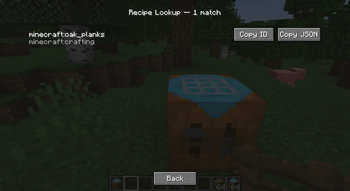
smithing-transform recipes. - Lookup searches for recipes matching the current contents:
- If the result slot has an item → every recipe that produces that item.
- Otherwise, if the grid is filled → the first matching crafting recipe.
- Returns up to 20 matches in a scrollable list, each with its id and
type and Copy ID / Copy JSON buttons.
Config File: recipes.json5
Located at config/recipecrafter/recipes.json5.
- Hand-editable at any time. Each entry is a normal vanilla recipe JSON
augmented with a unique"id". - Lenient parsing:
//comments and trailing commas are tolerated. - Comment- and formatting-preserving saves: new recipes are spliced into
the array rather than rewriting the file, so your comments and hand-formatting
survive every save. - Edit by hand, then
/recipecrafter reload(or relaunch) to apply.
Example shape:
{
  "recipes": [
    { "id": "recipecrafter:my_recipe", "type": "minecraft:crafting_shaped", ... }
  ]
}
Available Versions
How to Install Recipe Crafter on Your Server
Order Server
Order a Minecraft Java server with at least 3 GB RAM (4 GB recommended).
Set fabric Loader
In the panel under "Egg", select the fabric loader and matching Minecraft version (1.21.1).
Install Mod
Open the mod browser in the dashboard and search for "Recipe Crafter". Click "Install" – done! Alternatively, upload the .jar via SFTP to the /mods folder.
Compatibility
Mod Loaders
Minecraft Versions
1.21.1, 1.20.1
Server-side
✓ RequiredRecommended RAM
4 GB(min. 3 GB)Frequently Asked Questions
Recipe Crafter server crashes on startup – what to do?
Most common cause: wrong fabric version or insufficient RAM. Check the server log (latest.log) for "OutOfMemoryError" or "Mixin" errors. With Mado Hosting: ensure at least 3 GB RAM is allocated and the loader matches the mod version (1.21.1). You can switch loaders with one click in the panel.
Is Recipe Crafter compatible with fabric and forge and neoforge?
Recipe Crafter officially supports fabric, forge, neoforge for Minecraft 1.21.1, 1.20.1. Note: Forge and Fabric mods are NOT cross-compatible – pick one loader and stick with it. The Mado dashboard automatically detects incompatible loader combinations.
Server lagging with Recipe Crafter – how to optimize performance?
Recommended RAM: 4 GB (per 8 players). Use /spark profiler to check if Recipe Crafter consumes the most tick time. Common fixes: reduce server view-distance to 8-10, install "performant" or "starlight" as supplementary mods on Forge. With Mado Hosting, your server runs on NVMe SSDs with dedicated CPU cores for minimal latency.
Similar Mods




Rent Modded Server
Install Recipe Crafter with just one click on your server.