
Recolor
Allows you to change colors of hard coded values such as XP text color, reloading screen color, hit/damage color, block outline, and more! Similar to optifine's color.properties
Screenshots
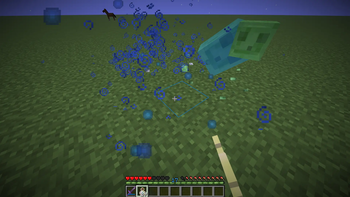
About this Mod
That mod allows resourcepack creators to change the color of a hard coded minecraft value into any color they want. This allows them to work with other resourcepack without using core shaders.
Some examples are:
- XP text color
- Reloading textures background
- Item cooldowns
- Container text
- Experience orb colors
- Block outline
- Durability bar colors
As far as versions go, supporting all versions 1.21+ is a pain since Mojang changed rendering code every single update. I will probably iron out some bugs in those versions then drop support for adding new features to them. I will try to support at least the last 3 drops. Versions below 1.21 are not planned and neither is a forge/neoforge version.
Changing Colors with a Resource Pack
In order to change the color of something, you find the corresponding entry and replace it with the value you want. You should only put the values you modify in your pack so packs below it can modify other ones without them interfering.
If there is something that you want to be added, create a feature request in the Github.
Data type
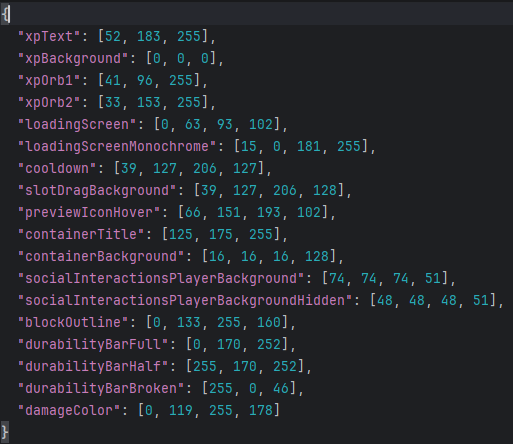
Accepts an array of ints [r, g, b] or [r, g, b, a] or a hex string "#rrggbb" or "#aarrggbb"
Path
assets/recolor/colors.json
Example Values
colors.json
{
  "xpText": "#34b7ff",
  "loadingScreenMonochrome": "#660f00b5",
  "containerTitle": [125, 175, 255],
  "loadingScreen": [0, 63, 93, 102]
}
- "#rrggbb" format
- "#aarrggbb" format
- [r, g, b] format
- [r, g, b, a] format
Current options:
Options
xpText
xpTextBackground
xpAnvilTextFail
Experience Orb interpolation colors
xpOrb1
xpOrb2
loadingScreen
loadingScreenMonochrome
cooldown (Item cooldowns)
slotDragBackground
World icon and Resource Pack hover background
previewIconHover
containerTitle
containerBackground
socialInteractionsPlayerBackground
socialInteractionsPlayerBackgroundHidden
blockOutline
Interpolates between these colors based on the durability
durabilityBarFull
durabilityBarHalf
durabilityBarBroken
damageColor
Available Versions
How to Install Recolor on Your Server
Order Server
Order a Minecraft Java server with at least 3 GB RAM (4 GB recommended).
Set fabric Loader
In the panel under "Egg", select the fabric loader and matching Minecraft version (26.1.2).
Install Mod
Open the mod browser in the dashboard and search for "Recolor". Click "Install" – done! Alternatively, upload the .jar via SFTP to the /mods folder.
Compatibility
Mod Loaders
Minecraft Versions
26.1.2, 26.1.1, 26.1 (+12 more)
Server-side
✗ UnsupportedRecommended RAM
4 GB(min. 3 GB)Frequently Asked Questions
Recolor server crashes on startup – what to do?
Most common cause: wrong fabric version or insufficient RAM. Check the server log (latest.log) for "OutOfMemoryError" or "Mixin" errors. With Mado Hosting: ensure at least 3 GB RAM is allocated and the loader matches the mod version (26.1.2). You can switch loaders with one click in the panel.
Is Recolor compatible with fabric and forge and neoforge and quilt?
Recolor officially supports fabric, forge, neoforge, quilt for Minecraft 26.1.2, 26.1.1, 26.1. Note: Forge and Fabric mods are NOT cross-compatible – pick one loader and stick with it. The Mado dashboard automatically detects incompatible loader combinations.
Server lagging with Recolor – how to optimize performance?
Recommended RAM: 4 GB (per 8 players). Use /spark profiler to check if Recolor consumes the most tick time. Common fixes: reduce server view-distance to 8-10, install "performant" or "starlight" as supplementary mods on Forge. With Mado Hosting, your server runs on NVMe SSDs with dedicated CPU cores for minimal latency.
Similar Mods

![[ETF] Entity Texture Features](https://cdn.modrinth.com/data/BVzZfTc1/af683d206d50b05258d865b0d6e4aa2f2cee12f2_96.webp)
![[EMF] Entity Model Features](https://cdn.modrinth.com/data/4I1XuqiY/6e5bbd0d06b1741bfdab6c0cfab6de8fdaf0064c_96.webp)



Rent Modded Server
Install Recolor with just one click on your server.